
Your first binding
Call a method, gate on a property, wait for an event, and send a message, all on one small component you write yourself.
On this page
A graph reaches your game through members you already wrote. This tutorial uses four of the six kinds on one component in one Sequence: gate on a property, call a method, wait for an event, send a message.
The thing this replaces
Section titled “The thing this replaces”The Platformer player’s slam has a wind up. The game raises SlamWindUpCompleted when that wind up finishes, and PlayerSlam.bqbehavior waits for that exact event before it sends the charged hit. Without an event binding the graph would own a second timer, and two timers disagreeing about when a wind up ended is a bug you get to find during playtesting.
Binding to the member means the graph never keeps its own copy of a fact your game already owns.
When you would reach for each kind
Section titled “When you would reach for each kind”- Method when the return value changes what the graph does next.
- Property or Field when the graph needs a value in or out of a member.
- Member condition when a value is a yes or no gate on a branch.
- Event condition when the graph must wait for the game to say “done”.
- Message when you want one void call and no waiting.
The Platformer sample keeps one of each in DocumentationMemberNodes.bqbehavior, a gallery that exists to be read.
The component
Section titled “The component”Twenty lines, one visible result. Add this to the project.
using System;using UnityEngine;
public sealed class Beacon : MonoBehaviour{    public event Action WarmUpFinished;
    [SerializeField] private Renderer lamp;
    public bool IsReady { get; private set; } = true;
    public bool BeginWarmUp(float seconds)    {        if (!IsReady)        {            return false;        }
        IsReady = false;        Invoke(nameof(FinishWarmUp), seconds);        return true;    }
    public void Shine() => lamp.material.color = Color.yellow;
    private void FinishWarmUp()    {        IsReady = true;        WarmUpFinished?.Invoke();    }}
Create a Cube named Beacon, add the component, give it a Sphere child named Lamp, and assign the Sphere’s Mesh Renderer to the Lamp field.
Target, just the part you need here
Section titled “Target, just the part you need here”Every member node starts at the Target card, and its Mode row offers Agent, Reference, Static, and Variable. This tutorial uses Agent throughout, with Resolve on Self, which resolves the component on the GameObject the agent runs on. The rail says so under the control. The other three modes point at a serialized scene object, a static type with no instance, and a blackboard value that carries an object. The member reference has the full table when you need one of them.
Build the graph
Section titled “Build the graph”-
Choose Assets > Create > Behavior & State > Behavior Tree, name it
BeaconWarmUp, and open it in Static. -
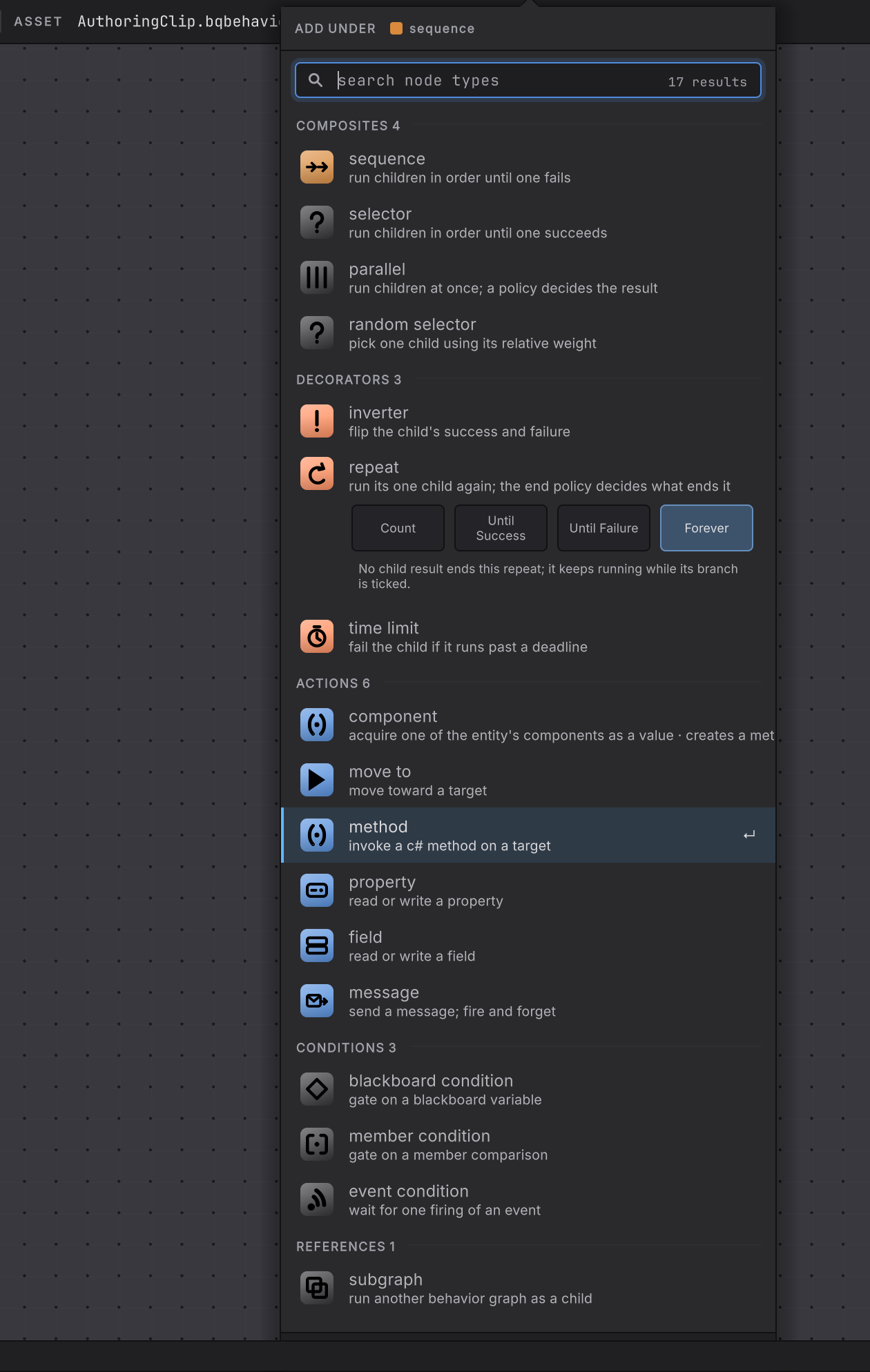
Click add root behavior on the empty canvas and choose sequence under COMPOSITES. A Sequence runs its children in order and stops at the first one that fails.
-
Click the insertion handle under the Sequence. The picker opens with the heading ADD UNDER sequence. Choose member condition under CONDITIONS, described as “gate on a member comparison”.
-
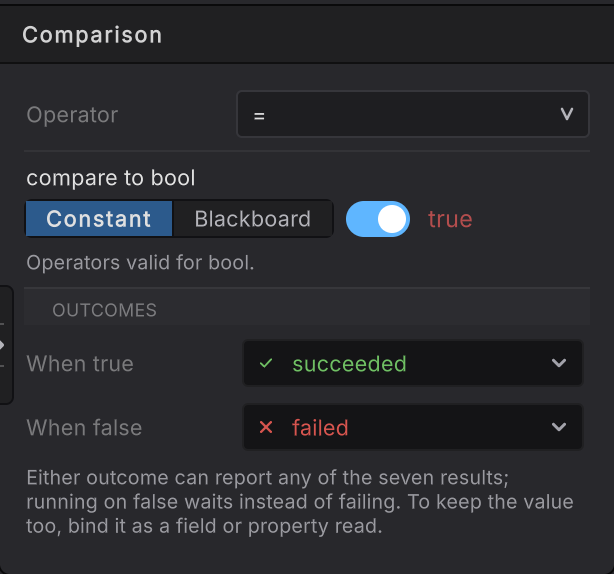
Select it, set Target to Agent, Self, component
Beacon, then Member > Change and pickIsReady. In Comparison choose operator=, Constanttrue, When true succeeded, When false failed.
-
Add a second child to the Sequence: method under ACTIONS. Bind it to
BeaconandBeginWarmUp(float seconds), setsecondsto the Constant1.5, then in Result choose Node result Test, operator=, Constanttrue, When true succeeded, When false failed. -
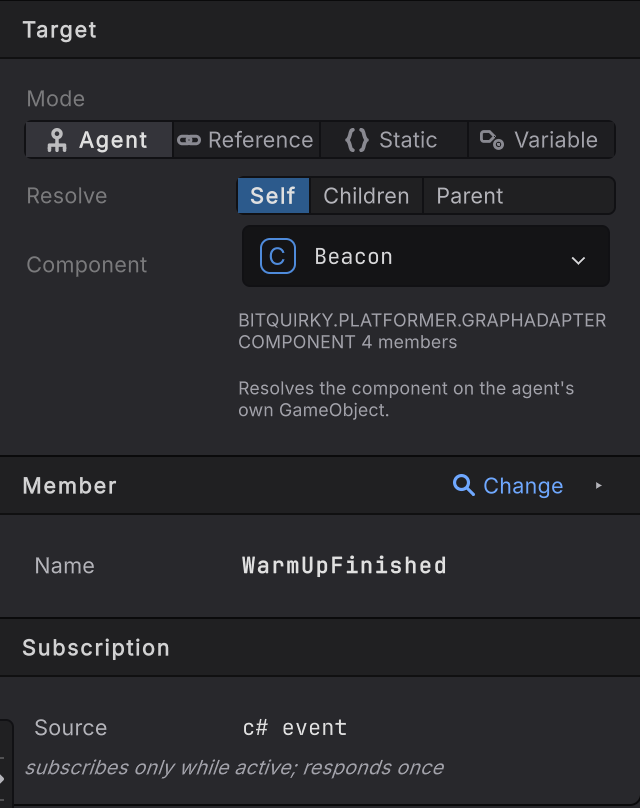
Add a third child: event condition under CONDITIONS, described as “wait for one firing of an event”. Bind it to
BeaconandWarmUpFinished. Subscription is the whole card: Source reads c# event, with the contract under it, “subscribes only while active; responds once”. There is nothing to choose. The node holds Running until the event fires, then reports Success.
-
Add a fourth child: message under ACTIONS. Bind it to
BeaconandShine(). Its Result card keeps one live control, Always with Reports on succeeded; Test is inert, because a void return has nothing to compare. -
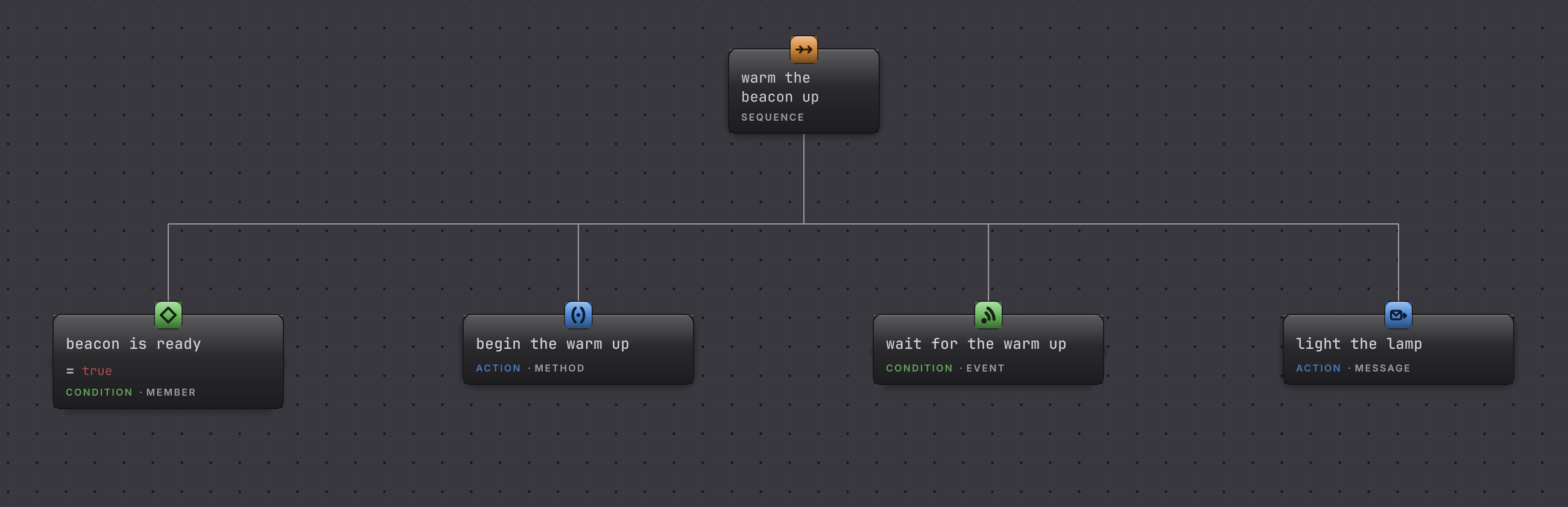
Name the four nodes after what they do,
beacon is readythenbegin the warm upthenwait for the warm upthenlight the lamp. Select a node, then click its name on the identity header at the top of the right rail, or press F2, and the graph reads as the sentence you meant. -
Clear validation, then press Save (Cmd/Ctrl+S): autosave writes the graph file only, and Save imports the graph and regenerates its member provider. Wait for compilation, then add a Behavior Agent to Beacon, assign the graph, choose Update for Update Mode, and attach this graph’s generated provider to Member Provider Component.
-
Enter Play Mode.
How it decides
Section titled “How it decides”The four nodes report differently, and the Sequence reads each one in turn.
Result
- Success
- The condition compared true, the method returned true, the event fired, or the message was accepted. The Sequence moves to the next child.
- Failure
- IsReady compared false, or BeginWarmUp returned false because a warm up was already running. The Sequence stops and reports Failure.
- Running
- Only the event node stays Running here. It subscribes while it is active, waits, and responds once.
An event subscription belongs to one activation. Interruption, timeout, reset, or leaving the state removes it, and a firing from an earlier activation cannot complete a later one. An event that never fires waits forever, so wrap it in Time Limit when the game cannot promise it.
When it goes wrong
| Symptom | Check | Fix |
|---|---|---|
| WarmUpFinished is missing from the picker. | Open the Events tab in the picker and confirm the event is public. | Make the event public, or expose a public wrapper event the graph can see. |
| IsReady appears with no setter choice. | Read the Access line in the Member card disclosure. | A read-only property binds as a read or a condition. Add a setter if the graph must write it. |
| The lamp turns yellow immediately. | Confirm the fourth child is the Message and the third is the Event condition. | Reorder the children so Shine runs after the event node. |
| The graph reports Failure on the first tick. | Read the When false outcome on the member condition and on the method Result. | IsReady starts true, so a Failure here usually means the comparison constant is false. |
| The lamp never turns yellow. | Confirm the game actually raises WarmUpFinished, by logging it once. | An event the game never raises is an indefinite wait. Raise it, or bound the node with Time Limit. |
| A NullReferenceException hits Shine. | Look at the Lamp field on the Beacon component. | Assign the Sphere Mesh Renderer. |
- Watch it run: follow these four nodes while the game plays.
- Member nodes reference: arguments, outputs, generics, waiting, and faults.
- Platformer sample: the gallery graph these cards come from.