
Platformer
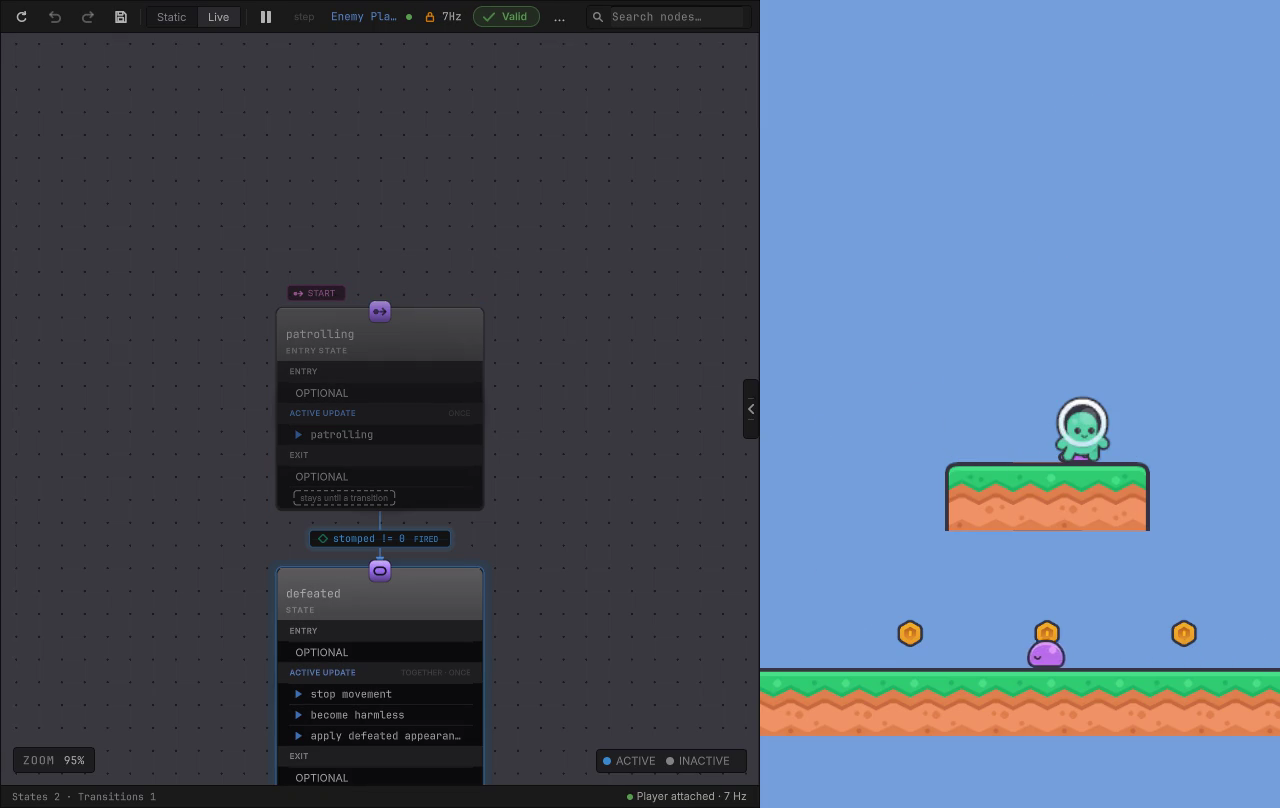
Stomp an enemy and watch its graph change mode. The first sample: one patrol tree, one defeat state machine, a list and a struct in the blackboard, and everything else left in C#.
On this page
Start here. A 2D level, coins on the platforms, and a door at the end. Three creatures walk it. Enemy Platform takes its patrol and its defeat from graphs you can open and edit, Enemy Ground does the same job from ordinary C# so you can see there is no magic in either, and Enemy Params is a third walker whose only job is to show a graph reading its waypoints from scene Transforms. Only the first two can be stomped.
Play it in one minute
Under a minute
- Scene
Assets/Platformer/Scenes/Platformer.unity- Select
- Enemy Platform > Behavior Agent (EnemyPatrol) in the Hierarchy
- Controls
- Keyboard: A and D or the left and right arrows to move, Space to jump. Gamepad: left stick to move, south button to jump. There is no attack button in this sample; the slam exercise is started from the Inspector.
- Goal
- Collect five of the level's six coins so the goal door opens, then walk into the door. Land on an enemy from above to stomp it.
The first thirty seconds
Section titled “The first thirty seconds”Enemy Platform walks a three-point route across the raised platform and stops for a blink at each end. Enemy Ground and Enemy Params pace the ground below it. Expand Enemy Platform in the Hierarchy and select the first of its two Behavior Agent components before you press Play, the one holding EnemyPatrol. The editor attaches to that exact agent as the scene starts, so the graph on screen belongs to the enemy you are watching. Selecting the object itself attaches to nothing, because two agents on one object is ambiguous on purpose.
Touch Enemy Platform or Enemy Ground from the side and the player reappears at the level start with a three-quarter-second grace window. Fall below the level and the same thing happens. Coins you already picked up stay picked up and the score stays where it was, so a death costs you position and nothing else. Enemy Params is solid but harmless in this release: it will shove you along the ground and cannot be stomped, because it carries no Enemy component, only the waypoint patrol it exists to show. Reach the door with five coins in hand and the level completes; press Return or the keypad Enter to reload the scene.
Two scene files sit in this project. Assets/Scenes/SampleScene.unity is the leftover Unity template scene: ignore this one. Everything in this chapter is in Assets/Platformer/Scenes/Platformer.unity.
Paths here follow the standalone project layout. Importing the packaged sample puts the same folders under Assets/BitQuirky/BehaviorTreesAndStateMachines/Samples/.
What this game teaches
Section titled “What this game teaches”- A first behavior tree that is small enough to read in one look: a Forever repeat over a Sequence of one check and one call.
- A first state machine with two modes, one transition, and a defeated mode whose three actions run Together and Once.
- Member bindings against the game’s real API: a property read for the gate, a method call for the work, and a comparison that turns a returned
boolinto a node result. - Value shapes past the primitives. The patrol route is a
List<Vector2>and the patrol profile is your ownstruct, both declared in the blackboard and handed to C# as typed arguments. - A
params Transform[]method fed two ways, as individual values or one collection. - Live on one instance, plus pause and step on that instance while the rest of the scene keeps playing.
What the graphs deliberately leave in C#: movement, physics, collision classification, which contact counts as a stomp, waypoint progression, pause timing, scoring, coin state, the door rule, respawn, and input. The graph decides; the game acts. That boundary is the whole point of the sample, and it is the one you keep when you copy it.
Graph versus game code
Section titled “Graph versus game code”| The graph decides | Your game code does |
|---|---|
EnemyPatrol.bqbehavior on Enemy Platform, hosted by GraphEnemyPatrol |
Enemies.EvaluatePatrol owns the waypoint order, the pause clock, and the facing sign. Rigidbody2DBehaviorMovementAdapter puts the returned velocity on the body. |
EnemyStateMachine.bqbehavior on Enemy Platform, hosted by GraphEnemyModeCoordinator |
Enemies accepts the first valid stomp and rejects the rest. Scoring awards the 25 points. The coordinator stops the body, clears the harmful flag, and swaps the sprite when the graph asks. |
EnemyPatrolParams.bqbehavior on Enemy Params, hosted by the same GraphEnemyPatrol script |
The three markers under Enemy Params Waypoints are ordinary Transforms. The adapter writes them into the graph’s declared slots and converts them to positions. |
PlayerSlam.bqbehavior on Player, hosted by GraphPlayerSlam, composed disabled |
Players.Slam(float power = 8) owns the slam rule, and only the light power opens the wind-up window that raises SlamWindUpCompleted. |
| Nothing at all | Enemy Ground runs EnemyPatrol.cs with EnemyModeCoordinatorReference: the same patrol and the same defeat, hand-written, kept as the comparison. |
LevelRules holds the tunables neither side authors in a graph: five coins to open the door, 10 points a coin, 25 for a stomp, and the fall line at y = -6.
These are not the game
Section titled “These are not the game”The Behavior folder holds more graph files than the scene runs. EnemyMode.bqbehavior and ArgumentBindingFixture.bqbehavior are authoring fixtures. Everything under Behavior/Tutorials/ is a documentation and capture fixture, which is where most of the editor clips on this site come from. The Documentation*.bqbehavior set exists so the guides can show one node at a time. Open them, read them, copy from them, and expect no gameplay: nothing in the scene points at any of them. The four graphs in the table above are the playable ones.
Follow one decision
Section titled “Follow one decision”The patrol is four nodes wide, and every one of them is worth a look.
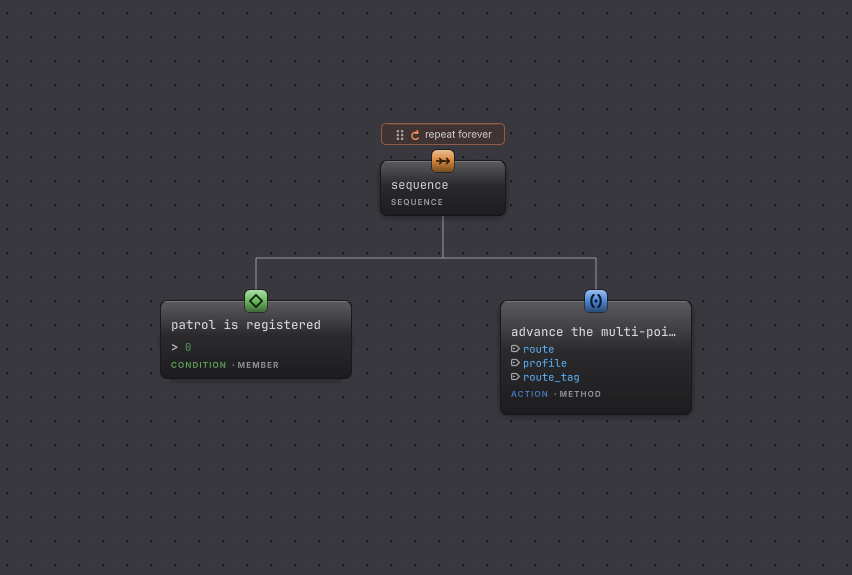
EnemyPatrol.bqbehavior at rest. The card tagged CONDITION · MEMBER tests your data; the card tagged ACTION · METHOD beside it calls your code, with its three arguments listed on the card.-
Open
Assets/Platformer/Behavior/EnemyPatrol.bqbehaviorand leave the toolbar on Static. The window is Window > Behavior & State > Behavior Tree Editor if it did not open itself. -
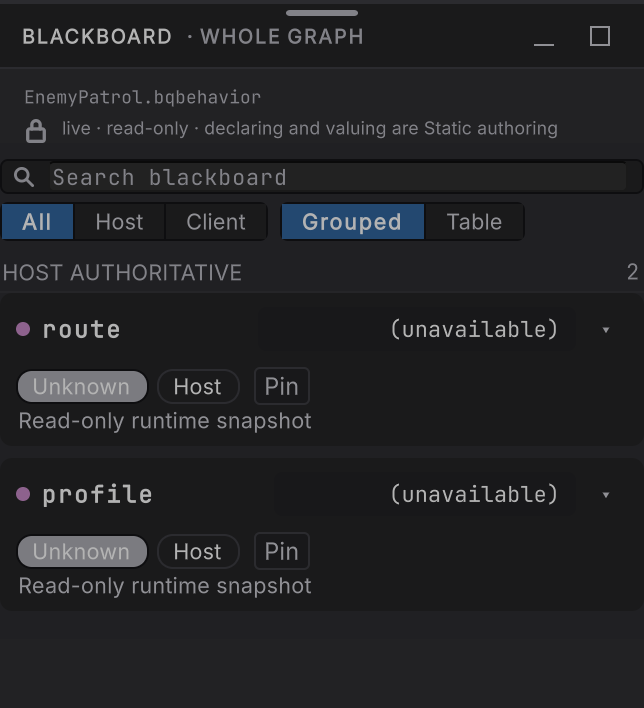
Open Blackboard · Whole graph in the right rail. Three declarations:
route, a List ofVector2holding(6.5, 3.8),(8, 3.8), and(9.5, 3.8);profile, onePatrolProfilestruct withPauseSeconds0.05,FaceDirection1, andMoveSpeed2; androute_tag, the stringcurious. That is the enemy’s design, and all of it is data. -
Select patrol is registered. Its target is the
enemiesreference slot, the exactEnemiesasset the scene uses, and it reads theRegisteredPatrolCountproperty and compares it with0. No registered patrol means no reason to walk. -
Select advance the multi-point patrol. Its target is self, meaning the
GraphEnemyPatrolcomponent on the agent’s own GameObject, and it callsAdvancePatrolwith all three blackboard values as arguments. The method returns abool, and the node compares it withtrue, so a refused move becomes Failure instead of a silent success. -
Press Play with Enemy Platform selected and switch to the agent whose graph is
EnemyPatrol. The canvas now carries status colors, and the repeat above the sequence holds Running while the legs below it come and go. -
Open Blackboard · Whole graph again, in Live this time. The same three values, read from the instance that is walking in front of you.
On the other side of that call, AdvancePatrol hands the route, the profile, and the tag to Enemies.EvaluatePatrol along with the body position and the fixed delta, gets one PatrolInstruction back, and applies it: horizontal velocity onto the Rigidbody2D, the facing sign onto the sprite, the idle emote token onto its observation. The graph never touches a waypoint index. Ask it to walk, and your authority decides where.
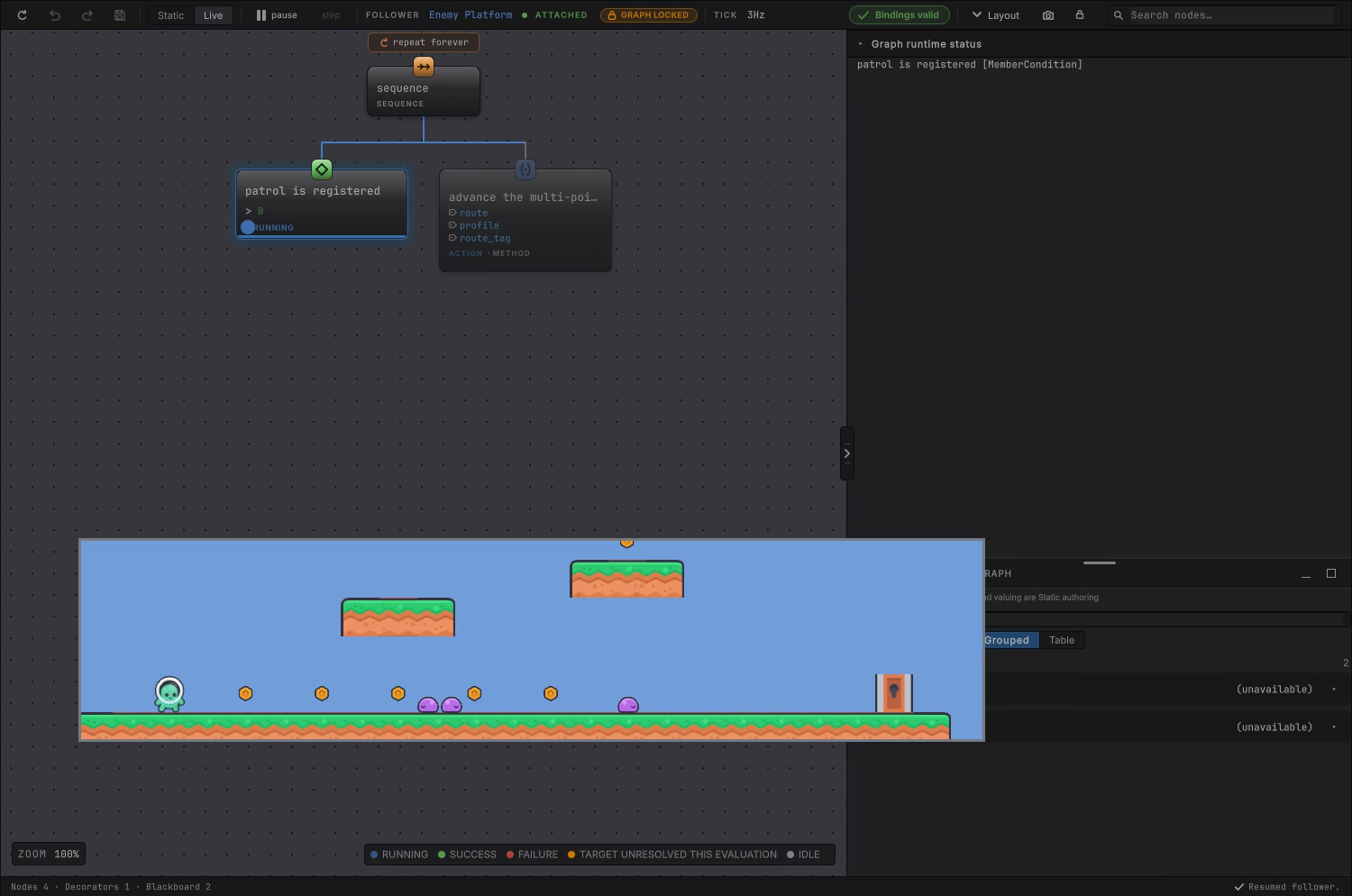
Paused, that whole chain holds still for you. The condition resolves in one step, the call holds Running across several, and the other enemy keeps pacing the whole time because the pause belongs to this agent alone.
Change something and watch
Section titled “Change something and watch”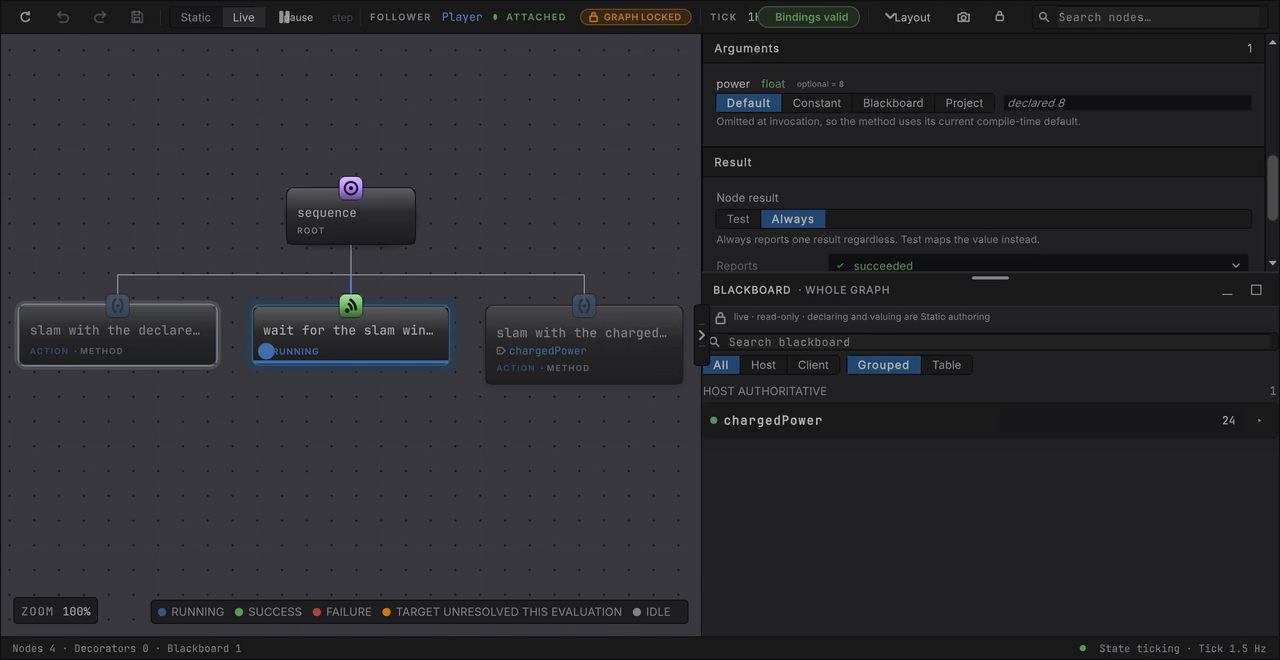
Use this in your own game
Section titled “Use this in your own game”Copy as-is: the shape. One tree for “how do I do this job”, one state machine for “should I still be doing this job”, one thin host component per graph. GraphEnemyPatrol and GraphEnemyModeCoordinator are the two scripts worth reading line by line before you write your own, and they are short on purpose: assert what they need, wire the generated provider and the reference slot, forward one call, apply one instruction.
Rebind: the member targets. Your patrol authority is not called Enemies and your method is not called AdvancePatrol, so point the condition at your own property and the method node at your own method, then set the argument sources to your own declarations. The member picker lists what your assemblies actually expose, so this is picking from a list, not typing names.
Needs new C#: anything the graph asks for that your game cannot yet do. A new capability such as climbing, a lift, or a special attack is a new method on your own component first and a node second. The same goes for a fact the graph wants to test: expose it as a property or a field and the condition can read it.
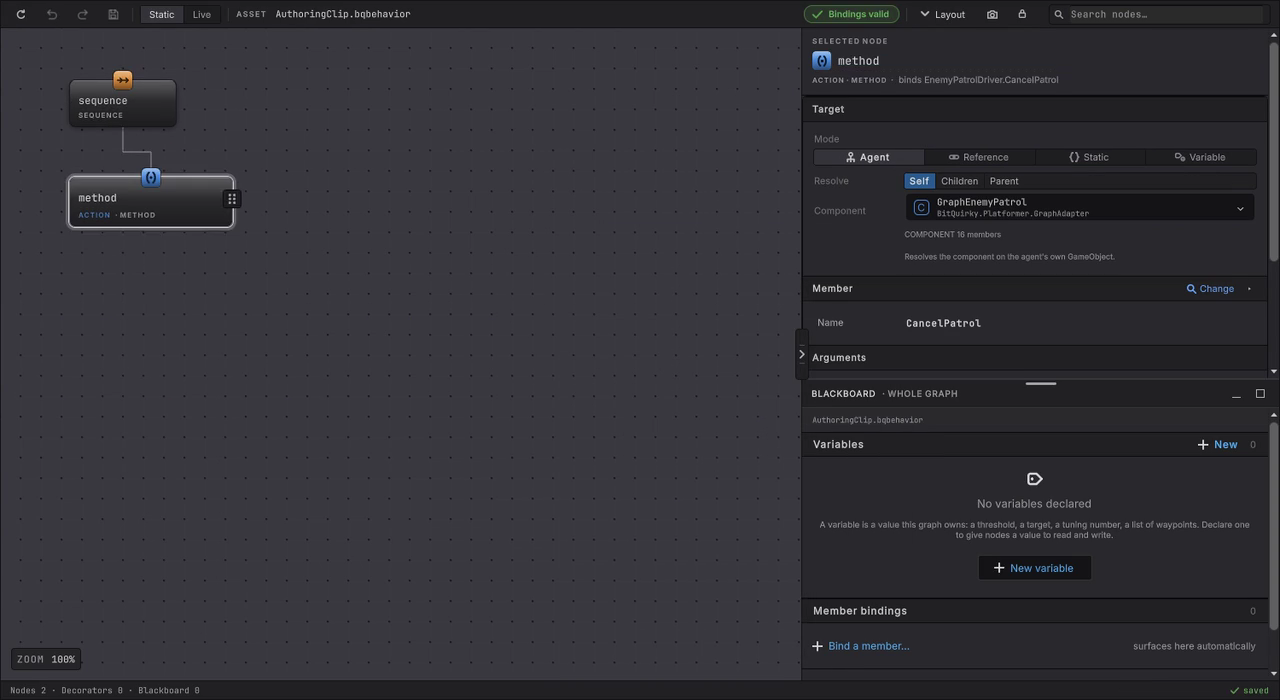
That is the loop you will live in: insert a node, pick a target, pick a member, bind the arguments. Nothing in this sample was authored any other way.
When it goes wrong
| Symptom | Check | Fix |
|---|---|---|
| Your edit changed nothing. | Which enemy are you watching? Enemy Ground runs the hand-written C# patrol and has no agent on it at all. | Watch Enemy Platform for anything driven by EnemyPatrol or EnemyStateMachine. |
| The wrong graph opens when you select the enemy. | Enemy Platform carries two Behavior Agent components, one for the patrol tree and one for the state machine. | Select the exact agent component whose graph you want. Attachment is exact and never guesses a sibling. |
| You edited a graph and the scene ignored it. | Confirm the file you opened is one of the four playable graphs and not a Documentation, Tutorials, EnemyMode, or ArgumentBindingFixture file. | Open the graph the scene names in the table above. |
| A Live value looks wrong and the saved graph looks right. | Read who owns the row in Blackboard · Whole graph. Enemy Params declares its waypoints as none and the host writes real Transforms in at runtime. | Judge a running agent from its Live values. A saved none is not proof of a missing reference. |
| The patrol registration condition fails forever. | Inspect the enemies reference slot on the agent and confirm it holds the project Enemies asset the scene uses. | Assign that exact asset. Another asset of the same type has no registered patrols. |
| A member node reports its target as unresolved. | Look for the generated provider component on the same GameObject as the agent, and confirm it was generated for this graph. | Regenerate it from Tools > Platformer, and keep the provider and the graph paired. A provider baked for another graph binds nothing. |
| The slam never starts. | Read the Graph Player Slam checkbox on Player. | Enable the host. There is no input binding waiting to start that graph for you. |
| The enemy walks into a wall or stalls at a tile seam. | Inspect the collider layout, not the tree. | The level merges adjacent floor tiles into continuous collision surfaces. Keep that when you extend it; no amount of graph editing fixes a snagging collider. |
What next
Section titled “What next”- Dungeon Heist: the same ideas with priority and interruption, where a guard changes its mind mid-stride.
- Patrol and chase: this sample’s tree grown into the shape most enemies want.
- Watch it run: the Live view in full, on this scene.
- GameObject hosting: what a Behavior Agent does on your own prefabs.
- Adapters and services: the boundary
GraphEnemyPatrolis an example of.
Credits and reuse
Section titled “Credits and reuse”The art and audio are by Kenney, who gives away thousands of game assets for free:
- New Platformer Pack: every sprite and sound in the level, from the player and the enemies to the tiles and the door.
We took ours from Kenney Game Assets All-in-1, the paid bundle of everything Kenney has released; the links above go to the same packs on kenney.nl, where each one is a free download.
The pack is CC0, which asks nothing of you and allows commercial use; we always credit Kenney when we use their assets, and support them by buying the packs. We hope you will too! The pack sits under Assets/ThirdParty/Kenney/ with its own License.txt, and the project’s Assets/CREDITS.md repeats this credit. Keep both with the art if you reuse it. The asset’s own license covers the code and the graph files; the art license is a separate thing, so check both before you ship a derivative.