
Start here
What behavior trees and state machines do for a game you have already started, shown on a platformer enemy that patrols and gets stomped.
On this page
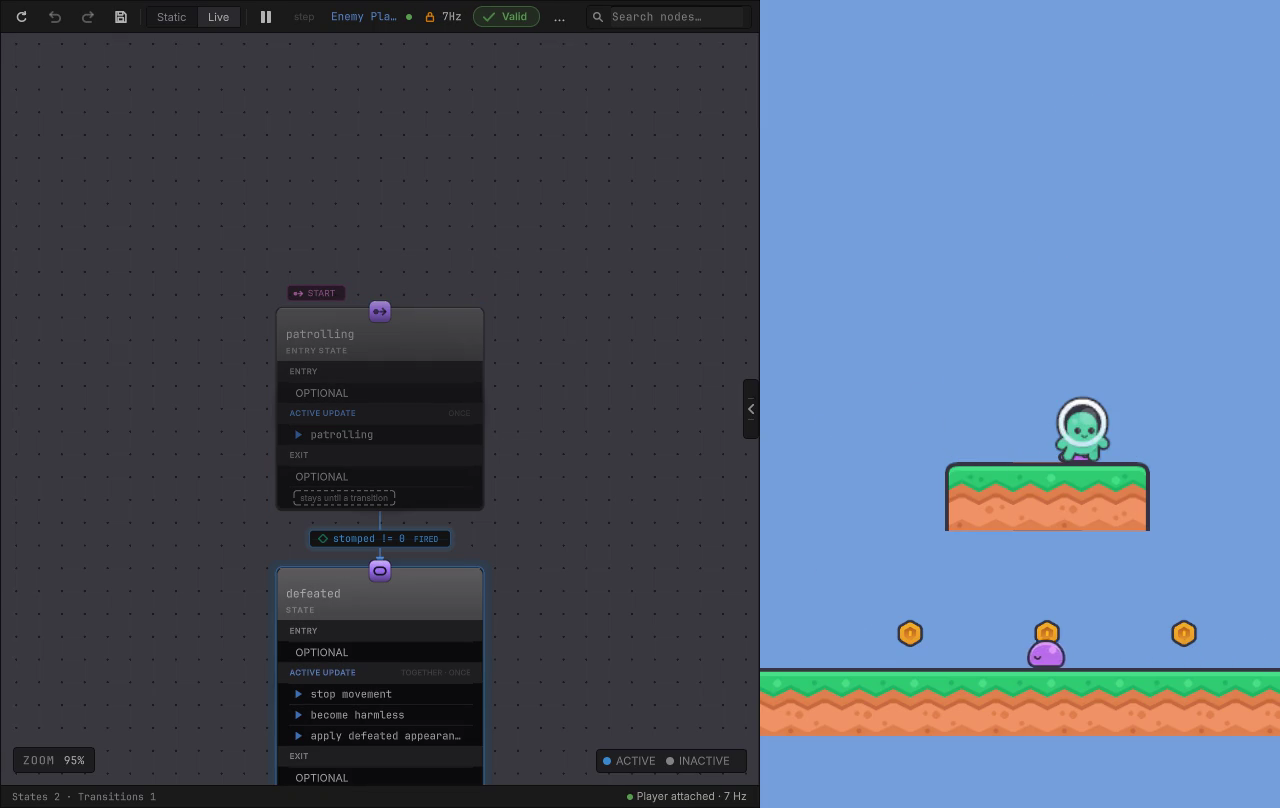
There is an enemy on a ledge in the Platformer sample. It walks a three point route and turns around at each end. Land on its head and it stops moving, stops hurting you, and slumps into its defeated pose. It never wakes up again.
Two graph files decide all of that. EnemyPatrol.bqbehavior decides how the walk proceeds, EnemyStateMachine.bqbehavior decides whether the enemy is still patrolling at all, and the enemy’s own C# keeps doing the walking, the collision, and the sprite work.
The version of this you have already written
Section titled “The version of this you have already written”That enemy exists in your game too, and it probably looks like a component with a bool isPatrolling, then a second bool for the hurt frames, then a coroutine that was supposed to be temporary. It works. Then a designer asks for the enemy to pause longer at the left end, and you read four scripts to find out which one owns the pause.
The cost is rarely the first decision. It is the fifth one, the one added under pressure, next to a flag that two other systems also read.
What this asset does for that enemy
Section titled “What this asset does for that enemy”The decision moves into a graph file you open in a window. Your components stay exactly where they are and keep their jobs.
- The graph holds the plan: check this, then do that, otherwise try the other thing.
- A Behavior Agent component on the GameObject runs the graph, so one enemy prefab gets one graph and its own values. Entity based games run the same graph through
BehaviorEntityRuntimeinstead. - Graph nodes call members you already wrote: a method, a property, a field, a message, a condition, or an event on your own components.
- Values the decision needs live on the graph’s blackboard, so the same graph drives a slow patrol and a fast one.
- While the game plays, the Live view colors the running nodes, so you watch the enemy decide instead of guessing from logs.
Nothing here asks you to hand over movement, physics, damage, or animation. The graph decides when to call your code. Your code still owns what happens when it does.
Two graphs, because they answer different questions
Section titled “Two graphs, because they answer different questions”A behavior tree answers “what should I do next” and it re-decides as soon as the current action finishes. A state machine answers “which mode am I in” and holds that answer until something changes it. The enemy needs both: patrolling and defeated are modes, and the patrol itself is a small plan that runs while the patrolling mode is active.
How trees and machines work together takes that apart with the real Platformer graphs.
Who gets value out of this
Section titled “Who gets value out of this”You have a Unity game or a prototype, and the enemies, companions, doors, round flow, or the thing you call “the director” are getting hard to change. You want to know how much of your game has to move. The answer is one decision at a time, starting with one object, and your C# stays yours.
You have bought it and want something visible today. Install the package, then follow your first behavior tree. An actor in your own scene moves before the end of the sitting.
Either way, read where the edges are before you plan a milestone around it. The honest list of what is missing sits on what it does not do yet, in plain view.
Where to go next
Section titled “Where to go next”- What you get: the pieces that land in your project, each with the guide that teaches it.
- Trees and machines together: the rule that decides which one holds what.
- Adapt your game: move one decision into a graph without touching the rest.
- Install: package install, first graph, sample games.
- Common behaviors: six graph shapes from the sample games, each naming the game problem it solves.
- Sample games: four playable projects with the graphs the scenes actually run.