
Adapt your game
Move one decision from your own scripts into a graph, bind it to members you already have, and watch it run before you move the next one.
On this page
Your game already works. That is the constraint worth respecting, so the adoption path here moves one decision and leaves everything else alone. An afternoon is enough for the first one.
Pick one decision
Section titled “Pick one decision”Choose a decision you can already watch happen and describe in a sentence. Good first candidates sound like this:
- When does the guard start walking its route?
- When does the turret decide the target is worth shooting?
- When does the locked door open?
- When does the round move from countdown to play?
Skip anything whose current implementation you cannot explain, and skip the one that is entangled with netcode or input buffering. The point of the first decision is to learn the loop with a result you can see.
Move it
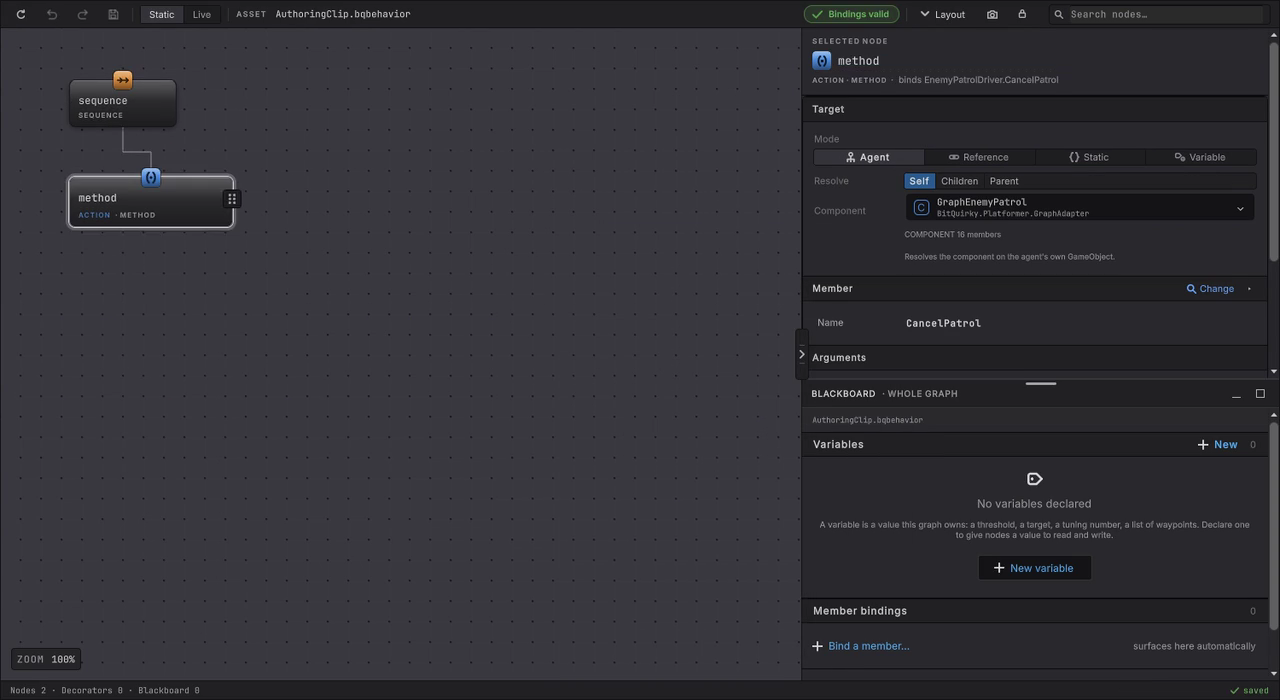
Section titled “Move it”Here is the whole loop at speed: an empty graph gets a Sequence, a Method node under it, the member picker on the component, and a finished binding.
-
Write the decision as a question your components can answer and an operation they can perform. “Is the target in reach” and “swing at it” is the right size. Both should already exist in your code, or be a two line method on the component that owns the rules.
-
Make the fact a public property or a method that returns a value, and make the action a public method. A small game facing method beats a graph reaching into a large controller. Keep navigation, damage, cooldowns, and animation inside your component.
-
Choose Assets > Create > Behavior & State > Behavior Tree, name the graph after the decision, and open it. Click add root behavior on the empty canvas and choose Sequence, then use the insertion handle under the Sequence to add the Condition and the Method nodes.
-
Select a node. In the Target card leave Mode on Agent and Resolve on Self, then pick your component in the Component row and take the exact member signature in Member. Fill the arguments from constants, blackboard values, or a project asset, then map the result: what counts as succeeded, what counts as failed, and what means keep going.
-
Add a Behavior Agent component to a single instance, assign the graph, choose the update mode, and attach the generated member provider for that graph. The GameObject runtime guide has the provider step in full.
-
Disable or delete the flag, coroutine, or branch you just replaced. Two owners issuing the same attack is the failure mode that wastes an afternoon.
-
Enter Play Mode and select the object. The graph opens in Live mode and the nodes color as they run, with the values each one used.
Then grow it deliberately
Section titled “Then grow it deliberately”Add the second decision to the same graph when it belongs to the same actor and the same moment. Start a second graph when the actor needs modes, and let a state machine hold those modes with this tree inside the mode it belongs to. Trees and machines together covers where the line sits.
Two habits keep this pleasant at scale. Put values the designer will want to change on the blackboard, so one graph serves several prefabs. Keep each bound member small enough to name, because a member called DoEnemyStuff is a graph that explains nothing.
When it goes wrong
| Symptom | Check | Fix |
|---|---|---|
| The component is missing from the Component row. | Wait for the script to compile, then confirm the component and the graph are in assemblies that can see each other. | Reference the assembly that owns the component, or move the graph beside it. |
| The member is missing from the picker. | Confirm the member is public and read its full signature, including overloads. | Make it public, or add a small game facing wrapper method and bind that. |
| The agent reports a missing provider. | Look at the Member Provider Component field on the Behavior Agent. | Attach the provider generated for this graph, from its own generated folder, and assign it. |
| The action fires twice per frame. | Search for the old call site and for a second Behavior Agent on the object. | Remove the retired code path so the graph is the only caller. |
| The node succeeds immediately and nothing moves. | Read the Result card. A method returning true mapped to Success finishes on the first tick. | Map the keep going value to Running and the finished value to Success. |
| Live shows values you did not author. | Confirm whether you are reading the graph defaults or the running instance. | Edit defaults in Static mode, and read Live values as the state of that one instance. |
- Install if the package is not in the project yet.
- Your first behavior tree: the same loop with a component supplied for you.
- Your first state machine: add modes once one decision runs.
- Watch it run: Live colors, values, pause and step.