
Trees and machines together
A behavior tree decides what to do next, a state machine holds which mode you are in, and the Platformer enemy shows how one hosts the other.
On this page
Two graph types ship in the same package and people reasonably ask which one they are supposed to use. The split is easier than it sounds, and the Platformer enemy uses both, one for each half of the question.
The two questions
Section titled “The two questions”A behavior tree answers what should I do next. It walks down from the root to the branch that is currently running, resumes that branch, and decides again wherever nothing is holding Running. Add a reactive interrupt and a higher branch can take the tick back mid-action.
A state machine answers which mode am I in. It holds one state, runs that state’s work, and only changes when a transition condition passes. The answer is sticky on purpose.
The enemy that uses both
Section titled “The enemy that uses both”Open the Platformer scene, select Enemy Platform, and you will find two graphs on one object.
EnemyStateMachine.bqbehavior has two states. Patrolling is where the enemy starts. Defeated is where it ends up, and the transition between them fires when the player lands on the enemy from above. Defeated stops the movement, makes the enemy harmless, and applies its defeated appearance. All three run together, once, as Active Update on that mode.
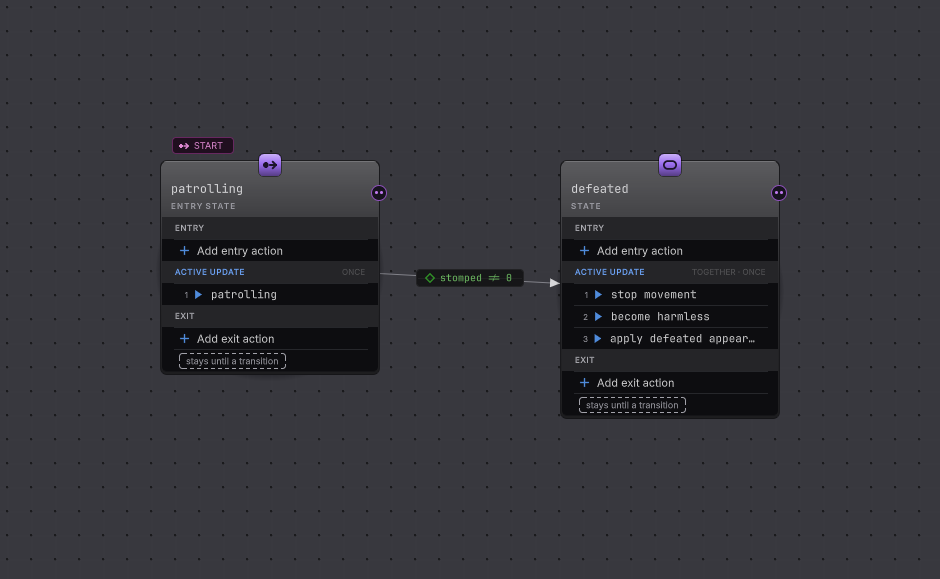
EnemyStateMachine.bqbehavior on the canvas. The start badge marks the mode the enemy begins in, and the pill on the arrow carries the fact that moves it.EnemyPatrol.bqbehavior is the tree that runs the walk. A Repeat keeps it going, a Sequence checks that the patrol is registered before it moves, and a member method asks the enemy’s own patrol component to advance one step. The tree re-decides that plan every time a step finishes, which is what you want from a walk that can be blocked or interrupted.
The division of labor reads cleanly out loud: the machine decides whether this enemy is still a threat, the tree decides how a threat spends its afternoon.
The rule the tree follows
Section titled “The rule the tree follows”Every node in a tree reports Success, Failure, or Running, and the composite above it reads that report to decide what happens next. Two composites cover most plans.
Selector takes the first child that works
Section titled “Selector takes the first child that works”Result
- Success
- A child succeeded. The Selector stops there and reports Success.
- Failure
- Every child failed. Nothing was left to try.
- Running
- A child is still working, so the Selector reports Running and keeps the cursor on that child.
Use a Selector for priorities. Attack if you can, otherwise chase, otherwise stand there looking menacing.
Sequence needs every child, in order
Section titled “Sequence needs every child, in order”Result
- Success
- Every child succeeded, in order.
- Failure
- A child failed. The Sequence stops there and reports Failure, and the rest of the steps are skipped.
- Running
- A child is still working, so the Sequence waits on it.
Use a Sequence for steps that depend on each other. Check that the target is in reach, then swing, then start the cooldown.
Read those two boxes together and the whole tree language falls out: a Selector is an “or”, a Sequence is an “and”, and nesting them gives you the plan. Behavior tree guides go through the rest of the family.
How a state hosts a tree
Section titled “How a state hosts a tree”A state can own actions, and a state can own a whole behavior tree instead. While the state is active, that tree ticks. When a transition takes the state away, the tree stops with it and its progress is discarded.
That is the pattern to reach for when a mode contains real decision making. Combat is a mode; attack, chase, and reposition are choices inside it. A tree inside a state shows the authoring and what the Live view looks like while both run.
When one is enough
Section titled “When one is enough”A behavior tree on its own is fine when the actor has one job and a priority order inside it. A patrol that checks, moves, and waits needs no modes.
A state machine on its own is fine when each mode is small and the interesting part is the change between modes. A door that is closed, opening, open, or closing needs no tree, and neither does a round that counts down, plays, and scores.
Reach for both when the modes are few and the work inside a mode is a decision rather than a single action. If you find yourself adding a state called AttackingButAlsoSearching, the inside of that mode wanted a tree.
- Your first behavior tree: bind one node to one method in your own scene.
- Your first state machine: patrolling to defeated, with the transition you can watch fire.
- Adapt your game: pick the first decision to move.