
State machine controls
Every state machine control, with its lifecycle box, its right-rail fields, and the guide that teaches it.
On this page
Seven controls build every state machine in the product. Each entry here gives the lifecycle rule, the fields on the right rail, and the guide that shows the control doing its job.
The machine rail is the same in every graph. A Runtime card at the top reads the live machine: Active state, Active action, Last transition, Cause, Lifecycle, Pass, Exit handoff, Exit budget, Exit boundary, Destination, Machine result, Suspended, with a status pip reading RUNNING, PAUSED, or NO DATA. A Machine card follows, then a States list with its Add button, then the card for whatever you have selected.
A selected control starts with the shared identity header: a caption reading SELECTED · STATE, SELECTED · ACTION, SELECTED · TRANSITION, Any State, or reference · state machine, then the editable name. Rename there; no detail card repeats a name field. In Live every value in the rail is a reading, and the header says why: “Live locks graph authoring; values shown for reading”.
Set the machine’s storage path and choose which mode activates first. Source token root.
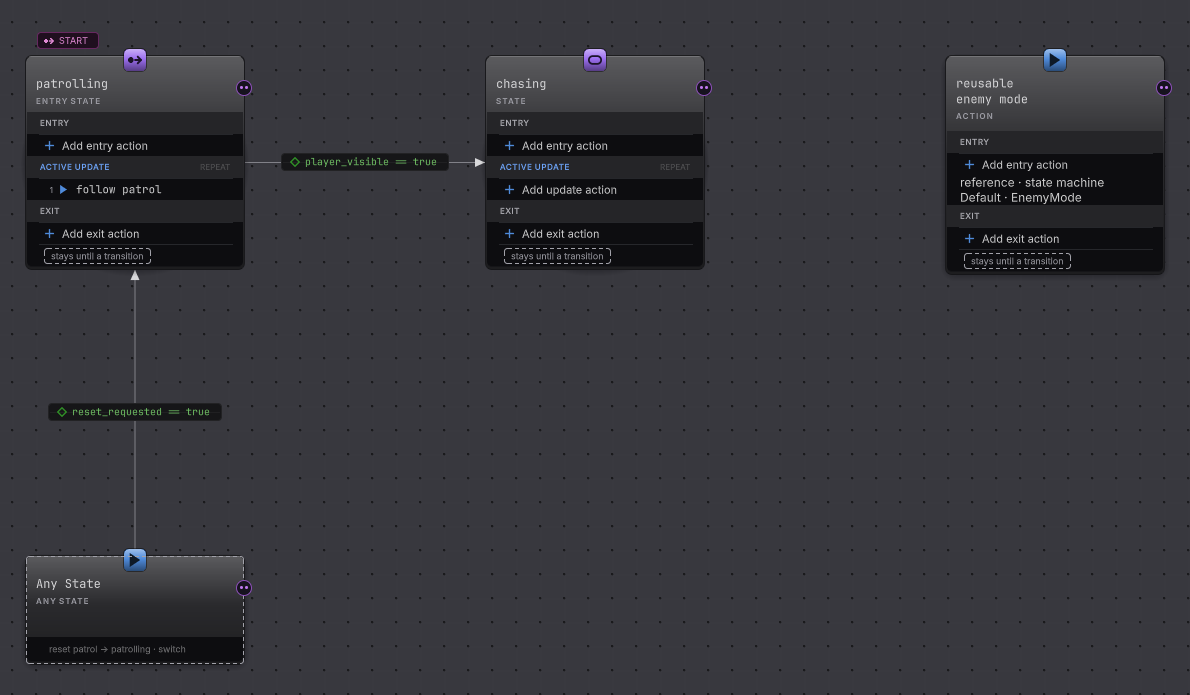
| Field | What to enter | Effect |
|---|---|---|
| Runtime path | GameObject or Entity. | Selects how the blackboard is stored. GameObject carries every declared type; Entity stores unmanaged data, so it carries value types only. |
| Entry state | Pick one authored state. | That state gets the first fresh activation. Exactly one entry state per machine, and authoring refuses zero or two. |
| States / Transitions | Read-only counts. | A structural summary. Neither is a limit. |
| States > Add | Adds an ordinary state. | Creates another mode without touching the current entry state. |
The root has no parameter form of its own. It stays active until a state finishes the machine, a parent reference consumes the result, or a fault ends the run. The machine result is None, Success, Failure, or Faulted. A referenced child machine owns its own root and its own Any State.
Use it when you start a machine. Guide: state machines.
State and Entry State
Section titled “State and Entry State”Keep one mode’s work together and say how that mode ends. Source tokens state, entry.
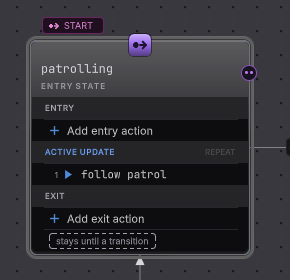
Lifecycle
- Enter
- Runs once per fresh activation. Active Update waits for it to succeed, and a Running row keeps the state in Entry. Entry carries no Lifetime.
- Active
- Direct action rows or one hosted behavior tree. In order advances one unfinished row per update; Together advances every unfinished row in the same update. Once holds the terminal result; Repeat starts a new pass on the next update.
- Exit
- One bounded update after a transition latches, before the destination's Entry. Unfinished work is canceled, unreached In order rows are skipped, and an empty Exit skips the update.
- Finished
- A terminal Active Update result no transition claimed. Completion then applies: Stay, Return, or Finish.
| Field | What to enter | Effect |
|---|---|---|
| Entry state | Toggle on to make this the machine’s entry state. | Static ordinary states only. Turning the current one off directly is refused; choose another entry state instead. |
| Entry / Active Update / Exit rows | Add rows, drag to reorder, remove. | A row runs in the group that holds it. Empty groups are valid. |
| Run | In order or Together. | Appears when the group holds more than one row, or when Together is already authored. Group scheduling on one update, not threads. |
| Active Update Source | Actions or Behavior Tree. | A state holds one Active Update source. The switch to Behavior Tree waits until the update rows are gone. |
| Active Update Lifetime | Once or Repeat. | Once holds the terminal result for an On finish row. Repeat starts a new pass on the next update unless a transition latched. |
| Completion > When done | Stay, Return, or Finish. | Applied after the Active Update boundary when no transition matched. |
| Completion > Result | Success, Failure, or Use result. | Finish only. Use result publishes the terminal Active Update result as the machine result. |
| Precedence | Drag the outgoing rows. | First matching row wins, with Any State rows scanned ahead of local rows. |
The rail’s Lifecycle card spells out the handoff: the transition fires, Exit is deferred, the source gets one Exit update, then the destination’s Entry begins on the following update. A state whose rows omit an explicit phase is a legacy action list: it maps into Active Update, the lifecycle controls stay read-only, and Upgrade lifecycle source converts it once, preserving the current order, Run, and Lifetime.
Use it for any named mode, as in the Platformer enemy (sample). Guide: states and lifecycle.
Transition
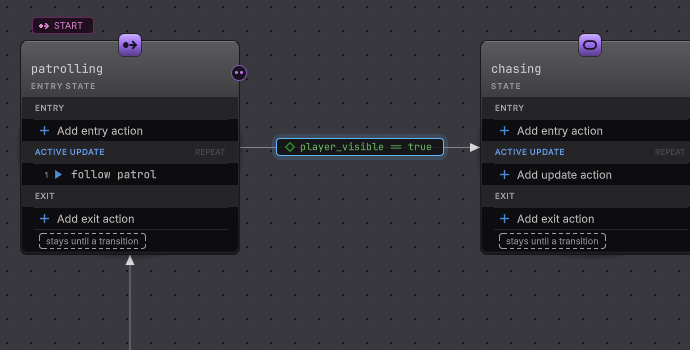
Section titled “Transition”One ordered typed handoff, and the exact moment it may fire. Source token transition.
| Field | What to enter | Effect |
|---|---|---|
| From / To | Navigation readings. | Name the exact pair. A self transition reads · itself beside the destination. |
| Evaluate > When | Continuous, On finish, or On iteration. | Any State offers Continuous alone. A reference source offers Continuous or On finish. Ordinary states offer all three. |
| Evaluate > Result | Any, Success, or Failure. | On finish and On iteration only. Running never satisfies a filter, and a runtime fault is never read as authored Failure. |
| Trigger > Source | Conditions, Event, or None where legal. | Continuous requires Conditions or Event. None appears only when the finish or pass cadence can arm the row on its own. |
| Event field | One result event the source state exposes. | Event source only. A saved id that goes missing stays visible as missing; no same-named event is substituted. |
| condition group | All conditions or Any condition. | All stops at the first false row; Any stops at the first true row. Enabled once a predicate exists. |
| predicate variable | A readable graph value. | One row per predicate, evaluated in authored order. |
| predicate comparison | An operator legal for that type. | The set is <, <=, ==, !=, >=, >, narrowed by type: a bool keeps equality without ordering. |
| predicate compare with | Constant or Blackboard, then the typed literal or a compatible value. | One right operand per row. Both sides have to be declared and readable by this transition. |
| Kind > When taken | Switch or Push. | Switch cancels running work and discards suspended states; only the active state gets its bounded Exit. Push suspends the source at its current row without Exit. |
| Kind > On return | Resume or Re-enter. | Push only. Resume continues the preserved activation; Re-enter runs Entry and starts a fresh pass. |
| Re-entry > On re-entry | Restart or Resume. | Self transitions only. Restart uses Exit and Entry; Resume keeps progress and runs neither. |
| Precedence | Drag the row among its source’s outgoing rows. | First matching row wins. |
Every transition needs one source and one destination. A Continuous row with no trigger, a Continuous row carrying a result filter, Resume re-entry on a non-self row, an Any State row that is not Continuous, an On iteration row from a reference source, and an On finish row whose source Active Update repeats are all refused by validation. A faulting predicate faults the machine rather than falling through to a lower row, and a predicate the executing authority may not read is declined so the scan continues.
Use it for every handoff. Guide: transitions.
Any State
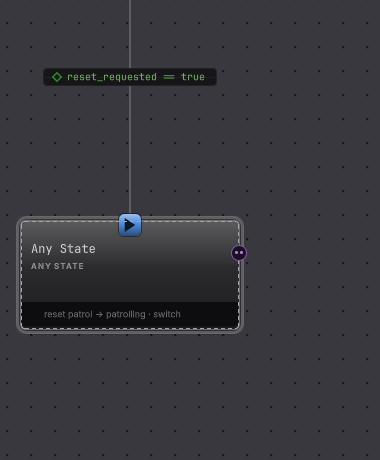
Section titled “Any State”Hold the handoffs that are true from every mode in one ordered list. Source token any_state.
| Field | What to enter | Effect |
|---|---|---|
| Identity | Read only. | The name is fixed, and the rail says so: “Any State’s identity is fixed”. |
| Rail caption | Read only. | “These transitions are checked before the active state’s own list. A row targeting the active state is skipped.” |
| Precedence | Drag its outgoing rows. | First matching row wins, ahead of every local row. Configure each row by selecting the transition itself. |
Any State is never entered, never reported as the active mode, and produces no result. It owns none of the lifecycle controls: no Entry, no Active Update, no Exit, no Run, no Lifetime, no Completion. Authoring refuses lifecycle work or semantic parameters on it. A machine holds at most one, reached by exactly one containment edge from its root, and it may source only transition rows. Each composed machine owns its own.
Use it for death, reset, or one machine-wide alarm. Guide: Any State.
Referenced State Machine
Section titled “Referenced State Machine”Run one eligible reusable machine as a parent mode’s Active Update. Source token state_machine_reference.
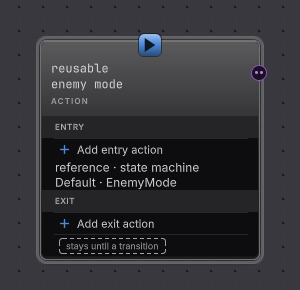
Lifecycle
- Enter
- The parent's own Entry group still runs before the child activates.
- Active
- The selected child machine. Selection is rechecked while the child runs: an unchanged winner keeps its progress, a new winner cancels the old child and its owned suspensions.
- Exit
- The parent's own Exit group, with the same one bounded update as any other state.
- Finished
- The child's Success or Failure becomes this state's terminal Active Update result. A child fault stays Faulted.
| Card | What to do | Effect |
|---|---|---|
| Candidates · ordered | Add candidate, pick a machine asset, drag the ordinary rows into priority order. A row offers Open and Remove. | The first eligible ordinary candidate wins. The picker excludes this host and anything cyclic or incompatible. |
| Eligibility | Author a condition group with typed predicates for the selected ordinary candidate, or press Remove eligibility. | No condition means eligible as soon as the scan reaches the row. |
| Value overrides | Set each declaration to Off or Override, then edit it with that declaration’s own typed editor. | Override changes that candidate’s effective declared value on this host alone. An invalid saved payload offers Reset to module default. |
| Default · unconditional | Add Default candidate. | Considered last, whatever its position. Without one, the reference parks when nothing is eligible. |
| Completion / Result events | The same parent state controls. | The child result feeds On finish rows, the Completion policy, or exposed result events. |
Each candidate belongs to one reference. Missing assets, duplicate ownership, reference cycles, incompatible runtime storage, invalid overrides, and unusable eligibility all block a valid bake, and no asset is ever substituted by name. A reference source offers Continuous or On finish on its outgoing rows.
Use it to share one routine across actors. Guide: referenced machines.
Direct lifecycle action
Section titled “Direct lifecycle action”Put one service or member operation in a lifecycle group. Source token action, or the member token for a member operation.
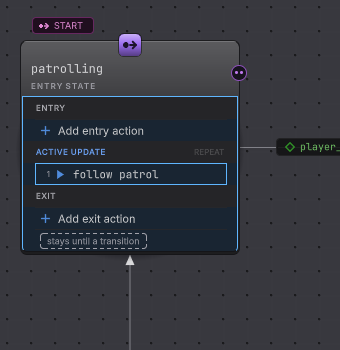
| Field | What to select or read | Effect |
|---|---|---|
| Behavior | The service behavior or member operation. A broken saved identifier reads Missing behavior (…) until you replace it. | Decides the operation-specific fields that follow. |
| Group | Entry, Active Update, or Exit. | Moves this row into that group. A row that omits an explicit phase belongs to Active Update. |
| Position | Reads n of count. |
Execution order inside the group. Reorder in the owning state’s group list. |
| Owning state | Navigation row. | Opens the state that holds the row. |
| Group execution > Run | In order or Together. | The owning group’s policy, shown here so a row always names it. |
| Group execution > Lifetime | Once or Repeat. | Active Update rows only. |
A member behavior then embeds the same Target, Member, Arguments, and Result rail documented in member nodes and bindings. A service action exposes only the fields its behavior descriptor owns, so an operation with no parameters adds no form. In Live a group reads Waiting or Complete while each row reads Succeeded, Failed, Canceled, Deferred or Skipped, and a resting row reads nothing at all.
Use it for the work a mode owes the game. Guide: states and lifecycle.
Hosted Behavior Tree controls
Section titled “Hosted Behavior Tree controls”Use a whole behavior tree as Active Update while the state keeps the lifecycle. Source parameter active_update_source: behavior_tree.
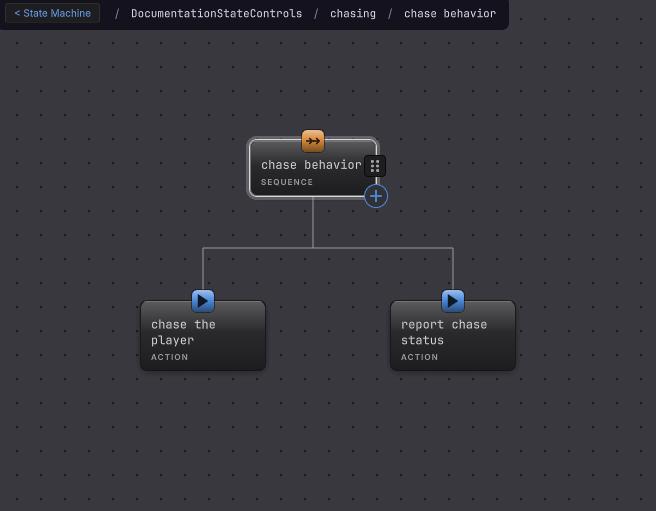
Lifecycle
- Enter
- The state's own Entry group runs first. The hosted cycle starts after it succeeds.
- Active
- One hosted cycle at a time, at most one per machine update. A Running tree keeps its cursor and pending operations across updates.
- Exit
- A Switch or a self Restart cancels pending work inside the tree before the destination takes over. Push preserves the state and the hosted cursor.
- Finished
- The tree's terminal Success or Failure becomes the state's Active Update result, and it feeds an On finish row, an On iteration boundary, a result filter, or Completion.
| Field | What to do | Effect |
|---|---|---|
| Active Update Source | Choose Behavior Tree. | Replaces direct update rows, which have to be gone first. The card gains a HOSTED BEHAVIOR TREE tag. |
| Choose a Behavior Tree… | Choose project tree for an existing asset, + Create here for a tree authored inside this graph file. | An assigned tree offers Edit tree; a project asset also offers Change and Clear. |
| Lifetime | Once or Repeat. | Once keeps the terminal result. Repeat restarts on the next update after a terminal result if no transition latched. |
| Result events > Success / Failure > EXPOSE | Toggle each independently. | Each enabled result emits its own graph event once when that result becomes terminal. Two exposed results cannot share one identity. |
| Completion | Stay, Return, or Finish. | Applies at the hosted terminal boundary exactly as it does for direct rows. |
A missing project asset reads Missing tree · … with its last display name preserved, and no same-named tree is substituted. An inline tree is authored in its own behavior tree context and its nodes never mix into the machine canvas, which is also why the live machine canvas draws modes rather than the hosted tree’s nodes. Hosting runs one way: a behavior tree has no node that runs a state machine.
Use it when a mode needs a real decision inside it, as in the Horde Survival surge (sample). Guide: a tree inside a state.