
Referenced machines
Run a whole reusable machine as one parent mode, pick which machine by eligibility, and override its declared values per host.
On this page
Your third enemy type needs the same four-mode combat routine as the first two. A Referenced State Machine lets one parent mode run that routine as a shared machine instead of a third copy of it.
The problem
Section titled “The problem”Copy a combat routine into three graphs and you own three of them. The fix you want is the one you already use for meshes and prefabs: keep the routine in one graph file, and let each host point at it.
DocumentationStateControls.bqbehavior has that shape. Beside the ordinary modes sits reusable enemy mode, a reference whose Active Update runs a child machine held in its own asset.
When to reach for it
Section titled “When to reach for it”- One combat, dialogue, or turn routine shared by several actors, where each host supplies different numbers.
- A routine that should differ by situation: a cautious search machine while the alert level is up, the ordinary patrol machine otherwise.
- A parent flow that stays small because each of its big modes is a machine in its own right.
See it: a machine as one mode
Section titled “See it: a machine as one mode”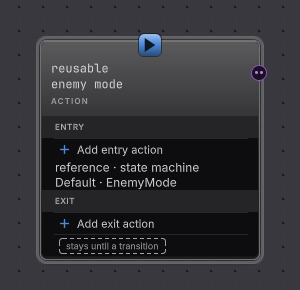
-
Open
Assets/Platformer/Behavior/DocumentationStateControls.bqbehaviorand select reusable enemy mode. The rail’s identity line reads reference · state machine. -
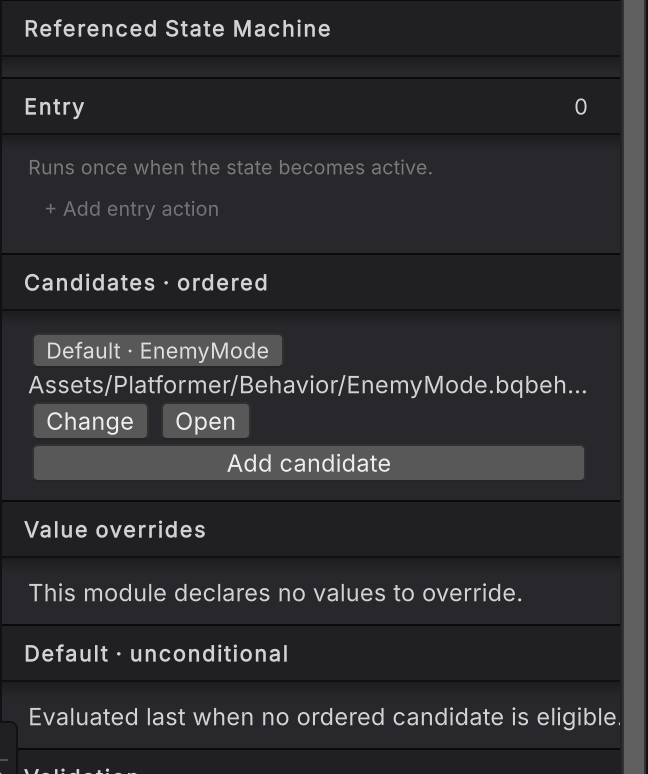
Read the Candidates · ordered card. Each row names one child machine asset and carries Open and Remove, with a status line when the assignment needs attention.
-
Press Add candidate to add an ordinary candidate, then pick a machine asset. The picker leaves out this host and anything that would form a cycle.
-
Select that row and author its Eligibility: a condition group with typed predicates, exactly like a transition trigger. Remove eligibility makes the row unconditional when the scan reaches it.
-
Read Value overrides. Each declared value in that child module gets Off or Override; switching to Override reveals that declaration’s own typed editor, and the change belongs to this candidate alone.
-
Read Default · unconditional. With one present, the rail says it is evaluated last when no ordered candidate is eligible. Without one, it says the reference parks when no candidate is eligible.
How it decides
Section titled “How it decides”Candidate selection
Ordinary candidates are scanned in authored order, and the first one whose eligibility holds is selected. A candidate with no eligibility is eligible as soon as the scan reaches it. The Default is skipped during that scan and used only as the fallback, whatever position it occupies.
Selection is rechecked while the child is active:
- an unchanged winner keeps its progress;
- a different winner cancels the old child’s active work and the suspended activations that child owned, then activates the replacement;
- nothing eligible with no Default parks the reference, which means no child is active and control does not jump anywhere else.
Value overrides
An override keeps the child module’s declared type and shape, and belongs to that candidate on that host. A fresh activation restores the child’s values from its effective defaults, mutable managed values are copied so two hosts never share one accidentally, and Unity object references keep their identity. Resuming a Push-suspended reference preserves its values instead of resetting them.
Overrides replace declared defaults. They are not input or output ports, and a finished child’s mutated values are not copied back into the parent.
Child completion
A finished child machine hands the parent its Success or Failure as the reference’s terminal Active Update result. From there the parent can use an On finish transition with a Result filter, apply the reference’s Completion policy, or expose result events for outgoing Event rows. A child fault stays Faulted and is never softened into authored Failure to make a parent row eligible.
A reference source offers Continuous or On finish on its outgoing rows. On iteration is refused there, because a machine completes but has no passes.
Ownership rules
Each candidate belongs to exactly one reference. Missing assets, duplicate ownership, reference cycles, incompatible runtime storage, invalid overrides, and unusable eligibility all block a valid bake, and changing or removing a candidate never substitutes a same-named asset behind your back.
Candidate switching is how this product replaces a nested machine at runtime. It chooses among assets you authored, cancels the previous child, then starts or restores the new one under the owning lifecycle.
When it goes wrong
Section titled “When it goes wrong”When it goes wrong
| Symptom | Check | Fix |
|---|---|---|
| The reference runs nothing. | Read the Runtime card for a parked reading, then read each candidate’s Eligibility. | Make one predicate true, or add a Default candidate as the unconditional fallback. |
| The wrong child machine wins. | Read the order of the ordinary rows in Candidates · ordered. | Drag the row that should win above the row that should lose. The Default is always considered last. |
| A conditional candidate never runs. | Look for an earlier row with no eligibility. | An unconditional ordinary row ends the scan where it sits, so give it a predicate or move it below. |
| The child restarts and loses progress. | Read whether the selected candidate changed, and whether the parent row that fired was a Switch. | Keep the winner stable while the child should continue, and use Push where the parent must interrupt without ending the child. |
| An override looks ignored. | Confirm the row is set to Override rather than Off, and that you edited the candidate you expect. | Overrides belong to one candidate on one host. An invalid saved payload offers Reset to module default. |
| Baking is refused after a rename. | Read the candidate row’s status line and the Validation card. | Reassign the missing asset. The saved identity stays visible so you can repair it deliberately. |
- A tree inside a state: the same idea with a behavior tree as the mode’s work.
- Push and Return: suspending a reference and resuming its child.
- Referenced State Machine reference: the cards, field by field.