
A tree inside a state
Let one mode own the lifecycle while a whole behavior tree chooses the work inside it.
On this page
Chasing is one mode. Inside it the enemy still has to choose: close the distance, take a shot, call it in. A state can hand that choice to a whole behavior tree and keep owning the mode.
The problem
Section titled “The problem”Flatten a mode’s internal choices into states and the machine grows a state per option, with a transition between every pair of them. Nine states and twenty rows later, nobody can say what the actor is doing.
The choice inside a mode is what trees are for. DocumentationStateControls.bqbehavior keeps the split visible: chasing is the mode, and its Active Update is a tree called chase behavior that runs the chase action and the status report.
When to reach for it
Section titled “When to reach for it”- A combat or chase mode whose internal decision reshuffles while the mode stays the same.
- Horde Survival’s surge phase, where the machine owns the phase and the hosted tree picks which pressure to apply (sample).
- A reusable tree you already authored, dropped into a mode that should own its start and its cleanup.
See it: the mode holds while the tree chooses
Section titled “See it: the mode holds while the tree chooses”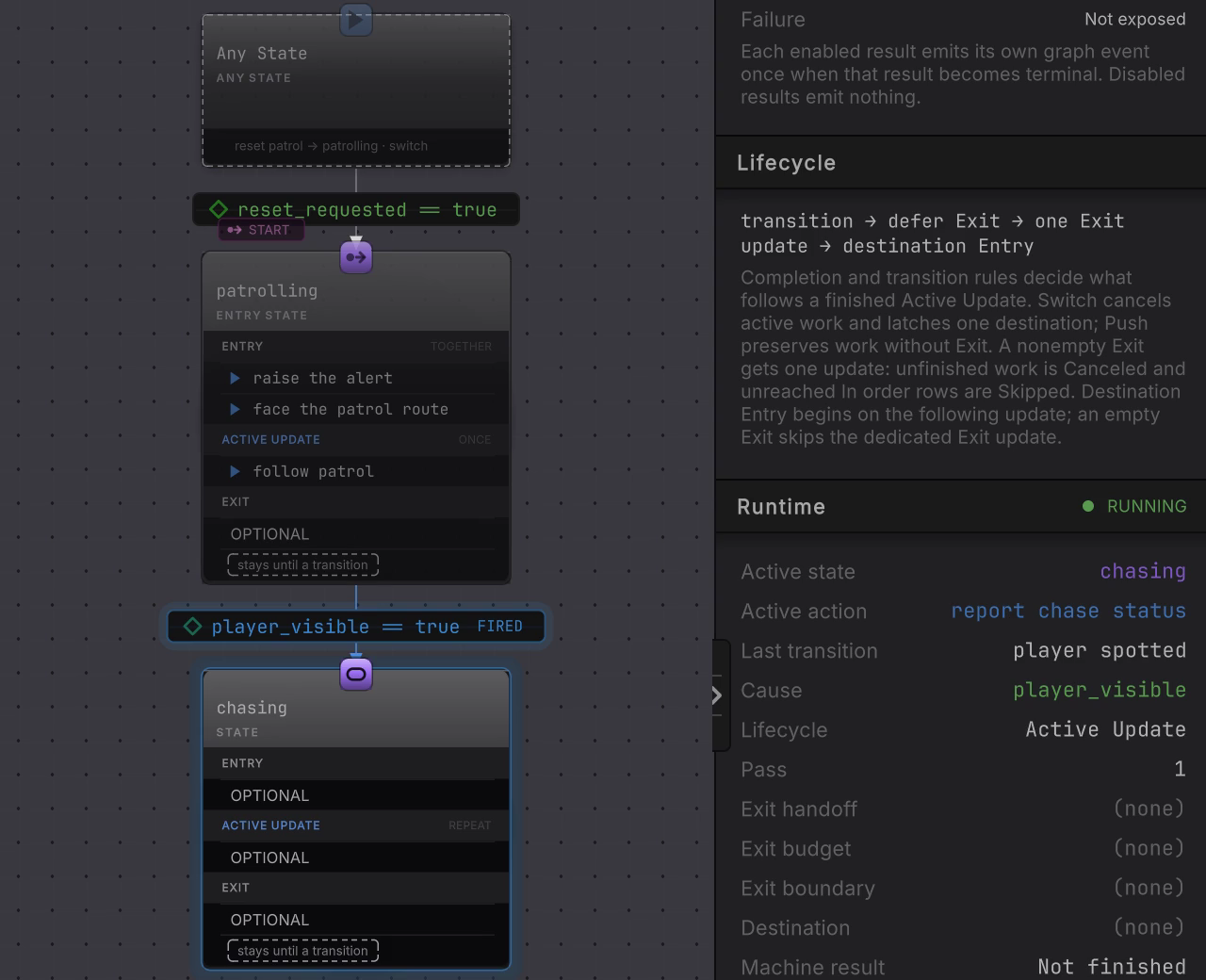
DocumentationStateControlsLive.bqbehavior hosts the same tree in its chasing mode. The machine canvas keeps showing modes, and the rail is where the tree’s work surfaces: Active state reads chasing while Active action moves between chase the player and report chase status.
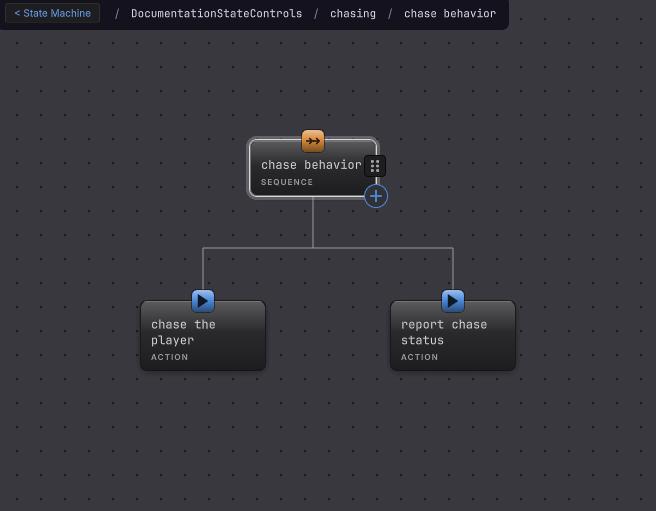
chasing, and these nodes never mix into the machine canvas.-
Open
Assets/Platformer/Behavior/DocumentationStateControls.bqbehaviorand select thechasingstate. -
Read the Active Update card. Its Source row is set to Behavior Tree and the card carries a HOSTED BEHAVIOR TREE tag. A state cannot hold both direct update rows and a tree, so a state that still lists update actions refuses the switch until you move or remove them.
-
Read the assigned tree. Choose project tree takes an existing asset, + Create here authors one inside this machine’s own graph file. An assigned tree offers Edit tree, and a project asset also offers Change and Clear.
-
Read Lifetime. The caption states the rule: it starts after Entry, Once keeps its terminal result, and Repeat restarts on the next update after terminal Success or Failure if no transition has latched.
-
Read the Result events card, tagged OPTIONAL · SEPARATE. Success and Failure each have their own EXPOSE switch, and each enabled result emits its own graph event once when that result becomes terminal.
-
Press Edit tree to open the hosted tree in the behavior tree context. Its nodes are authored there, and they never mix into the machine canvas.
How it decides
Section titled “How it decides”One cycle at a time
A hosted cycle starts after Entry succeeds, at the state’s baked tree root. At most one hosted cycle advances per machine update, so a tree whose branch finishes immediately does not spin through a second cycle in the same frame.
- Once runs one cycle for the activation and keeps its terminal result. A later update does not start another.
- Repeat starts a fresh cycle on the next update after Success or Failure, unless a transition latched first.
A Running hosted tree keeps its cursor and its pending operations across updates, exactly as it would at the root of its own graph.
The result is the mode’s result
The tree’s terminal Success or Failure becomes the state’s Active Update result. Everything that reads an Active Update result reads this one:
- an On finish transition on a Once host, or On iteration at a completed Repeat pass;
- the Result filter Any, Success, or Failure;
- the state’s Completion setting of Stay, Return, or Finish.
That is the shortest path when the rule is “the tree finished, move on”. Reach for a named result event when one mode needs two different destinations for the two outcomes.
Result events
A host may give its Success and its Failure separate stable ids, and may expose neither, one, or both. Two exposed results cannot share one identity, and the editor says so. An outgoing Event transition listens to one id exposed by its own source state, so the event is local to that state and scoped to the update it fired on. For Repeat, an unmatched event expires before the next cycle. For Once, the terminal result stays held, so a guarded On finish row can still become true later.
Interruption
A Switch or a self Restart cancels pending work inside the hosted tree before the destination takes over, and late completions from that abandoned work cannot resume it. Push preserves the state and its hosted cursor for the return policy on that row.
One direction only
A state can run a behavior tree. A behavior tree has no node that runs a state machine, so when the parent is already a machine, reach for a referenced machine instead.
When it goes wrong
Section titled “When it goes wrong”When it goes wrong
| Symptom | Check | Fix |
|---|---|---|
| Source will not switch to Behavior Tree. | Look for action rows still listed under Active Update. | Move them to Entry or Exit, or remove them. A state holds one Active Update source. |
| The tree runs once and stops. | Read Lifetime on the Active Update card. | Set it to Repeat for a mode that should keep deciding. |
| An On finish transition never fires. | Read Lifetime again, then read the Result filter. | On finish needs Once. With Repeat, use On iteration at the pass boundary. |
| An Event transition finds no id. | Read the Result events card on the source state. | Expose Success or Failure there. The picker lists only ids exposed by that row’s own source. |
| The rail reads Missing tree. | Read the preserved name beside the warning. | Reassign the asset with Change. No same-named tree is substituted for the one that went away. |
| The live machine canvas shows no tree nodes. | The machine canvas draws modes, and the hosted tree is authored in its own context. | Nothing to repair. Read the Runtime card: Active state names the mode and Active action names the node inside the hosted tree that is running. |
- Transitions: On finish, result filters, Event triggers.
- Behavior trees: what the hosted tree can do once it is in there.
- Mode switch with an inner tree: the whole pattern, end to end.