
States and lifecycle
Put setup, ongoing work, and cleanup in the group where each belongs, then choose how the group runs and when the mode counts as done.
On this page
A stomped Platformer enemy has to stop moving, stop hurting the player, and look defeated. A state gives each of those jobs a place to live and a moment to happen.
The problem
Section titled “The problem”Cleanup is where modes go wrong. The enemy takes the stomp, the graph moves to the defeated mode, and the character keeps drifting along its patrol because the code that stops movement never ran. The same failure in reverse is a mode whose setup runs every frame instead of once, so an animation restarts forever.
EnemyStateMachine.bqbehavior in the Platformer sample answers both with grouping. Patrolling advances the patrol while it is the mode. Defeated stops movement, makes the enemy harmless, and applies the defeated look, all in Active Update, all once.
When to reach for it
Section titled “When to reach for it”- A mode with one-time setup: acquire a target, start an animation, raise a flag your components read.
- A mode with finite work whose end matters, like the Platformer guard walking to its post before the machine moves on.
- A mode that owes the next mode a clean handover: clear movement intent, release a reservation, hide a marker.
See it: two actions on the way in
Section titled “See it: two actions on the way in”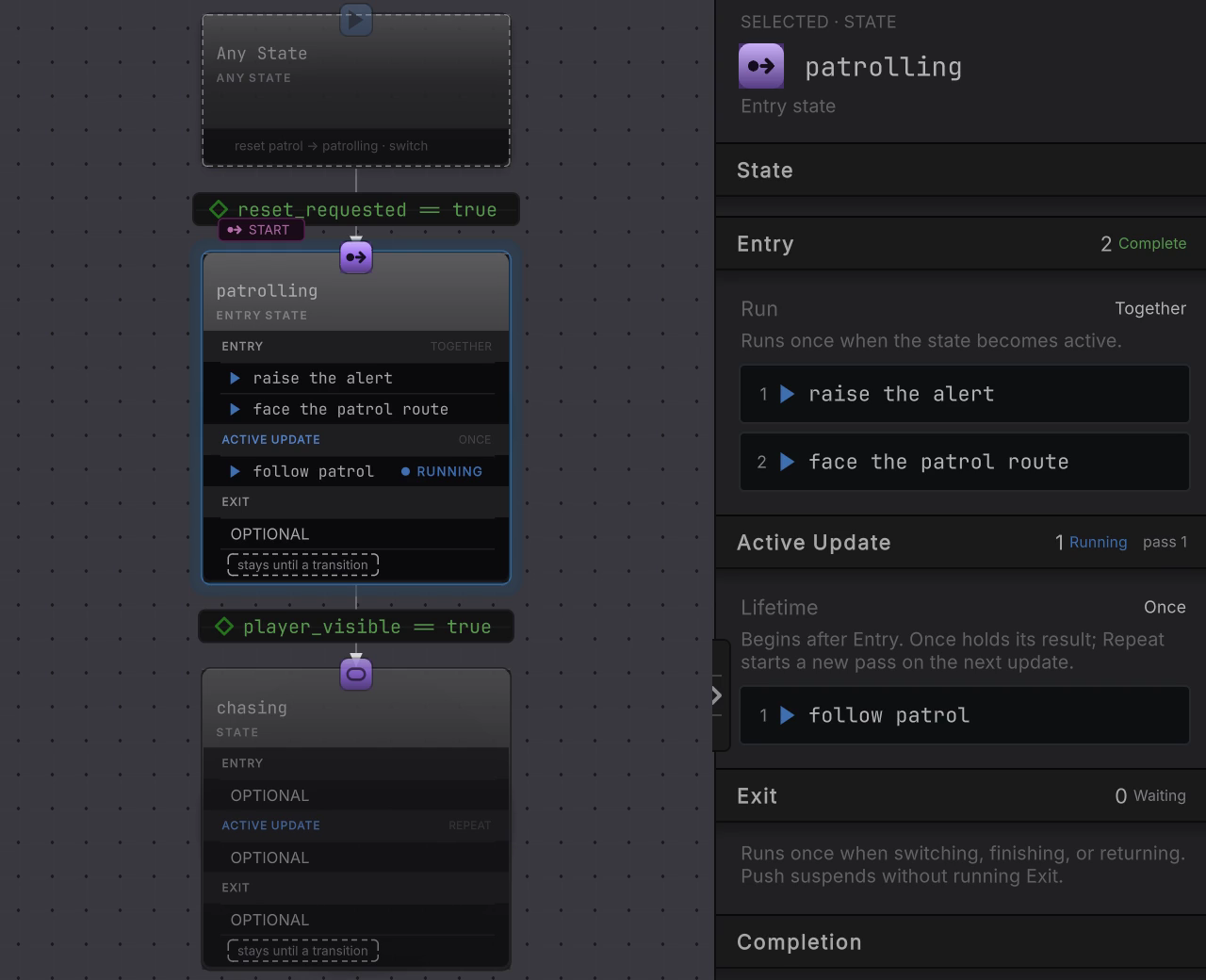
DocumentationStateControlsLive.bqbehavior gives patrolling two Entry actions, raise the alert and face the patrol route, with Run set to Together. The rail is the honest readout: the group header goes from Entry 2 Running to Entry 2 Complete while Active Update 1 Running pass 1 takes over below it, and Exit 0 Waiting sits untouched until something takes the mode away. On the state card itself only one row shows the running pip at a time, so read the group header rather than the card rows when work is genuinely overlapping.
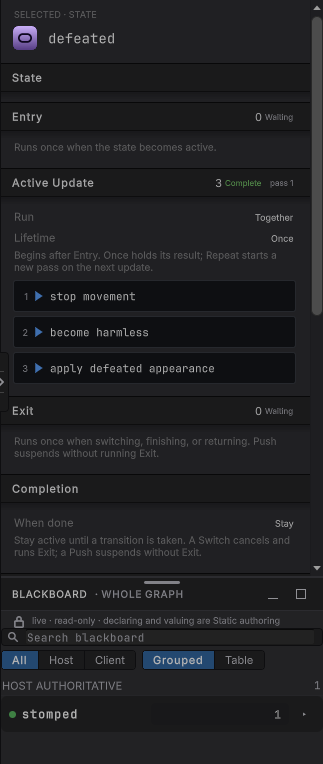
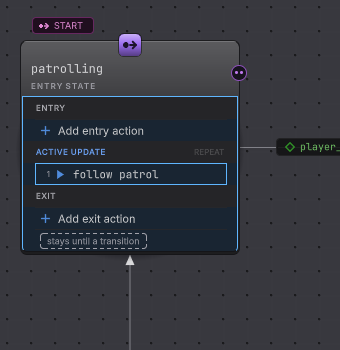
patrolling; this still is the same reading on a different mode of a shipped graph. After the stomp, each row in the Platformer enemy’s defeated mode carries its own result and the group above them reads Complete.DocumentationStateTransitions.bqbehavior under Assets/Platformer/Behavior/Tutorials/ has a state built to be read: alarmed owns all three groups.
-
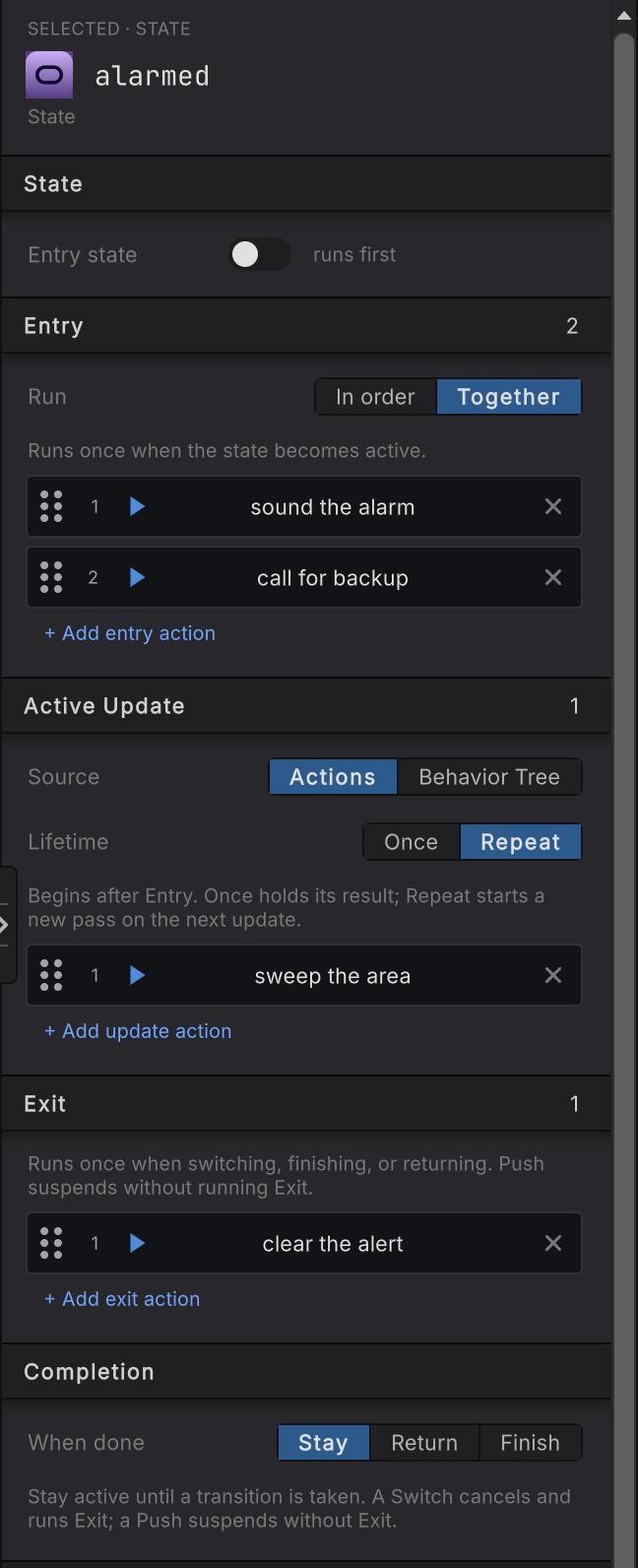
Open the graph and select the alarmed state. The rail opens with SELECTED · STATE, the editable name, then the three lifecycle cards.
-
Read Entry. Its caption says “Runs once when the state becomes active.” Two rows sit under it: sound the alarm and call for backup.
-
Read the Run row on that same card. It is set to Together, which is why both alarm rows advance in the same update. Switch it to In order and the second row waits for the first.
-
Read Active Update. It holds one row, sweep the area, so there is no Run control to choose. Lifetime is Repeat, so the row starts a new pass after each completed one.
-
Read Exit. clear the alert sits there, and the group’s caption says it runs once when switching, finishing, or returning.
-
Select the action sound the alarm on its own. Its Action card names Group, Position as
1 of 2, and Owning state, and a Group execution card below repeats the group’s Run value, so a row always tells you which group owns it. -
Select the investigating state and read Completion > When done. It is set to Return, which is the setting Push and Return needs.
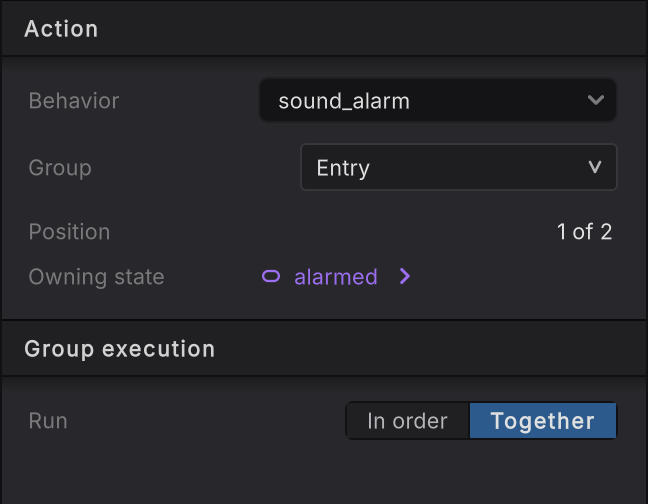
1 of 2, its Owning state, and the group’s Run policy.A state with one row shows no Run control, because there is no order to choose. Add a second row and the control appears.
How it decides
Section titled “How it decides”Lifecycle
- Enter
- Runs once per fresh activation, before Active Update. A Running Entry row keeps the state in Entry, and a failed row stays visible as the group's result instead of being skipped. Entry has no Lifetime, because once per activation is already its rule.
- Active
- The mode's work, from direct action rows or one hosted behavior tree. In order advances one unfinished row at a time; Together advances every unfinished row in the same update. Once holds the terminal result; Repeat starts a new pass on the next update.
- Exit
- One update, after a transition latches and before the destination's Entry. Unfinished work is canceled and unreached In order rows are marked skipped. An empty Exit skips the dedicated update entirely.
- Finished
- A terminal Active Update result that no transition claimed. Completion decides: Stay keeps the mode, Return pops the activation a Push suspended, Finish ends the machine with Success, Failure, or the result the mode just produced.
Run
- In order starts one unfinished row at a time. A row that succeeds while later rows remain reports Running for the group, so the next row begins on the following update. A non-success terminal result stops the group and becomes the group’s result.
- Together advances every row that has not finished during the same update. The group succeeds when all rows succeed; the first non-success terminal result cancels unfinished peers and becomes the group result. This is group scheduling on one update, so your code still runs on the host’s own thread.
Lifetime, on Active Update only
- Once keeps the terminal result. An On finish transition or a Completion policy can then read it.
- Repeat begins a new pass on the next update after Success or Failure, unless a transition latched first. Each completed pass is an On iteration boundary.
- A state with no Active Update rows reaches an empty successful boundary immediately, which is how an actionless mode still gets its transitions and Completion evaluated.
The handoff order
A latched transition does not cut the current update short. The transition fires, Exit is deferred, the source gets exactly one Exit update, and the destination’s Entry starts on the update after that. The rail spells the same sequence out under Lifecycle.
Completion
| When done | What happens |
|---|---|
| Stay | The mode stays active. Once holds its result; Repeat starts another pass. |
| Return | Exit gets its one update, then the activation suspended by the matching Push becomes active again. Returning with nothing suspended finishes the machine instead: it stops with no result. |
| Finish | Exit gets its one update, then the machine finishes with Success, Failure, or Use result, which publishes the terminal Active Update result. |
When it goes wrong
Section titled “When it goes wrong”When it goes wrong
| Symptom | Check | Fix |
|---|---|---|
| Setup work runs over and over. | Read which group the row sits in on the action’s own rail. | Move it to Entry with the Group row, or give Active Update Lifetime Once. |
| Cleanup never happens. | Read whether the transition that fired is Switch or Push, then confirm the row is in Exit. | Push suspends without Exit, so put final cleanup behind a Switch handoff. |
| Only the first Exit row ran. | Read Run on the Exit group. | Exit gets one update. In order stops at the first row that does not succeed immediately and skips the rest, so use Together when every row must get its turn. |
| The mode never finishes. | Read the Active Update group in Live and find the row that still reads Running. | Either let that operation complete or give the mode a Continuous transition that can take it out. |
| An On finish transition never fires. | Read Lifetime on Active Update. | Set it to Once. A Repeat group produces iteration boundaries and never a finish boundary. |
| The lifecycle controls are read-only in Static. | Look for a Source compatibility card reading Legacy action list. | Press Upgrade lifecycle source once. The graph keeps its current order, Run, and Lifetime, and the three groups become editable. |
- Transitions: the rules that decide when a mode ends.
- A tree inside a state: Active Update as a whole behavior tree.
- State and Entry State reference: every field on the state rail.