
State machines
Give your actor named modes, one live at a time, with rules for leaving each one that you can point at on the canvas.
On this page
A state machine gives your actor one mode at a time and a rule for leaving it. Patrolling, chasing, defeated: each mode has a name you can say out loud, owns its own setup and cleanup, and lights up on the canvas while the game runs.
When a machine is the right shape
Section titled “When a machine is the right shape”Reach for a machine when the current mode matters on its own, and the ways out of it are worth naming.
- A Platformer enemy that patrols until the player stomps it, then stays defeated.
EnemyStateMachine.bqbehavioris that and nothing more: two modes, one predicate, three cleanup actions. - Round or phase flow, like build-up into surge into relax, where each phase owns its own setup and has one way out.
- A mode that has to clean up after itself. A state has an Exit group that runs on the way out, and a tree branch has nowhere to put that work.
Reach for a behavior tree instead when the actor reshuffles its choice every few frames and no single current mode deserves a name. The two combine in one direction: a state can run a whole tree while it is the active mode, which is a tree inside a state. Trees and machines together shows the pairing from the top.
What a machine is made of
Section titled “What a machine is made of”A state machine root owns the states and picks which one starts. One state is the Entry state, marked on the canvas and the first to activate.
A state is one mode. It holds up to three action groups: Entry runs once when the mode becomes active, Active Update does the ongoing or finite work, Exit gets one update on the way out. Active Update can run direct actions or one hosted behavior tree.
A transition is one labeled handoff between two states. It carries the moment it may fire, the trigger that fires it, and what happens to the mode it leaves.
Two extras sit beside the ordinary states. Any State owns the handoffs that are true from every mode, and a Referenced State Machine runs a whole reusable machine as one parent mode.
How one transition fires
Section titled “How one transition fires”Four rules come out of that, and they explain most surprises.
- Every update opens at a transition boundary. Any State rules are checked first in authored order, then the active state’s own rules in the order they appear in its Precedence card. The first match wins and at most one transition fires per update.
- Then the state works. Entry runs until it succeeds, and Active Update starts only after that.
- When Active Update reaches Success or Failure, the boundary is checked again, this time also including the On finish and On iteration rules with their Result filter. If nothing matches, the state’s Completion setting decides whether it stays, returns, or finishes the machine.
- Firing a Switch transition cancels the work the old mode owned, gives its Exit group exactly one update, and starts the destination’s Entry on the update after that. A Push transition keeps the old mode instead, suspended without Exit, for a later Return.
Card positions carry no priority. Authored order does all of it, which is why the rail has a Precedence card with draggable rows.
Pick the page you need
Section titled “Pick the page you need”Build a mode:
- States and lifecycle: Entry, Active Update, Exit, plus Run, Lifetime, Completion.
- A tree inside a state: a whole behavior tree as one mode’s work.
- Referenced machines: one reusable machine as a parent mode, chosen by eligibility.
Decide when to leave it:
- Transitions: predicates, events, All and Any groups, cadence, order.
- Any State: the rules that hold from every mode.
- Push and Return: interrupt a mode, then continue the same activation.
The state-machine control reference is the field-by-field version, with the lifecycle box for every control.
Read a real machine
Section titled “Read a real machine”DocumentationStateControls.bqbehavior in the Platformer project exists to be read. Its machine is called enemy modes: patrolling is the entry state with one update action, chasing hosts a behavior tree, a transition called player spotted watches player_visible, an Any State rule resets the patrol, and reusable enemy mode references a child machine.
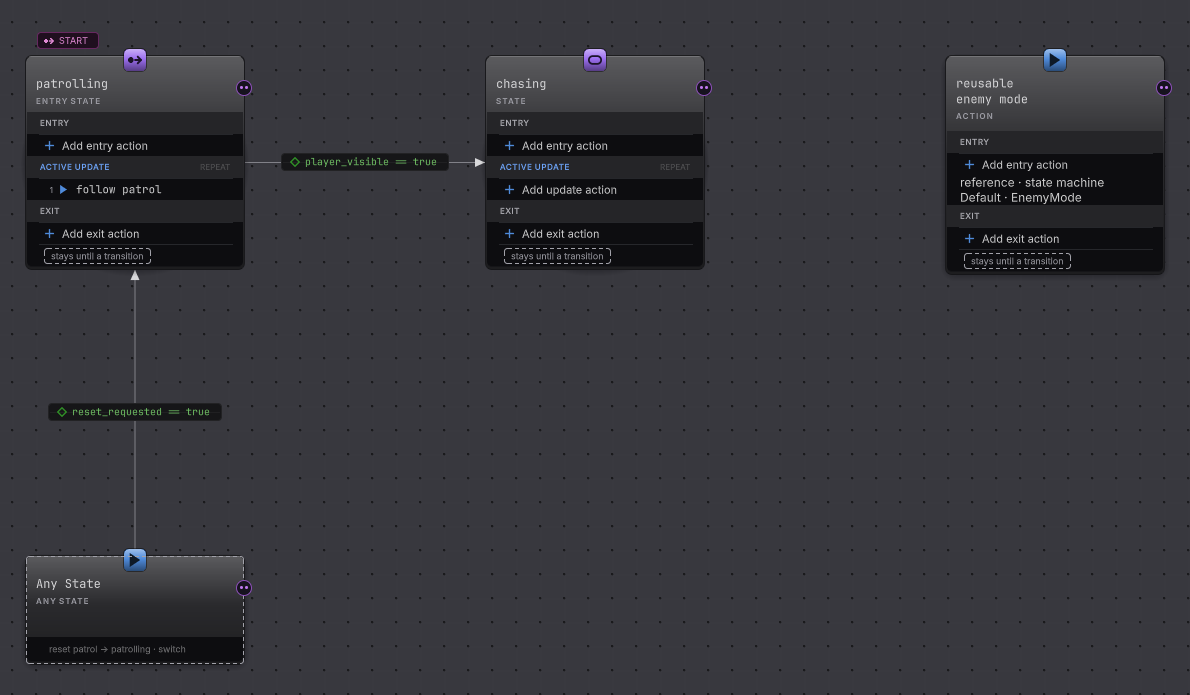
Open it from Assets/Platformer/Behavior/, select a card, and read the right rail. Nothing in that graph is wired to the playable Platformer scene, which is why it can show every control without breaking a game.
Before you blame the machine
| Symptom | Check | Fix |
|---|---|---|
| Nothing happens in Play Mode. | Select the agent object and look for a Behavior Agent component with the machine assigned and an Update Mode chosen. | Assign the graph and pick Update, then re-enter Play Mode. |
| The machine sits in its first mode forever. | Select the state and read its outgoing rows, then read each row’s Evaluate card. | Give the mode a transition whose cadence can actually happen. A Repeat Active Update never reaches an On finish boundary. |
| The wrong destination wins. | Read Any State first, then the Precedence card on the active state. | Drag the row that should win above the row that should lose. Moving cards on the canvas changes nothing. |
| A mode restarts every update. | Look for a global rule whose predicate stays true, or a self transition set to Restart. | An Any State row aimed at the already active mode is skipped, so check for a local self transition and set its re-entry to Resume if progress should survive. |
| Cleanup never runs. | Read whether the transition that fired is Switch or Push. | Push suspends the mode without running Exit. Use Switch where the handoff is final. |
- Your first state machine: build patrolling into defeated in one sitting.
- Mode switch with an inner tree: the pattern both graph types share.
- Watch it run: Live colors, values, pause and step.