
Behavior trees
Put an agent's decision on a canvas, watch it choose in Play Mode, and keep every line of game code where it already lives.
On this page
A behavior tree is the part of your agent that decides. Your components still move the character, play the animation, and deal the damage; the tree decides which of them gets to happen this frame, and shows you that decision while the game runs.
When a tree is the right shape
Section titled “When a tree is the right shape”Reach for a tree when an actor keeps choosing between several things it could do, and the answer changes as the game changes.
- A guard who patrols, looks at noises, chases what it sees, and gives up when it loses the target. The choice reshuffles constantly, and there is no single “current mode” worth naming.
- Work that has to happen in order and can fail halfway: check the route, walk to the post, raise the alarm.
- A director that picks one of several pressure options with weights on them, like the Horde Survival surge.
Reach for a state machine instead when the actor really does have named modes with rules about moving between them, like Patrolling to Chasing to Defeated. The two work together: a state can run a tree while it is the active mode. Trees and machines together shows the pairing.
Every node in a tree does one of four jobs. The families below are how the palette is laid out and how these guides are grouped.
Four families of node
Every graph is built from these four jobs. Each node opens its reference entry.
Choose and order
Pick between alternatives or work through steps.
Change one child
Wrap a branch to repeat it, time it, or gate it.
Do and check
Reach into your C# to act on the game or read a fact.
Where it runs
Hold a mode, leave it on a condition, and host a tree inside it.
How one update walks the tree
Section titled “How one update walks the tree”A behavior tree does not restart from the root on every frame. Each update resumes wherever the last one left off, walks down until something holds Running, and walks back up when a node produces a result.
Three rules come out of that walk, and they explain most surprises:
- While a node holds Running, the tree stays parked on it. Composites above it keep their child cursor, so a Sequence does not lose its place and a Repeat does not lose its count.
- When a result reaches a composite, that composite decides immediately and passes its own result upward. A whole chain of decisions can settle inside one update.
- When the root produces a result, the cursor clears and the next update starts at the root again, re-reading every condition on the way down.
A running branch keeps running even when the world changes underneath it. That is deliberate: you opt into re-checking with interrupt, on the branches where it matters.
What a node reports
Section titled “What a node reports”Three results do the everyday work. Success means the node finished its job, Failure means it finished without satisfying its parent, and Running means it needs more time.
Four more results are typed so the Live view and diagnostics can tell you which kind of stop happened: Blocked when a guard predicate is false, Interrupted when something preempted the branch, Timeout when a Time Limit expired, and Authority mismatch when the tick was refused by the authority gate. Composites treat Blocked like a failed choice and let the other three travel straight up to the root.
Pick the node you need
Section titled “Pick the node you need”Choose and order:
- Choose: Selector, alternatives in priority order.
- Do in order: Sequence, steps that depend on each other.
- Do together: Parallel, and what it really does today.
- Roll the dice: Random Selector, weighted variety.
Shape a result:
- Keep going: Repeat, with its four stopping rules.
- Give up after: Time Limit, a deadline on one subtree.
- Flip it: Inverter, one condition read backwards.
- Only if: Conditional, a gate that can also cancel.
- Interrupt: Lower Priority and Self, the reactive family.
Do the work and reuse it:
- Actions and conditions: where the tree meets your C#.
- Move somewhere: Move To through a movement adapter.
- Reuse a branch: Subgraph, one authored branch in many trees.
The node reference is the field-by-field version of all of it, with the result box for every node.
Read a real tree
Section titled “Read a real tree”DocumentationFlowControls.bqbehavior in the Platformer project exists to be read. Its root is a Selector called choose the next job, with a chase Sequence first, a Random Selector for search routes second, and a Parallel called keep watch last.
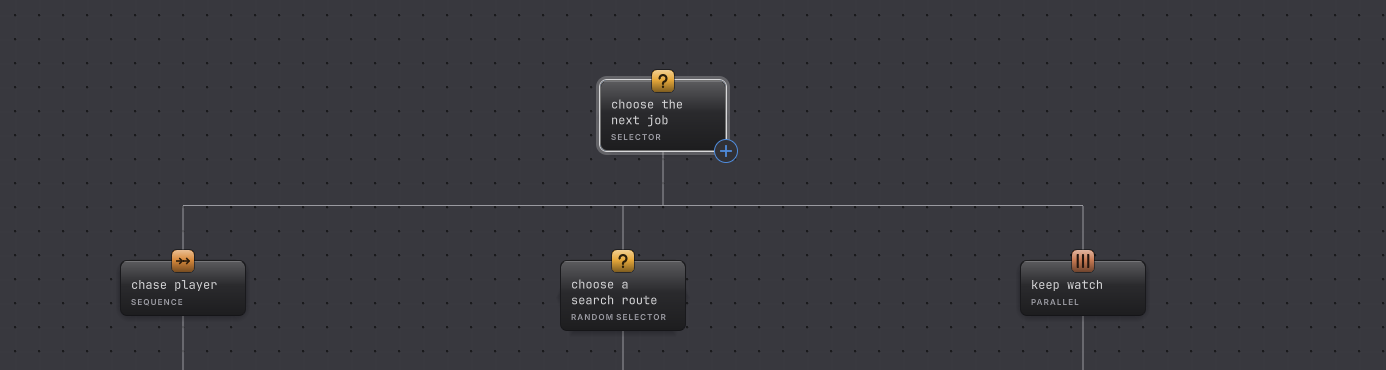
Open it from Assets/Platformer/Behavior/, select a node, and read the right rail beside the canvas. Nothing in that graph is wired to the playable Platformer scene, which is why it can show every control without breaking a game.
Before you blame the tree
| Symptom | Check | Fix |
|---|---|---|
| Nothing happens in Play Mode. | Select the agent object and look for a Behavior Agent component with a graph assigned and an Update Mode chosen. | Assign the graph and pick Update, then re-enter Play Mode. |
| The canvas stays gray while the game runs. | Read the toolbar: Static shows authored values, Live follows one agent. | Select the running object so the editor attaches a Live follower. |
| A branch you expected never runs. | Select its parent composite and read the Children list order, which is the execution order. | Drag the rows into the order you want. Card positions on the canvas carry no priority. |
| A branch keeps running after the world changed. | Look for a reactive opt-in on the Selector or on the guarding Conditional. | Turn on Lower priority or Self where the branch should be dropped mid-run. |
- Your first behavior tree: build one in twenty minutes with your own component.
- Common behaviors: six named game patterns assembled from these nodes.
- Watch it run: Live colors, values, pause and step.