
Racing Line
Race three graph-driven CPU cars, then read the one graph that decides for them while every driving rule stays in the racing code you already have.
On this page
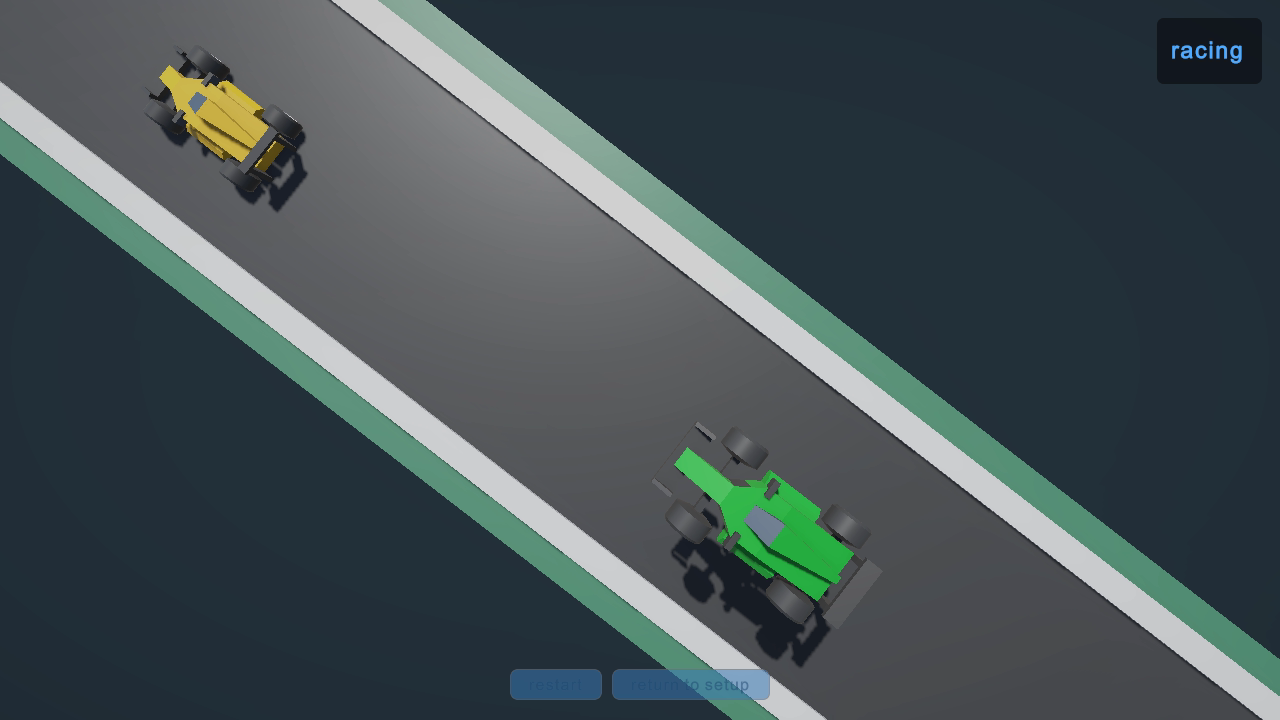
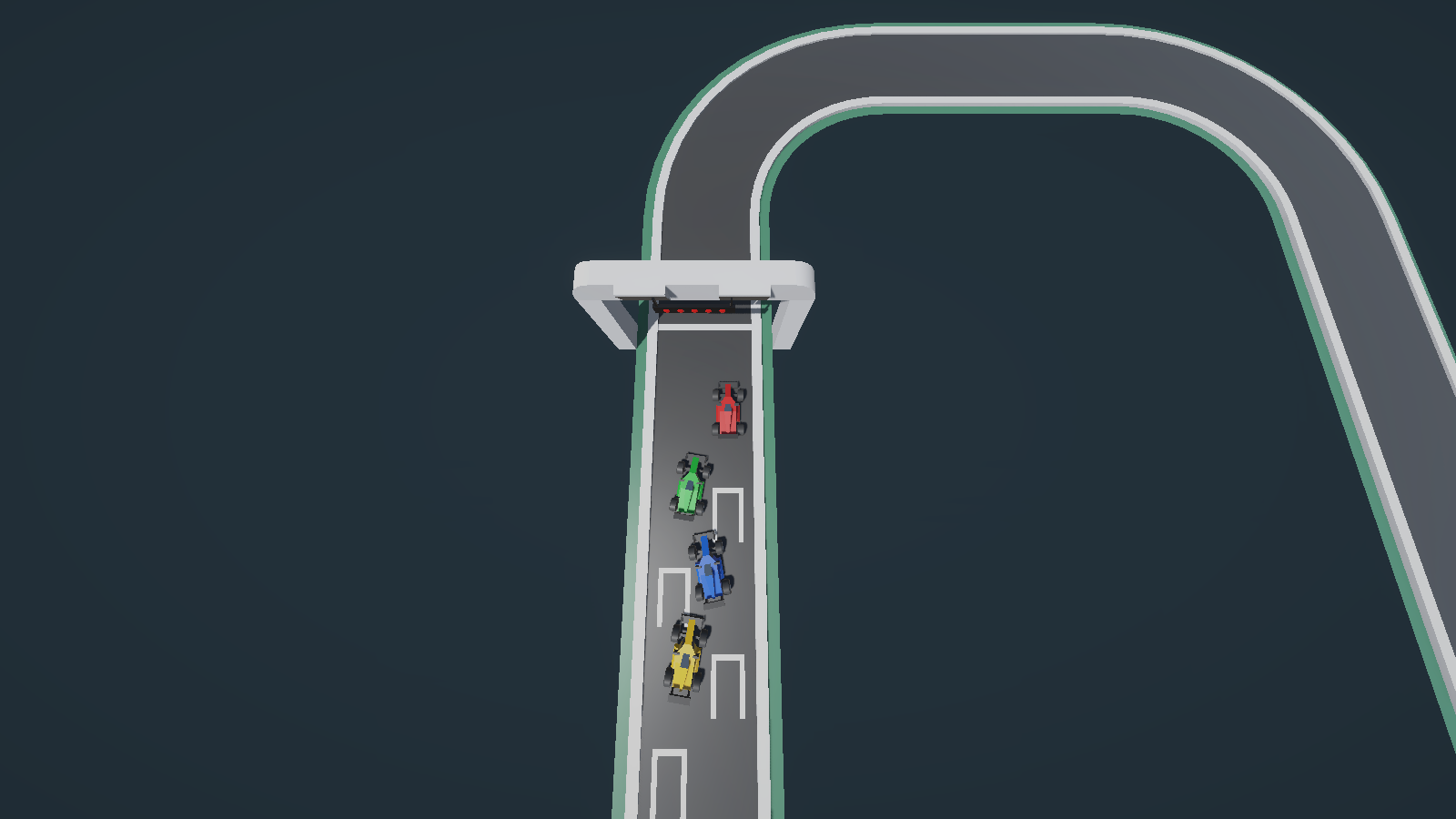
Your car is the red one. The other three pick their own speed for every corner, close on you when you pull away, and get out of trouble when you shove one into the grass. One graph does all of that, and it contains no racing math at all.
Play it in one minute
Under a minute
- Scene
Assets/_Project/Scenes/RacingLine.unity- Select
- In Play Mode, DriversRoot > car-cpu-1 > CpuGraphAgent in the Hierarchy
- Controls
- Gamepad only. Join with Start; claim a car with Button West or Button East; start the race with Button South. Driving: steering is left stick X; the right trigger is the throttle; the left trigger brakes and reverses; the handbrake is Button East. Restart with Button North and return to setup with Select. This sample declares one control scheme called Gamepad and binds no keyboard key at all.
- Goal
- Beat three graph-driven CPU cars over three laps of the oval.
Plug in a gamepad first. InputSystem_Actions.inputactions declares a single control scheme called Gamepad, and every binding it holds is a gamepad path, from joining to driving. Without a pad you get a setup screen that reads press start to join and stays that way.
Keep at least one CPU car, or there is no graph in the race. The setup screen’s cpu cars value starts at 3 and accepts 0 to 4. Take it to 0 and you get a perfectly good race with no behavior agent anywhere in it, because the CPU cars are the only graph hosts this game spawns.
Open Assets/_Project/Scenes/RacingLine.unity. The project also carries an empty Assets/_Project/Scenes/Sample.unity left over from the project template: a camera and a light, nothing else. Ignore that one.
The first thirty seconds
Section titled “The first thirty seconds”-
Press Play, then press Start on your gamepad. Your card fills the local players slot and stops saying press start to join.
-
Press Button West or Button East until a car is claimed for your slot. A claim is exclusive, and the race refuses to start while a joined slot has no car.
-
Press D-pad left or D-pad right to land on the oval entry under showcase tracks. The current track panel names what you selected.
-
Read the cpu cars value. It moves between 0 and 4: left stick press takes it down, right stick press takes it up. Leave it at 3 for this run.
-
Press Button South to start. Five lights fill in sequence over about four seconds, and forward progress is locked until they clear, so holding the throttle early buys you nothing.
-
Drive. Steering is left stick X; the right trigger is the throttle; the left trigger brakes and reverses; the handbrake is Button East.
In the first thirty seconds you should see the lights clear, all four cars launch together, and the three CPU cars brake for the first corner before you do. Watch one of them in your mirror for a lap: when you gain a big lead, the car behind gets fractionally quicker, which is the graph’s catch-up pressure doing its work.
There is no lose state here, only a finishing position. A car that leaves the road is not a failure either: it falls out of the world, waits half a second, and is then dropped back onto the route behind where it left, bouncing once as it lands. The whole trip takes about a second and a half. Button North restarts the same race, and Select returns you to setup with your roster intact.
These paths are the standalone project layout. When you import the packaged samples instead, the same folders arrive under Assets/BitQuirky/BehaviorTreesAndStateMachines/Samples/.
What this game teaches
Section titled “What this game teaches”This is the chapter for the game that already has good code. Racing Line had a line follower, a pace envelope, a lap authority, and a vehicle model before any graph existed. The graph decides the order of things and hands rich values between the members that already knew how to do the work.
- Binding to an existing API:
Driving.PlanInput(driverNumber, vehicle, projection, context)is the racing code’s own operation, and the graph calls that exact overload. Nothing was reshaped into graph-friendly scalars to make it callable. See method bindings and targets and resolve. - Your own value types on the blackboard:
VehicleState,RouteProjection,CpuRaceContext, andVehicleInputStateare the project’s ownreadonly structtypes. They travel between nodes whole. See variables and types. - Branch priority as a safety rule: one Selector orders Finished, Recovery, Drive, and Countdown, and that order is the whole guarantee that a finished car cannot be handed fresh input and that steering cannot fight a car in mid-recovery. See Choose.
- Catch-up pressure you can read: a
refparameter accumulates the rubber band into one named blackboard value, and a member condition branches on it. See the catch-up pressure pattern. - A graph the game ticks itself: every agent here ships disabled and is advanced by
RaceCoordinatorthroughTickOnce, once per race update, so graph evaluation lands between route sampling and input application. See GameObject agents.
What stays in C#, deliberately: the race phases and lap acceptance; the classification; the speed planner with its four personalities; drift and traction; physical recovery; barrier placement; tile track generation; split-screen cameras; the HUD; every scrap of human input. The graph never learned a racing rule.
Graph versus game code
Section titled “Graph versus game code”| The graph owns | Your game code owns |
|---|---|
_Project/Behavior/CpuRace.bqbehavior, one instance per CPU car, composed by the _Project/Prefabs/CpuGraphAgent.prefab host |
RaceDirector, an ordinary C# class holding the Setup, Countdown, Racing, and Finished phases plus lap acceptance, finish order, and the frozen classification |
| The branch order Finished, Recovery, Drive, Countdown, and the decision to call or skip each step | Driving.PlanInput, Pacing, Drivers, CpuLineFollower, and CpuRubberBandMath: the actual driving and rubber-band mathematics |
CpuBehaviorGraphDriver, the thin per-car adapter: it registers the driver number; samples four facts per tick; exposes the route projection plus the vehicle state; composes the race context; applies the planned input |
RacingVehicleController and the recovery phases, which move the car once the graph has handed over a VehicleInputState |
One blackboard per car, holding catch_up_pressure plus the values each call stores |
RaceCoordinator, which owns the tick order, the slipstream leader search, and car spawning |
Three things in this project look like the game and are not:
_Project/Behavior/CpuRaceReferenceVariant.bqbehavioris wired to no prefab, scene, or component. It exists so Reference Scan has a second saved graph to read. Editing it changes nothing you can drive.RaceDirectoris a C# state machine in the plain sense of the phrase: a class with a phase field and transition methods. No authored state machine graph file exists in this project, and none is needed.- Three nodes near the end of the drive Sequence (resolve vehicle body, resolve vehicle body again, and confirm one vehicle body) prove that
GetComponent<Rigidbody>()binds straight from a graph with no wrapper method in the way. They run every tick and steer nothing.
Follow one decision
Section titled “Follow one decision”Take the CPU car behind you closing a gap, and follow it from race data to throttle.
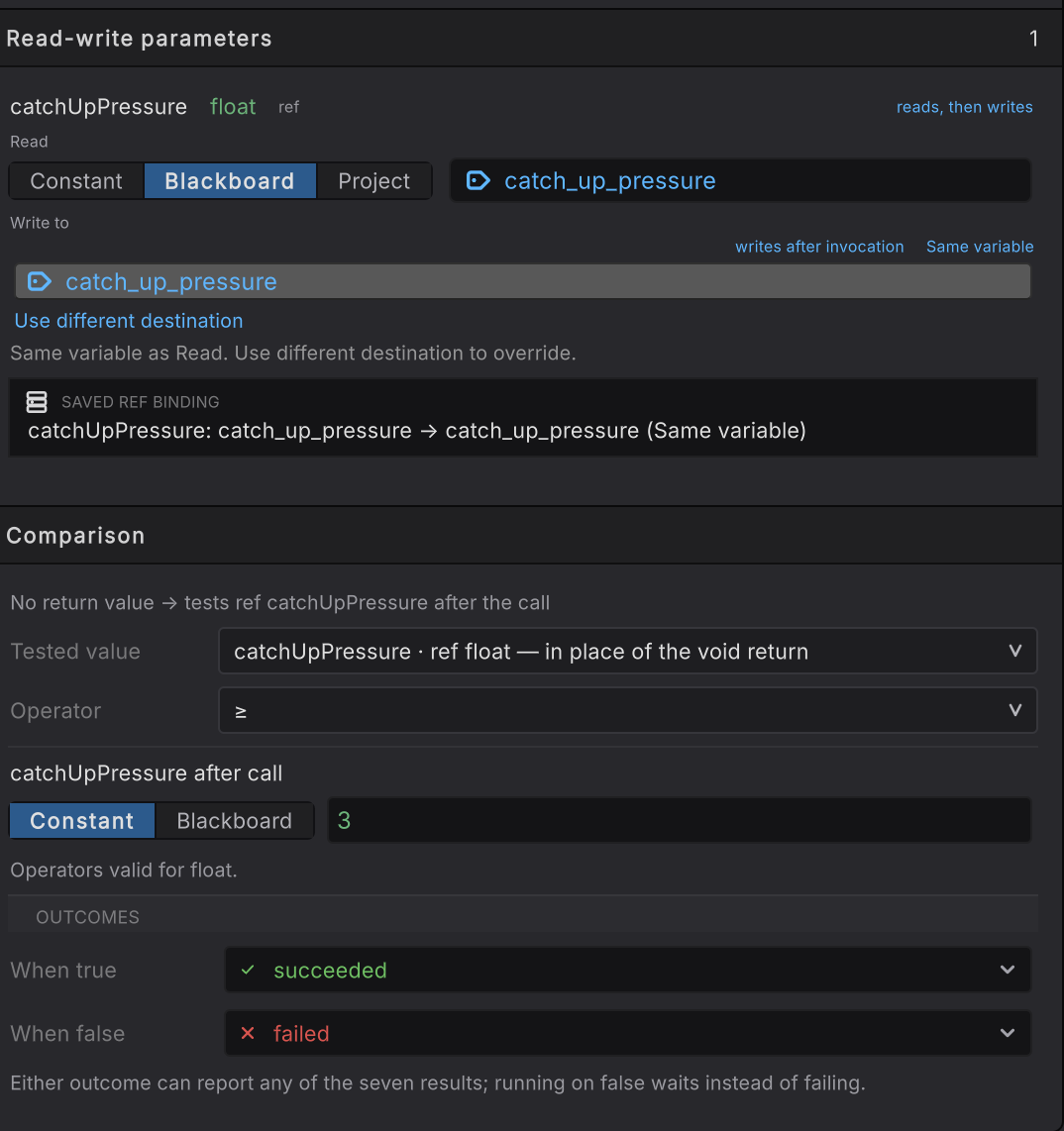
ref parameter gets its own Read-write parameters row, and because the method returns void, Tested value names that parameter as the thing to compare.-
CpuBehaviorGraphDriver.Samplewrites four facts into the blackboard before the tick:driver_number,exhibition,recovering, anddelta_seconds. This is the binder boundary, and it carries facts only. -
The Selector tries hold after the finish first.
GameMaster.HasDriverFinished(driver_number)is false mid-race, so that branch fails and the Selector moves on. ride out vehicle recovery readsrecovering, also false, and fails too. -
plan and apply one drive step opens with two guards,
GameMaster.IsRacingForandDrivers.IsCpuDriverEnrolled. Both bind through reference slots to the shared driving assets, and both have to succeed before a single number is sampled. -
sample the signed gap calls
GameMaster.SignedGapToPrimaryPlayerMeters(driver_number)and stores the result assigned_gap. Negative means this car is behind you. -
Pacing.SmoothPaceGap,Pacing.PlanPaceMultiplier, andPacing.PlanCorneringPaceMultiplierturn that raw gap intosmoothed_gap,pace_multiplier, andcornering_pace. Each one reads the previous value from the blackboard, which is how a per-car pace survives between ticks. -
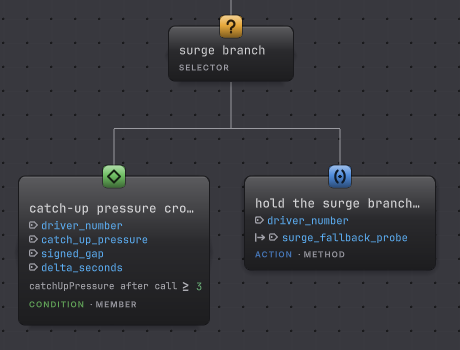
The surge branch Selector tries the member condition catch-up pressure crosses the surge threshold. It calls
Pacing.AdvanceCatchUpPressure, whose second parameter isref float catchUpPressure, so its Read-write parameters card readscatch_up_pressure, the game’s own rubber-band rule moves it, and the new value goes straight back to the same variable, marked Same variable. The method returnsvoid, so the Comparison card’s Tested value row namescatchUpPressureto stand in for the return, and the condition compares its value after the call against3. Pressure builds at 0.05 per meter of deficit toward a ceiling of 5, so about sixty meters behind you is where that branch starts winning. Below the threshold the condition fails and hold the surge branch neutral when not surging succeeds, keeping the Sequence alive. -
decide whether to commit to an overtake takes the adapter’s
_slipstreamTowfield and itsCurrentVehicleStateproperty as Project arguments, and storescommit_overtake. compose the race context packs both pace multipliers, the lap number, and that decision into oneCpuRaceContext. -
plan the complete control input calls
Driving.PlanInputwith the driver number, the vehicle state, the route projection, and that context, and stores the returnedVehicleInputStateasplanned_input. apply the planned control input hands it, withpace_multiplier, toCpuBehaviorGraphDriver.ApplyPlannedInput, which callsSetInputon the car.
To watch this happen, press Play with at least one CPU car, expand DriversRoot in the Hierarchy, open car-cpu-1, and select its CpuGraphAgent child (Unity marks runtime instances with a (Clone) suffix). The editor attaches Live to that one car’s agent, and the blackboard panel shows its own catch_up_pressure climbing and unwinding. Selecting the car root instead gets you nothing: the agent lives on the child.
Two Live details are specific to this sample. The agent component is disabled on purpose, so the editor’s per-follower pause and step have nothing to hold; RaceCoordinator owns advancement through TickOnce, and Unity’s own Pause and Step are the controls that work. And these member calls complete inside one tick, so read the card that carries the latest result together with the stored value instead of waiting for a long RUNNING highlight.

Change something and watch
Section titled “Change something and watch”Use this in your own game
Section titled “Use this in your own game”Copy the shape, not the racing.
- Copy the branch order and the adapter’s job description. A safety branch, a recovery branch, the normal work, and a fallback hold is a shape that suits a companion, a turret, or a squad member as well as a car. The adapter pattern copies too: identity, a handful of sampled facts, one apply call.
- Rebind the four reference slots.
gameMaster,drivers,pacing, anddrivingpoint at this game’s shared authorities. Yours will be your own components or assets, and the picker records the exact declaration you choose, including non-public members. - Write new C# only for the boundary. If your planner already has a
PlanInput-shaped operation, meaning one call that takes the actor’s state plus its situation and returns an intent, the graph can call it today. What you usually need to add is the small adapter that samples facts and applies the returned intent, and a[BehaviorMember]attribute on the fields or properties you want the graph to read. - Keep the tick honest. If your game has an update order that matters, disable the agent and call
TickOncefrom the system that owns that order, the wayRaceCoordinatordoes. An enabled agent plus aTickOncecaller steps twice per frame.
For a match or round flow, author a state machine graph and integrate it on purpose. RaceDirector stayed in C# because its rules are pure and already tested; that is a reasonable outcome for a system with no per-instance authoring story.
When it goes wrong
Section titled “When it goes wrong”When it goes wrong
| Symptom | Check | Fix |
|---|---|---|
| No behavior agent exists anywhere in the running scene. | Read the cpu cars value in setup. | Raise it above 0. The CPU cars are the only graph hosts this game spawns. |
| The setup screen ignores every key you press. | Confirm a gamepad is connected and that pressing Start filled a player slot. | Connect a pad. This sample binds no keyboard key for joining, setup, or driving. |
| Selecting the CPU car opens no Live document. | Look at which object in the Hierarchy you selected under DriversRoot. | Select the CpuGraphAgent child of the car. The agent component sits on that child, and the car root carries none. |
| Pause and step in the editor toolbar do nothing. | Read whether the agent is scheduled by Unity or by game code. | Use Unity global Pause and Step. RaceCoordinator advances this disabled agent through TickOnce. |
| A graph edit changes nothing in a race. | Confirm the file you edited was CpuRace.bqbehavior. | Edit that file. CpuRaceReferenceVariant.bqbehavior is wired to nothing and exists for Reference Scan. |
| An Object row reads assign a Driving in Static. | Notice which mode the editor is in. | Expect that in Static. The adapter fills every reference slot when it composes the agent at runtime. |
| The graph holds on the countdown branch after the lights clear. | Inspect GameMaster.IsRacingFor and the driver number that branch received. | Race phase comes from RaceDirector in C#, so chase the phase and the enrollment rather than the graph. |
| A bound member reports unavailable after you rename it. | Open Reference Scan and let it read every saved graph. | Remap the reported occurrence, then let the generated provider rebuild. |
What next
Section titled “What next”- Catch-up pressure: the rubber band as a reusable pattern.
- Choose: priority, fallbacks, and why branch order is a design decision.
- Arguments and results:
refandoutrows, Store, and result mapping. - Adapters and services: the four boundaries this adapter crosses.
- Sample games: the other three, and which one to read next.
Credits and reuse
Section titled “Credits and reuse”The cars, the road, and the scenery are by Kenney, who gives away thousands of game assets for free:
- Racing Kit: every car, road tile, and trackside prop.
We took ours from Kenney Game Assets All-in-1, the paid bundle of everything Kenney has released; the links above go to the same packs on kenney.nl, where each one is a free download.
The kit is CC0, which asks nothing of you and allows commercial use; we always credit Kenney when we use their assets, and support them by buying the packs. We hope you will too! It sits under Assets/ThirdParty/Kenney/RacingKit with its own License.txt. Keep that file beside the art if you copy any of it. The graph is easier to reuse than the scene: CpuRace.bqbehavior expects this project’s Drivers, Driving, Pacing, and GameMaster types and its four value structs, so bring those with it or point the slots at your own equivalents.