
Live values
Read the values one running graph instance is deciding with, type a new number into the ones the graph owns, and watch that one agent change its mind on its next evaluation while every other agent and the saved graph stay exactly as they were.
On this page
Attach Live to one running agent and the rail’s Live values section lists what that instance is deciding with right now: the threshold a condition compares against, the Blackboard field the graph wrote last tick, the seconds a state insists on staying active. Type into a row and that one instance uses the new number on its very next evaluation. The saved graph file and every other agent running the same graph never notice.
The problem
Section titled “The problem”Racing Line’s CPU cars surge when catch_up_pressure crosses the threshold on catch-up pressure crosses the surge threshold, a comparison authored as 3 right on the node. Is 3 the right number? You could change it in Static, save, press Play, drive three laps, and watch the mirror. That is one experiment every few minutes, and the whole field changes at once, so you never get to compare a car on the old number against a car on the new one.
The honest experiment is to change the number on one car, mid-race, and watch it against the two cars that did not change. Racing Line runs three independent instances of CpuRace.bqbehavior, one per CPU car, so the comparison is sitting on the track already.
When to reach for it
Section titled “When to reach for it”- Testing a threshold without a rebuild: a comparison constant such as Racing Line’s
surge_check, a Platformer cooldown, a detection count. - Forcing a branch to prove it works: set a graph-written Blackboard field to the value a condition is waiting for and watch the branch win on the next tick.
- Stretching or shrinking a state’s hold: raise a State’s
min_active_secondson one running instance and watch it sit in that state while the rest of the field moves on. - Settling what a value looks like to the graph when your code and your expectation disagree: the row shows what the instance holds, refreshed as it plays.
See it
Section titled “See it”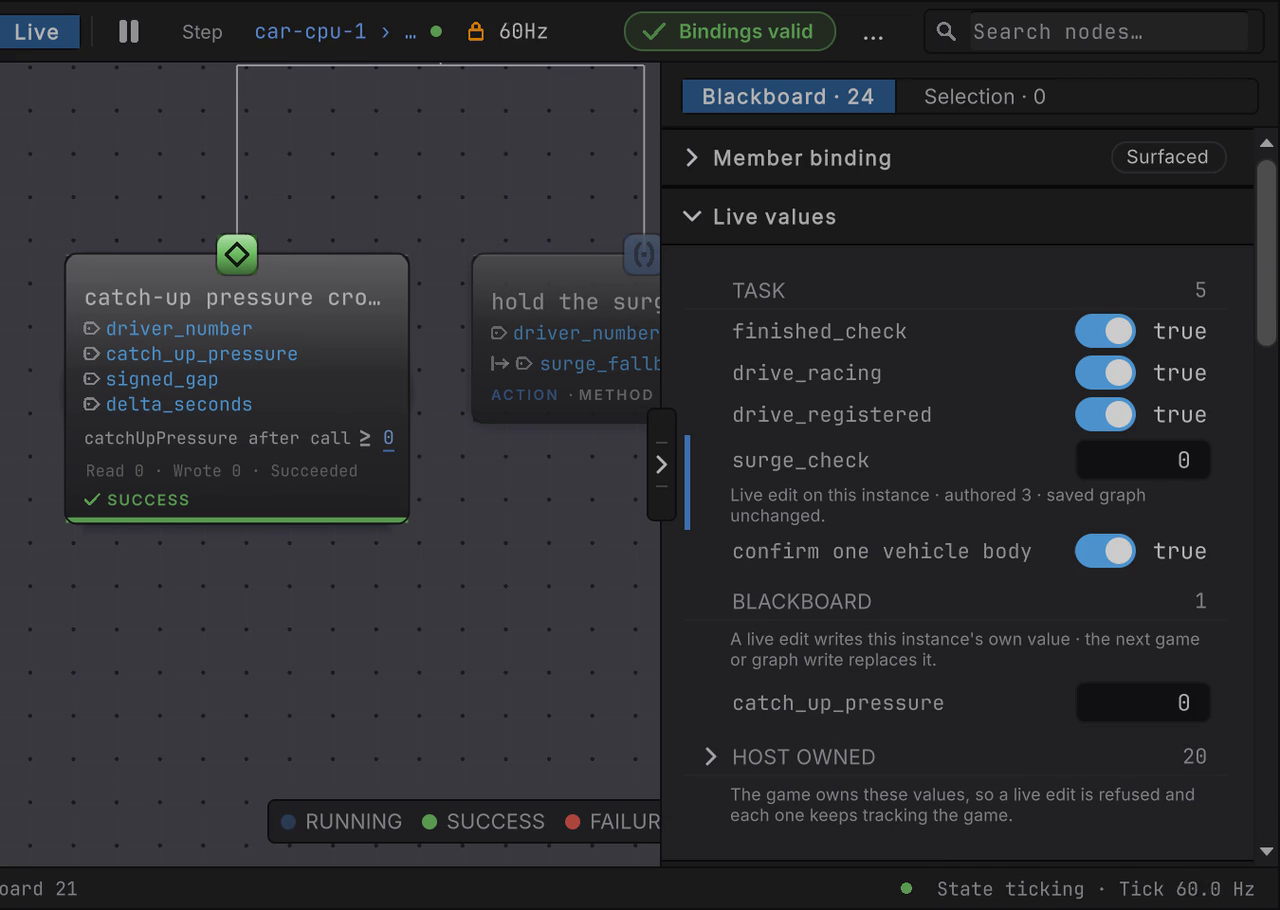
surge_check typed from its authored 3 to 0 on car-cpu-1, then the selection moved to car-cpu-2, whose own row still reads 3, then back to car-cpu-1, where the 0 is exactly where it was left.
The walkthrough uses Racing Line with two CPU cars, so there is a second instance to compare against. Any GameObject or entity agent works the same way.
-
Open
Assets/_Project/Scenes/RacingLine.unity, press Play, set cpu cars to 2, and start the race. In the Hierarchy, expand RacingLine › DriversRoot, opencar-cpu-1, and select itsCpuGraphAgent(Clone)child. The Behavior Tree Editor switches to Live, reads ATTACHED, and names the followercar-cpu-1 › CpuGraphAgent(Clone). -
Click an empty spot on the canvas so no node is selected. The rail opens its Live values section with three groups: TASK, BLACKBOARD, and a collapsed HOST OWNED.
CpuRacehas five TASK rows: the threeboolguards near the top of the tree (finished_check,drive_racing,drive_registered) and the auto-namedboolon confirm one vehicle body show as toggles, andsurge_checkshows as a number field. Collapse Member binding above it if you want the section nearer the top of the rail.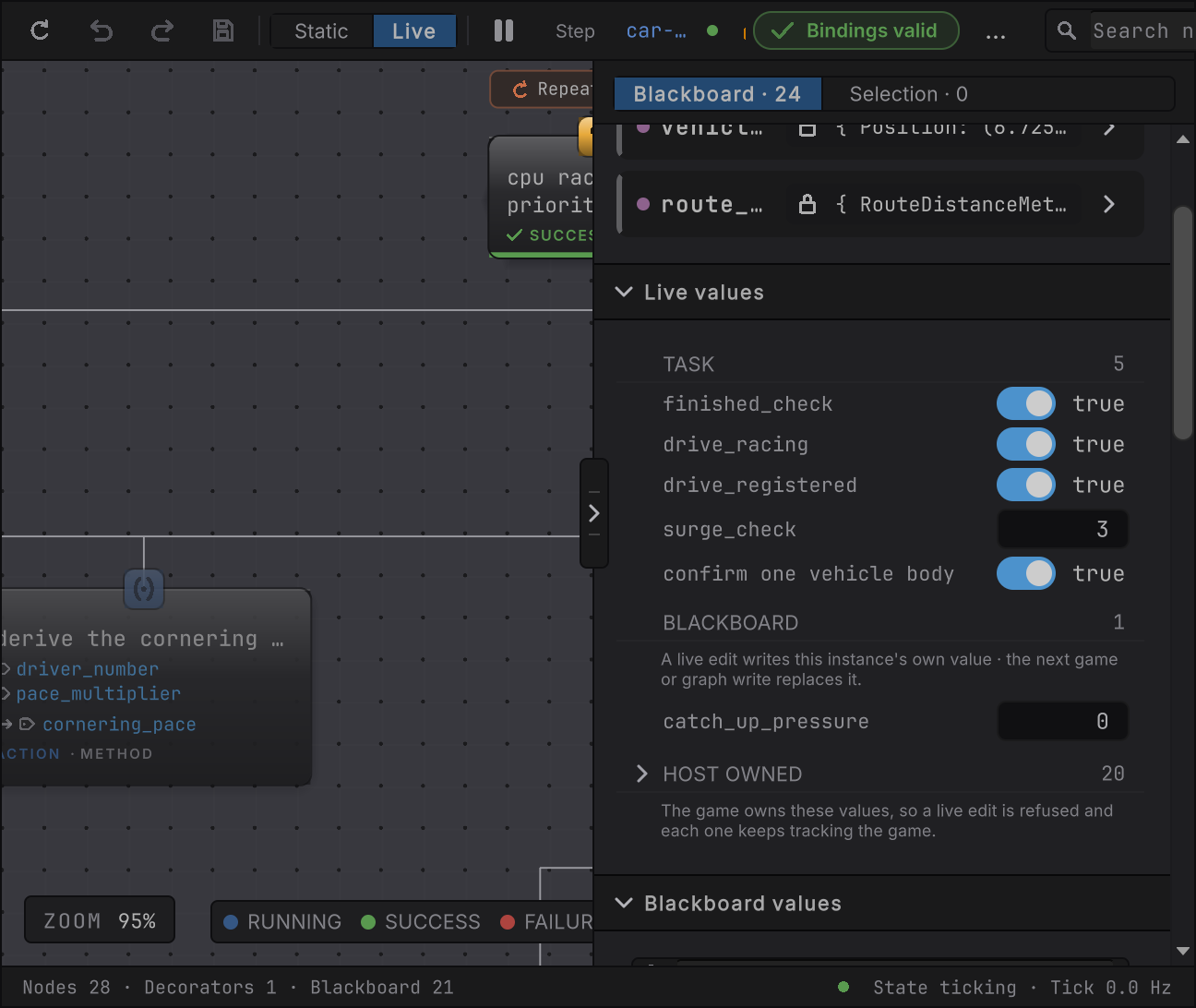
Figure 1. car-cpu-1mid-race.surge_checkis the comparison constant on catch-up pressure crosses the surge threshold;catch_up_pressureis the Blackboard field that node writes through itsrefparameter every evaluation. -
Click the
surge_checkfield, type0, and press Enter (or click away). The row takes the value at once, paints an instance-blue bar on its left edge, and states its origin underneath:Live edit on this instance · authored 3 · saved graph unchanged.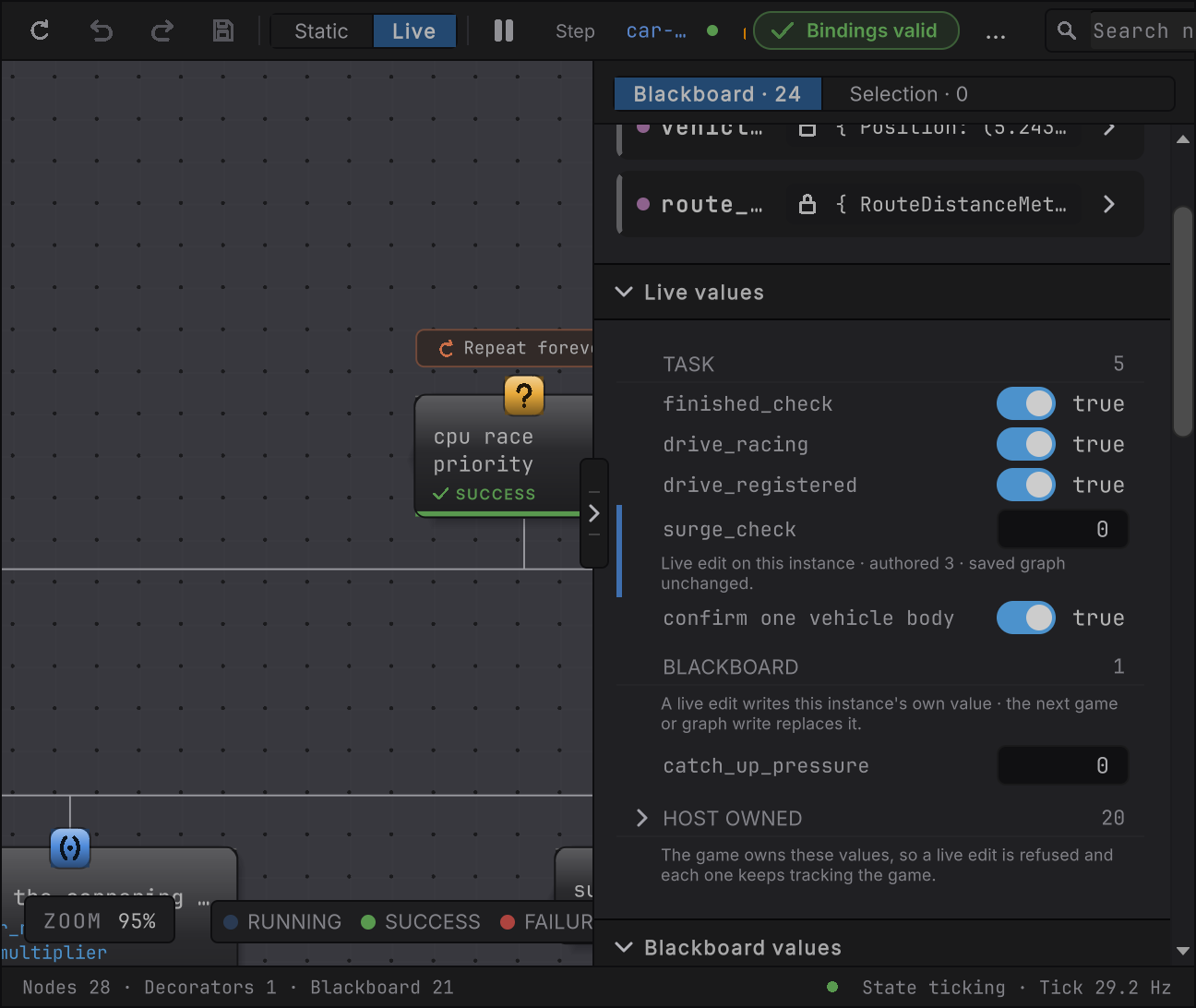
Figure 2. One committed edit. The origin line always names the authored value, so you never lose track of where the number started. -
Watch the canvas. On the car’s next evaluation the surge branch’s condition succeeds against
0, becausecatch_up_pressureis never below zero. The condition’s card states the value it now compares against,catchUpPressure after call ≥ 0: the0alone takes a lighter instance-blue ink and an underline, while the≥keeps the card’s own ink. Hover the0and it readslive edit on this instance · authored 3. Select the card and the Member binding rail’s Comparison card shows the same0in the same tone, held read-only so a live value never reaches the saved graph. You changed one car’s decision without a rebuild, a restart, or a save. -
Select
car-cpu-2’s ownCpuGraphAgent(Clone)child. The window attaches to that instance: itssurge_checkreads the authored3with no bar or origin line, and its condition card reads≥ 3. The other car never received your edit.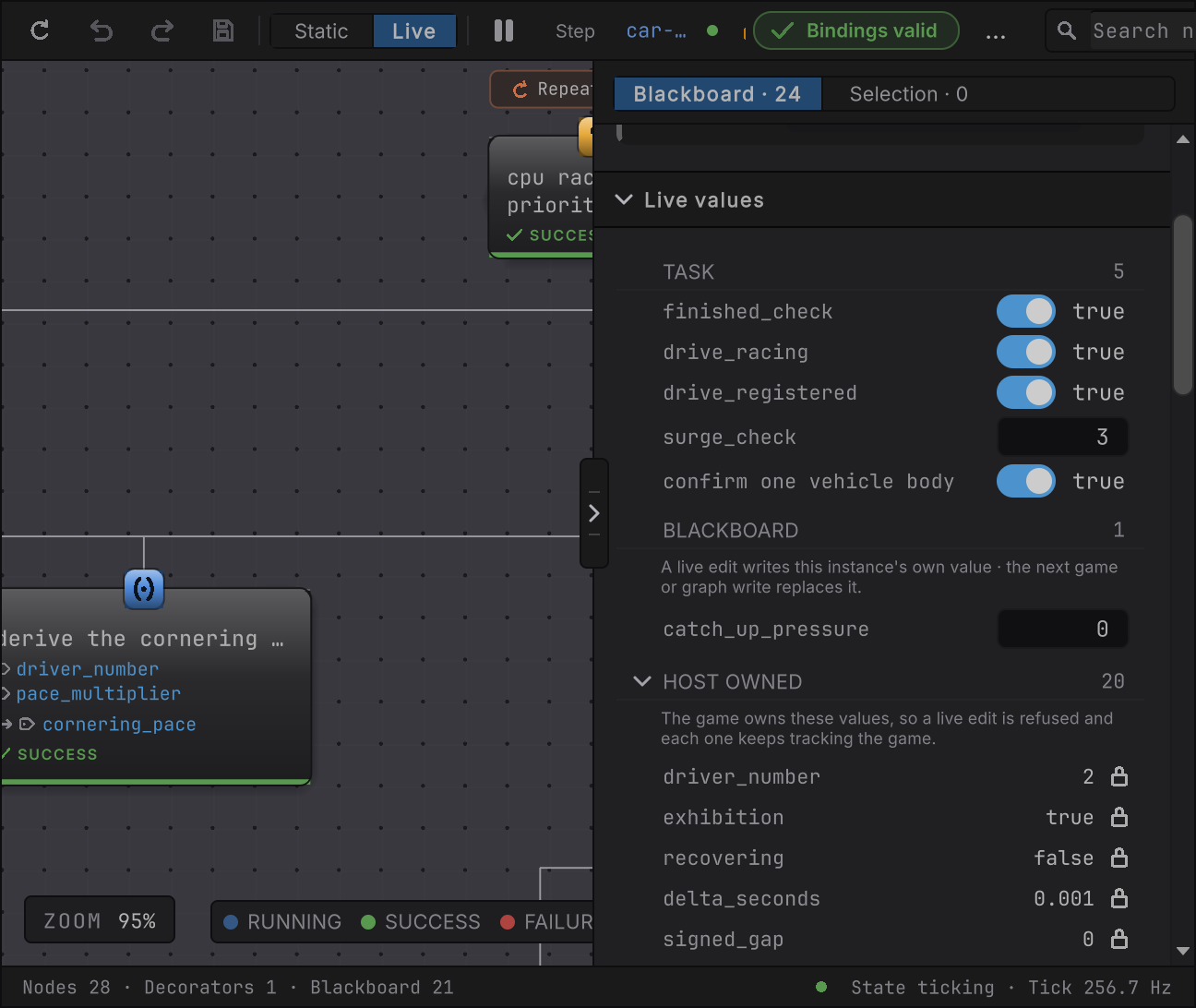
Figure 3. car-cpu-2’s own surge_check reading its authored 3, unaffected by car-cpu-1’s edit to 0 -
Select
car-cpu-1’s agent again. Its row still reads0with the same origin line. The edit lived on the car the whole time, whether or not a window was watching it.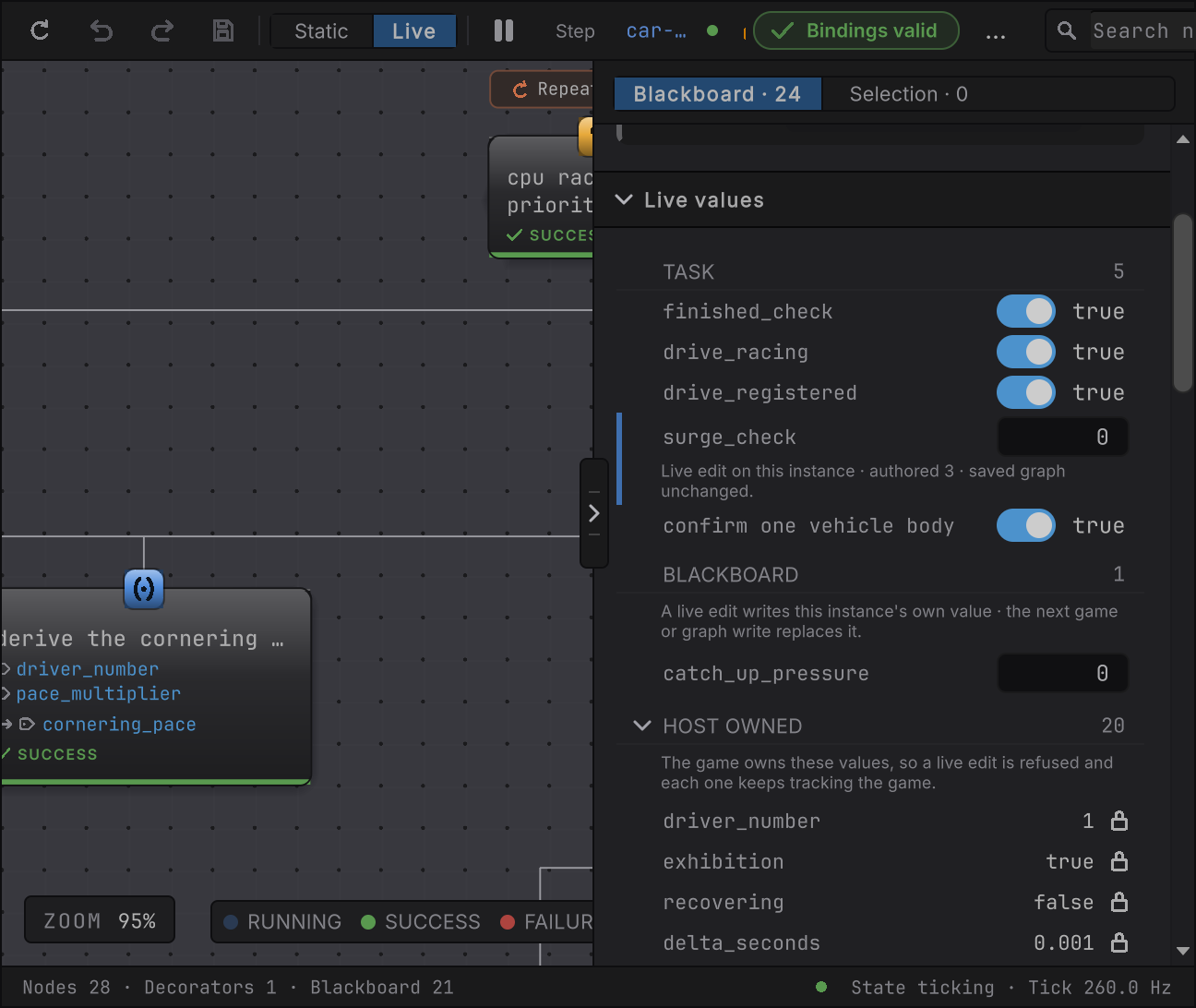
Figure 4. car-cpu-1 reselected after the detach, surge_check still reading 0 with the same live edit on this instance origin
The four groups
Section titled “The four groups”The section groups rows by who gets to write them. Empty groups stay hidden, so a graph with no comparison constants shows no TASK group at all.
| Group | What a row is | Who can write it |
|---|---|---|
| TASK | A node’s own authored comparison constant: the right-hand side of a Member condition or any other node that compares against a bool, whole number, or decimal you typed on the node. The row is labeled with the node’s authored id, such as surge_check, and a bool constant shows as a toggle. |
You, always. The edit becomes an override that outranks the baked constant on this instance. |
| STATE | The selected State’s own min_active_seconds, the duration that gates its outgoing transitions, or the active State’s when no plain State is selected. The row is labeled with the State’s authored id, such as recovering, with min_active_seconds on a quiet line beneath it. State Machine window only. |
You, always. Same override, same lifetime as a TASK edit. |
| BLACKBOARD | A declared Blackboard field or graph-local variable that a node holds write access to, the way surge_check writes catch_up_pressure back through its ref parameter. A field of a type with no live editor, such as a string, a vector, or a struct, sits here locked and still shows its value: hover its lock for <label> is written by this graph · its type has no live editor · the value keeps tracking the running instance. |
You, for a number, bool, or char field, until the graph or the game writes it again. The edit writes the instance’s own storage directly, so there is no origin line and no bar. |
| HOST OWNED | Every Blackboard value no node writes: the fields your code samples before each tick (Racing Line’s driver_number, exhibition, recovering, and delta_seconds) and the results nodes store without a write grant (signed_gap, pace_multiplier, vehicle_state, planned_input, vehicle_body, and the rest). Collapsed behind its count. |
Nobody here. Each row carries a lock; hover it for the reason. Its value keeps reading the running instance. |
Every row shows the value the instance holds, whatever its type:
- A struct reads its public fields and public auto-properties in declaration order, as
{ Field: value, ... }. A struct of floats alone reads as(x, y, z). Racing Line’svehicle_state,route_projection,planned_input, andbuildRaceContextread their fields this way. - A Unity object reference reads its name and type, such as
car-cpu-1 (Rigidbody)forvehicle_body,nonewhen it is empty, andmissing (Rigidbody)once the object is destroyed. Any other object reads as its type, such as(RouteNote). - A list or array reads its element count, counted as the Static Blackboard counts it, and its first three elements, such as
5 elements · [1.5, 2, 4, …](1 elementfor one). Hover the row for every element. - A value the window cannot read states why in place of a value, such as
(type not loaded). - A non-value (
none,missing (Rigidbody), or a stated reason) reads in the quieter ink the State Machine Runtime card uses for(none), so an object you namedmissingstill reads as a value.
The graph-wide Blackboard panel reads the same values the same way: a long reading stays on one line and ends in an ellipsis, and hovering it shows the whole reading. A Live member card’s Current and Source rows read the same values too, wrapped in full, because the card is the detail view of one binding.
A TASK or STATE row carrying an override paints the instance-blue bar you saw in step 3. A row whose last entry was refused paints a red one instead. Live colors covers both tones.
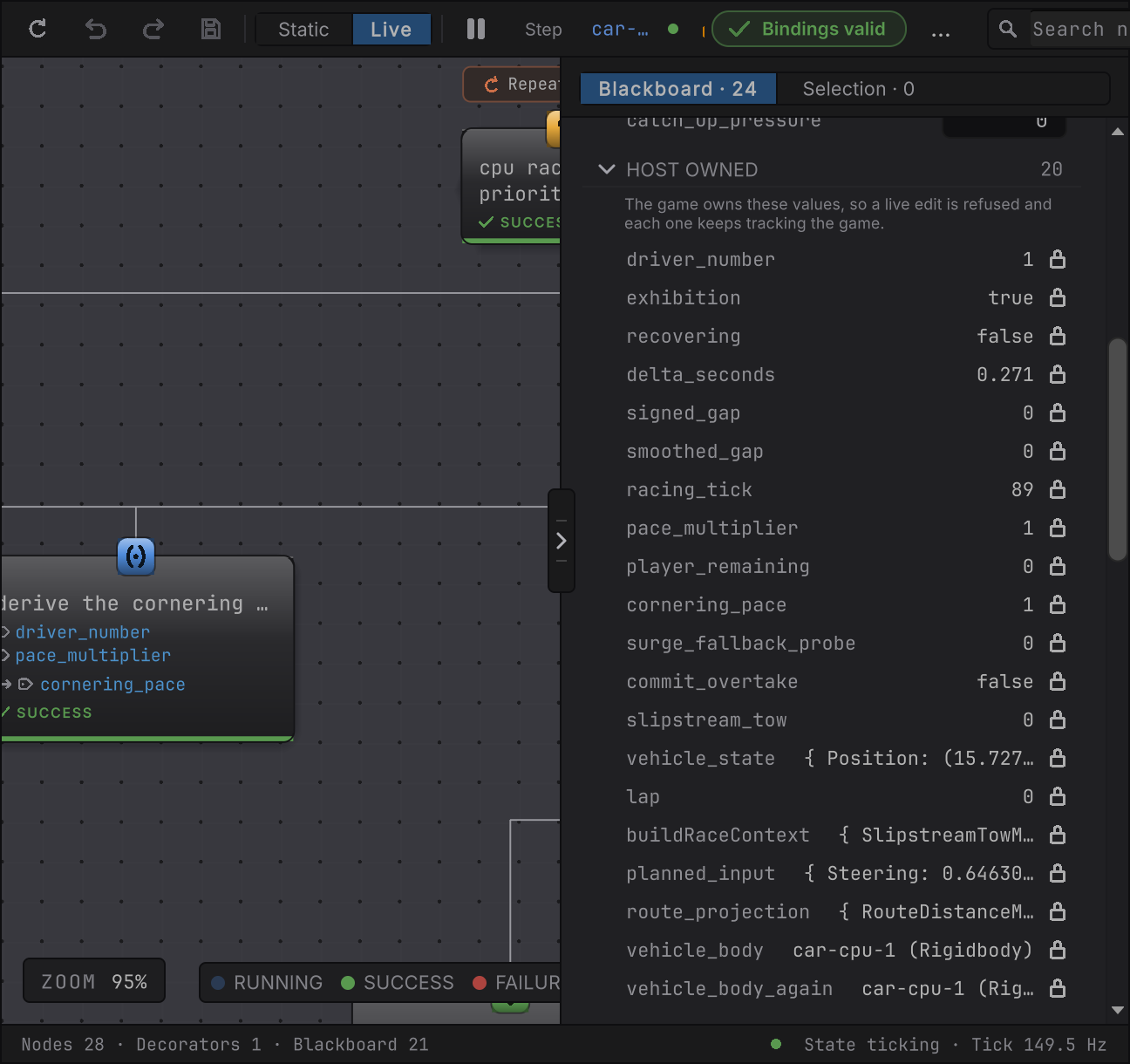
HOST OWNED opened on car-cpu-1: twenty locked values under one stated rule, The game owns these values, so a live edit is refused and each one keeps tracking the game, from the four fields the adapter samples down to the stored results. The structs read as their fields, cut by an ellipsis on the row, and the two Rigidbody results read as car-cpu-1 (Rigidbody). The five TASK rows and the one writable Blackboard row sit above the group.A state’s own duration
Section titled “A state’s own duration”The State Machine window’s section opens with a STATE group instead of TASK. Alongside editable transition values, it holds the selected State’s min_active_seconds, or the active State’s while nothing else is selected. The duration row is labeled with the State’s id, so it reads recovering 2.2 with min_active_seconds beneath it. Racing Line’s recovery companion, CpuRecoveryMode.bqbehavior, authors 2.2 on its recovering state so a car that has just been set back on the road sits at neutral input for a moment before it is allowed to drive again.
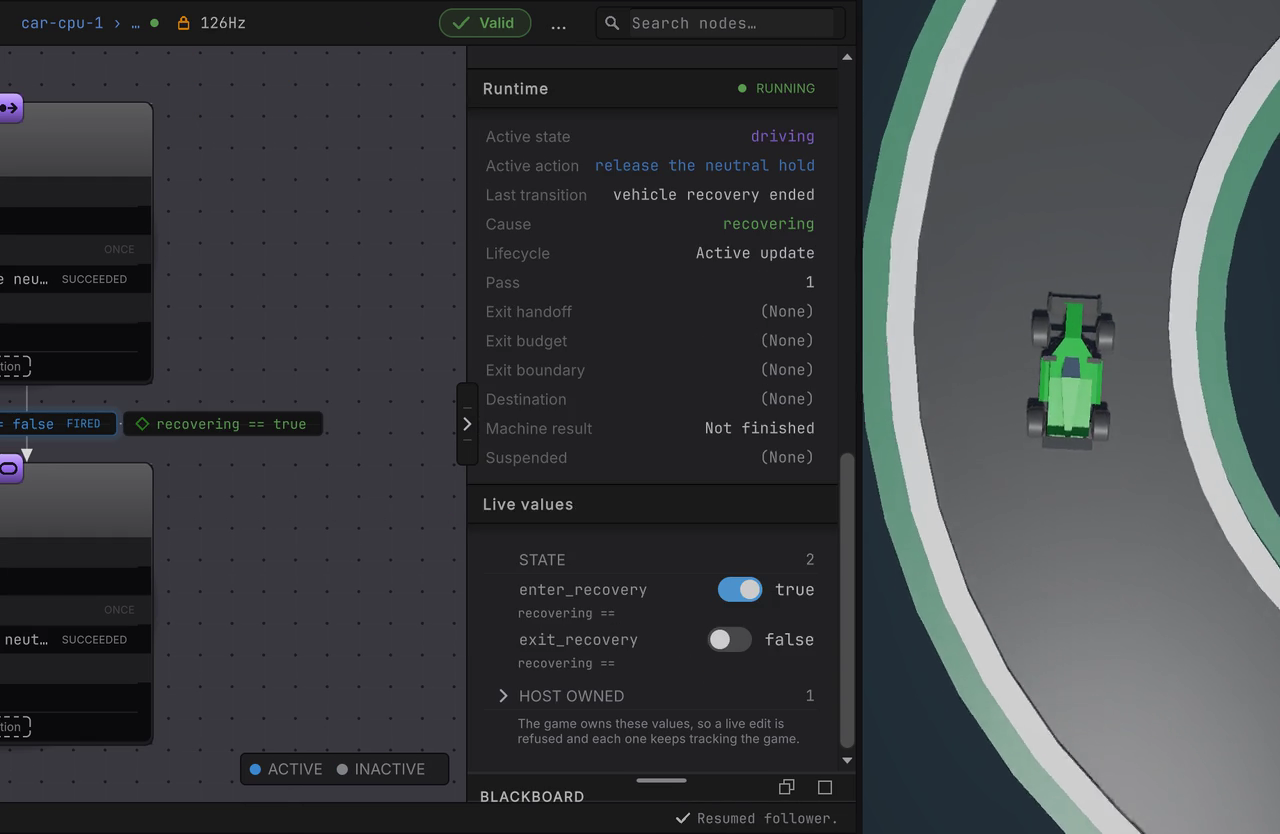
In the clip, car-cpu-1’s companion has recovering selected during the countdown and its row typed from 2.2 to 6; its driving graph is then paused one second after the lights go out, the car misses the first corner, and back on the companion recovering stays active for the edited six seconds while the car sits still on the road. The steps below walk the same route.
-
With cpu cars at 2, restart the race with Button North. During the countdown, select
car-cpu-1›CpuGraphAgent(Clone)›CpuRecoveryModeAgentin the Hierarchy. The State Machine Editor attaches Live, withdrivingACTIVE. -
Click
recoveringon the canvas. The STATE row follows your selection even thoughrecoveringis not running: it readsrecovering2.2, withmin_active_secondson the quiet line beneath. -
Type
6and press Enter. The row paints the instance-blue bar and its origin line readslive edit on this instance · authored 2.2 · saved graph unchanged. The edit governsrecovering’s next activation on this instance.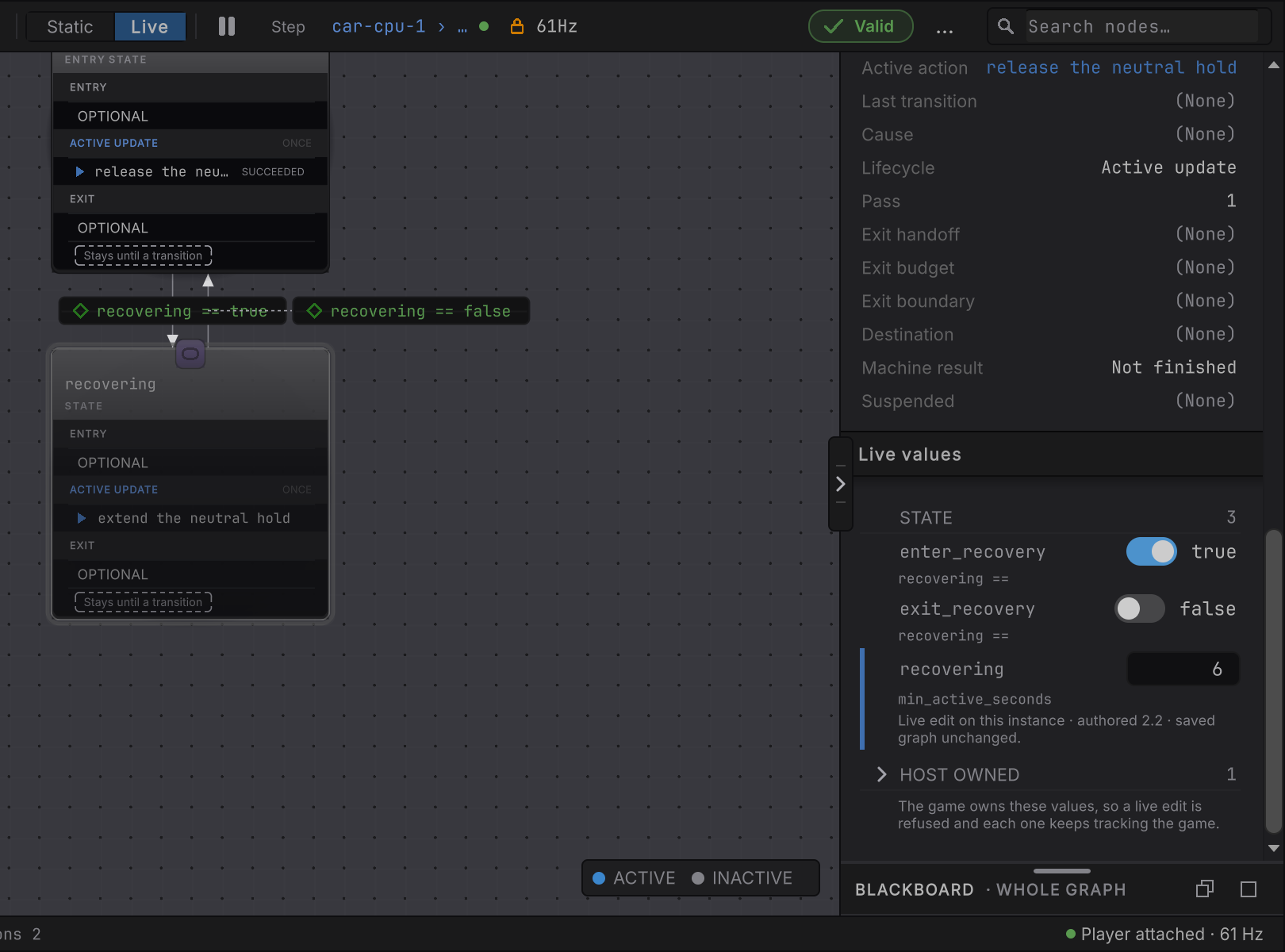
Figure 7. The State Machine window’s STATE group with min_active_seconds raised from its authored 2.2 to 6 on car-cpu-1’s companion -
Select
car-cpu-1›CpuGraphAgent(Clone). One second after the lights go out, press the Behavior Tree Editor’s own pause, just left of step (its tooltip reads Pause / Resume this follower only). With its graph holding its last input,car-cpu-1runs straight on at the first corner and drops out of the world. -
About three seconds later, select
car-cpu-1›CpuGraphAgent(Clone)›CpuRecoveryModeAgentagain. Selecting another object resumes the follower you paused, because a detach always does, and the State Machine Editor showsrecoveringACTIVE. It stays active until about six seconds after the fall, then hands back todriving.
The row belongs to the State you select on the canvas, whether or not it is running: select recovering while driving is active and the row reads recovering’s value, and an edit there governs recovering’s next activation on this instance. With nothing selected, or a transition, Any State, or the Entry state selected, the row falls back to the active State. The Entry state never has a row, because only a plain State carries min_active_seconds. Editing ahead of the activation means you do not have to race the authored window; when you do want to edit a State while it runs, the window’s own per-follower pause freezes this instance’s dwell clock while the rest of the scene keeps running. States and lifecycle covers the gate itself, and how to set the authored value in Static.
When an edit is refused
Section titled “When an edit is refused”A refused edit never silently does nothing. The row keeps its last valid value, paints a red bar, and states the reason underneath. Nothing is sent to the instance, and the saved graph is untouched.
| You tried | What the row says |
|---|---|
Typing text the row’s type cannot hold, such as fast into surge_check |
'fast' is not a number · nothing was sent · the running value is unchanged |
| Committing to a HOST OWNED row | There is no field to type into. The lock’s tooltip reads driver_number is owned by the host · a live edit is refused and the value keeps tracking the game. |
| Committing after the agent’s runtime was disposed | refused · runtime unavailable · nothing was sent · the running value is unchanged |
| Committing to a slot the rebuilt graph no longer has | refused · slot no longer exists · nothing was sent · the running value is unchanged |
A bool row asks for true or false, a char row for a single character, and an integer row for a whole number. The text you typed stays visible beside the reason until you replace it.
When the attachment ends
Section titled “When the attachment ends”Select an object with no agent on it, such as the race coordinator, and the window detaches. Every row reads cleared, the editors and locks disappear, and the section says what happened to your edit: No running instance is attached · a live edit stays with the instance that received it. The toolbar reads DETACHED, and the status bar says it once, for a few seconds, Detached: the selection has no running agent · Live edits stay on their instance., then keeps reading detached · no running agent selected. The toolbar reads LOST and the status bar Binding lost: runtime no longer reachable. only when the agent itself is gone, such as when its object is destroyed or Play mode ends.
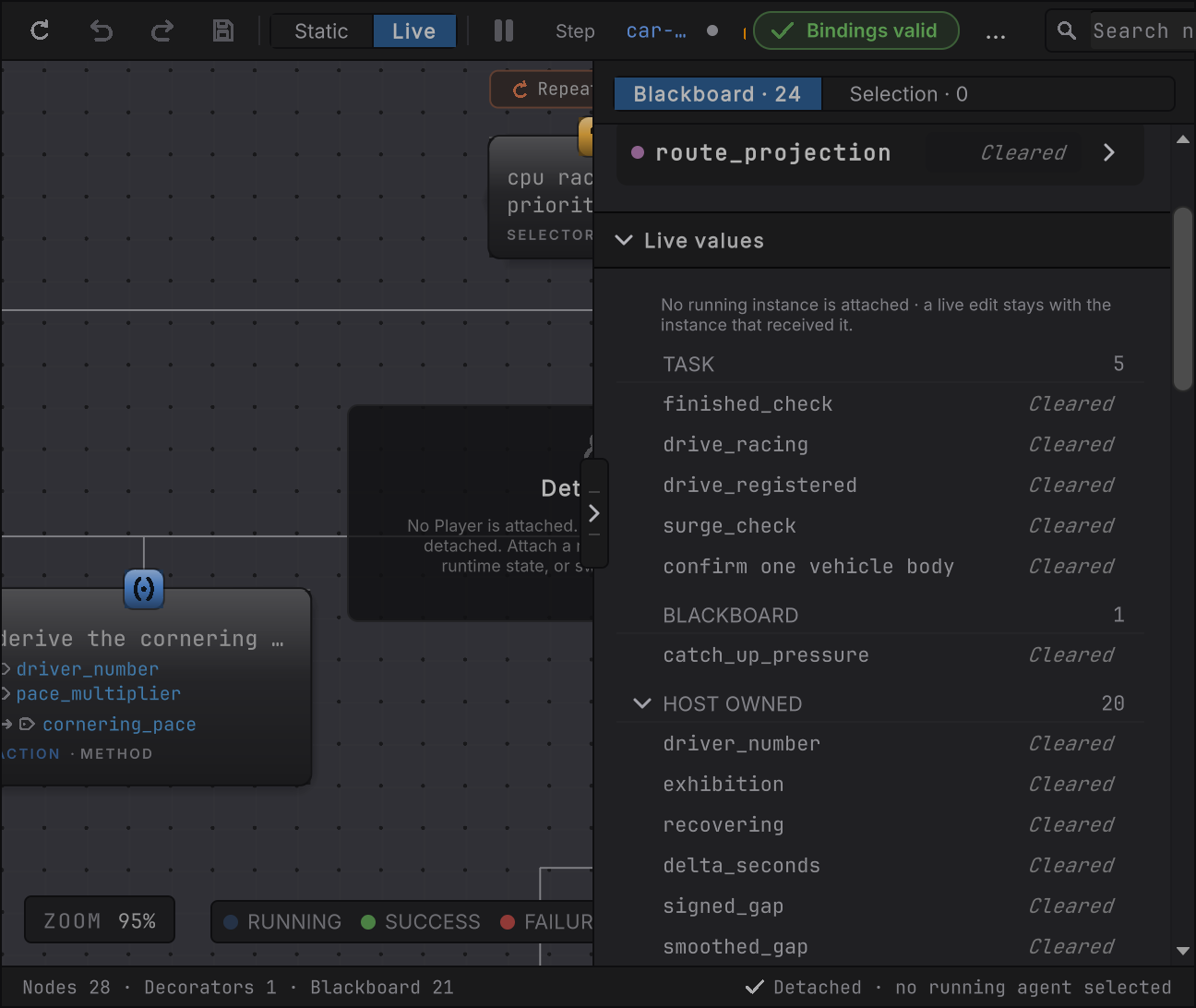
Select the car again and the rows refill from that instance, override and all. A detach ends the window’s view of the car; it never ends the car’s edit.
How it decides
Section titled “How it decides”Which rows appear
- One TASK row per node whose comparison tests against an authored
bool,Int32, orfloatconstant. A comparison against a Blackboard variable has no constant and gets no row. - One STATE row, in the State Machine window, for the selected plain State’s
min_active_seconds, or the active State’s when no plain State is selected. A state without the parameter still shows the row; its authored value is0, which never gates. The Entry state has no row. - One BLACKBOARD row per declared field or graph-local variable some node holds write access to. The row gets an editor when its type has a number,
bool, orchareditor and a lock otherwise. Every Blackboard value no node writes is HOST OWNED, stored method results included. - The section is shown only while Live is attached and at least one row exists.
What one edit does
- The window sends one typed request to the one attached instance. A refresh, a repaint, a focus change, or a detach sends nothing.
- A TASK or STATE edit is stored in that instance’s own overlay, one slot per node, consulted ahead of the baked constant on every evaluation. A BLACKBOARD edit writes that instance’s own Blackboard bytes in place.
- The instance reads it on its next evaluation. A paused follower reads it on its next step.
- A TASK edit also changes what the canvas states for that instance: the node’s card reads the effective operand in a lighter instance-blue ink with an underline, its operator unchanged, and the selected node’s Comparison card shows the same value read-only. The rail keeps room for the bar beside every row of that card, so nothing moves when an edit lands. Static, a detached window, and every other instance state their own value.
- The graph file, the document’s saved state, the dirty flag, and undo are untouched. Nothing is written back when Play Mode ends.
How long it lasts
- A TASK or STATE override ends when the instance resets or restarts, when Play Mode ends, or when you commit another edit to the same row. Typing the authored value back and committing it ends the override too: the row loses its instance-blue bar and its
live edit on this instance · authored …line, a TASK node’s card and Comparison card read the authored operand in their own ink again, and the instance runs on its saved value exactly as before. A graph write or a game write never removes it: the override outranks the authored constant for as long as the instance lives. - A BLACKBOARD edit ends the moment the graph or the game writes that field again, which for a field like
catch_up_pressureis the next evaluation. - Switching the inspected agent, losing the selection, or closing the window never clears, extends, or transfers an edit.
What refreshes
- The section re-reads the instance on the window’s Live refresh timer, every 100 ms by default. A row whose value did not change keeps its element and its text, so an untouched number never flickers or looks newly changed.
- A row you are typing into is left alone until you commit, so a refresh never overwrites your keystrokes.
On an entity agent
- The section reads and writes the same way on Entity Live: BLACKBOARD rows write the entity’s Blackboard buffer, TASK and STATE rows its overlay buffer. Member cards stay observe-only on entities; this section is the graph-held path and is not affected by that limit.
When it goes wrong
Section titled “When it goes wrong”When it goes wrong
| Symptom | Check | Fix |
|---|---|---|
| There is no Live values section. | Read the toolbar for Live and ATTACHED, then check whether the graph has any comparison constant or graph-written field. | Select the running agent so the editor attaches. A graph whose every field is written only by your code shows the section with a HOST OWNED group alone. |
| The value I want is under HOST OWNED. | Find which node, if any, holds write access to that value. A ref or out parameter writing it back is the usual grant; a stored method result is not one. | A field your adapter samples every tick is the game’s to change: change it in your code, or through the member card if a binding surfaces it. A field a node writes is never under HOST OWNED; if its row sits locked inside BLACKBOARD, its type has no live editor. |
| My Blackboard edit vanished on the next tick. | Read the BLACKBOARD group’s own line: the next game or graph write replaces it. | That is the lifetime. Edit the constant the condition compares against instead, which holds until the instance resets. |
| The edit worked on one car and the other car did not change. | Nothing to check. Each running instance owns its values. | Select the other car and edit it too, or change the authored value in Static once you know the number you want. |
| The STATE row is missing. | Confirm the State Machine window is attached and either a plain State is selected or the active state is a plain State. The Entry state has no row. | Select the State you want to tune on the canvas; its row appears even while it is not active, and the edit governs its next activation. |
| The row went red. | Read the reason under it. | Type a value of the row’s own kind. The last valid number is still running. |
| Every row reads cleared. | Read the detached note at the top of the section. | Reselect the running agent. Its edit is still on it. |
| The number I typed is gone after I stopped Play Mode. | Live edits never write to the graph file. | Set the value in Static once you have found the number you want. |
- Live editing: the member cards beside this section, for values your C# components own.
- States and lifecycle: the duration gate a STATE row tunes.
- Pause, step, breakpoints: holding one follower still so you can edit against a short window.
- Racing Line: the two cars this page edits.
- Member nodes and bindings: the comparison card that becomes a TASK row.