
Live colors
Read a running graph by its colors, find the node the runtime is sitting on, and tell a result from this run from one left over from an earlier one.
On this page
A Live card carries a word and a colored pip. Five words appear in the legend, and two more appear on cards.
The problem
Section titled “The problem”Platformer’s enemy walks its platform until a stomp ends it. While it walks, most of the graph is holding a result from earlier: the condition that was checked two ticks ago, the action that succeeded before the loop came round. If every colored card looked equally current, the canvas would be a wall of guesses.
The editor puts the running glow on exactly one card, so the question “what is happening now” has a single answer on screen.
See it
Section titled “See it”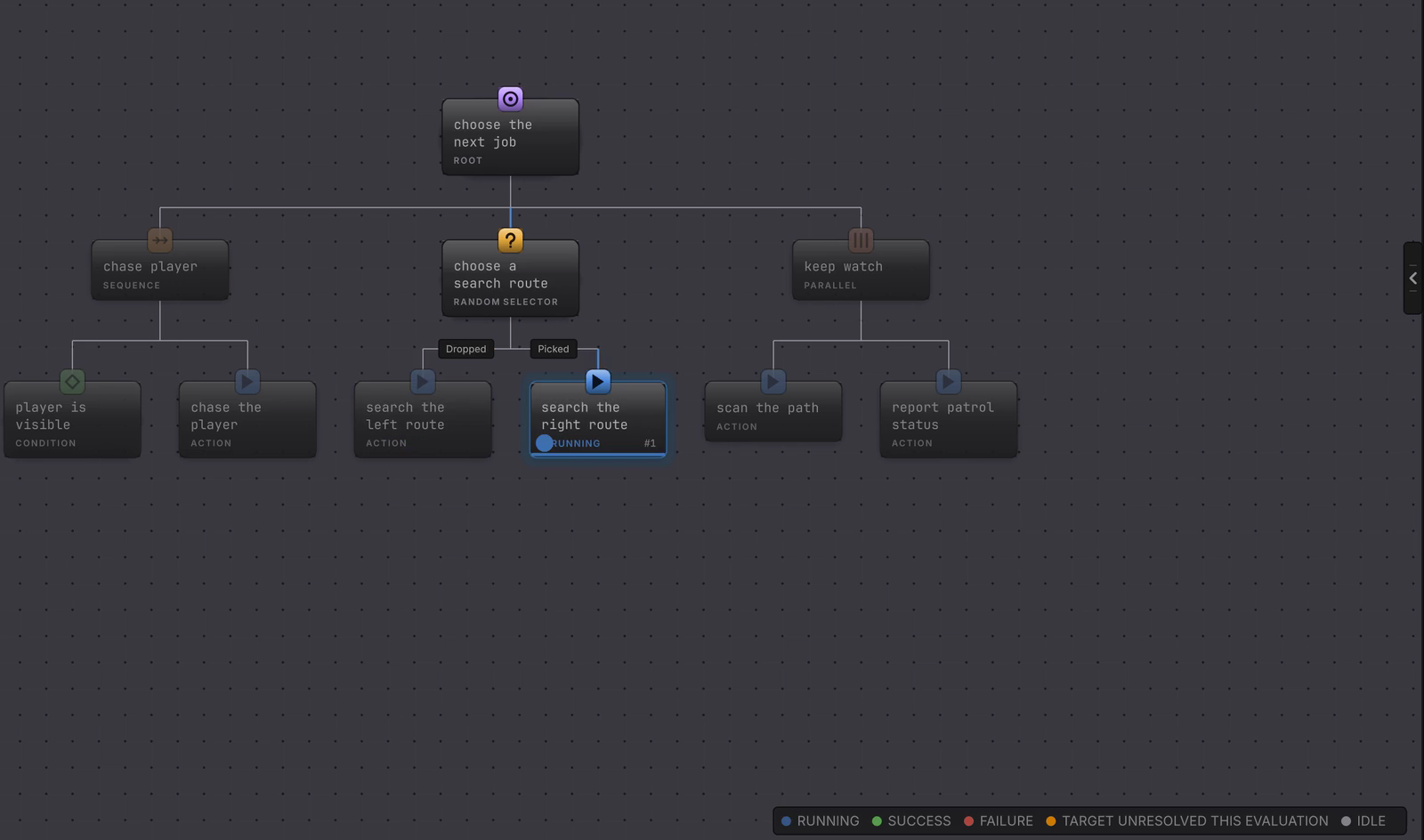
The words
Section titled “The words”
The legend in the corner of a Live behavior tree canvas names five readings.
| Word | Meaning |
|---|---|
| RUNNING | Active work. Its pip pulses, which is the one animated thing on the canvas. |
| SUCCESS | The latest pass finished what its parent asked for. |
| FAILURE | The latest pass finished without satisfying its parent. |
| TARGET UNRESOLVED THIS EVALUATION | The node’s target could not be reached on that evaluation, so the node failed. Amber, and separate, because the binding is still sound. |
| IDLE | Nothing to report since initialization or reset. |
Two more words appear on cards without being in the legend. INTERRUPTED says the work was cancelled through the runtime’s interruption path. DISABLED tags a node that is authored off.
A state machine canvas trades that legend for ACTIVE and INACTIVE, because a state is one or the other. Its rail then carries the lifecycle detail.
Read one tick
Section titled “Read one tick”-
Press Play and select the object with the graph you want. The Live document opens with the legend showing.
-
Find the status pills. On a GameObject graph one pill sits on the cursor node and shows that instance’s last result. On an entity graph every node that reported a result this run keeps its own pill, and the deepest evaluated node is the one wearing the running glow.
-
Read the words on the cards above it. A RUNNING ancestor is still holding the work below it.
-
Read Graph runtime status in the rail. It names the active node, the current state, and the last result, so the color you are reading has a written confirmation beside it.
-
Click Focus → on the Graph runtime status card to center the canvas on that node.
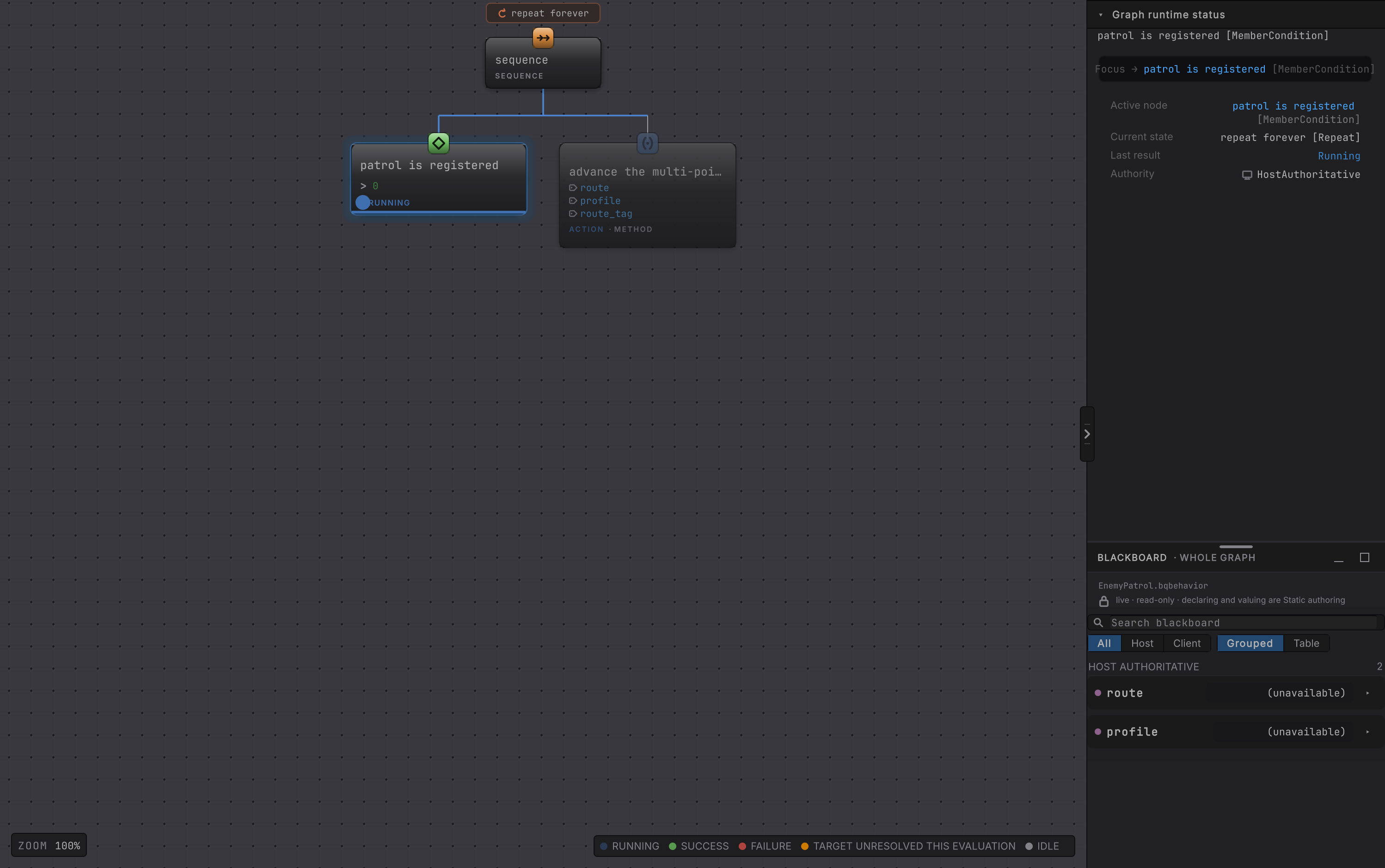
EnemyPatrol mid-walk. The condition carries the pill and the word RUNNING; the cards with no pill are showing their family caption, and the rail beside them names the active node and the last result in words.Results from earlier, and why they matter
Section titled “Results from earlier, and why they matter”A card with no pill is showing its family caption. It carries no result of its own, and on a GameObject graph that tells you nothing about whether it ran: a leaf that succeeds hands the cursor on inside the same tick.
On a GameObject graph the cursor is the only card with a pill, and every other card was cleared as the cursor moved. On an entity graph a pill stays on every node that reported a result during the run, so a pill there can be older than the latest tick. Live refresh never appends a · stale qualifier to either host, so date a result by reading Active node and Last result in the rail rather than by the canvas alone.
What the colors cannot tell you apart
Section titled “What the colors cannot tell you apart”The card word is a summary, and a few precise runtime results collapse into it.
- Everything that reads as an ordinary refusal shows FAILURE: an authored failure, a Time Limit timeout, a false guard reported as Blocked, a refused external service, and an authority mismatch or handoff.
- Everything else, including a genuine Faulted result, shows IDLE on the card.
When the difference matters, read Last result in the rail, which prints the exact result name, and the faults page, which explains what each one means.
When it goes wrong
| Symptom | Check | Fix |
|---|---|---|
| Every card reads IDLE and nothing moves. | Read Last result in the rail. A faulted graph stops ticking and clears its active node. | Read the faults page and the agent’s fault trace. |
| A card reads SUCCESS and you know it did not run this tick. | On an entity graph a pill survives the whole run, not one tick. Read Active node in the rail for the node the runtime is on now. | Read the other pills as history. The running glow is the only "now" on the canvas. |
| An amber word appears on a node that used to work. | Read the status bar, which names the variable and what it held. | Give that variable a usable object. The binding is still valid. |
| A condition failed and you wanted to know why. | Select the node and read its Last result row. | The canvas prints FAILURE for several distinct results; the rail prints the exact one. |
| The legend shows only ACTIVE and INACTIVE. | You are looking at a state machine document. | Read the state rail for Entry, Active Update, and Exit detail. |
- Attach and inspect: picking the exact agent and opening its values.
- Pause, step, breakpoints: freezing one tick to read it properly.
- Faults: the results the canvas summarizes.