
Move somewhere
Move To sends one movement request to your own locomotion code and stays Running until that code says it arrived.
On this page
“Go there, tell me when you arrive.” Move To is the one node that ships with that shape built in, and it gets there using whatever locomotion your game already has.
The problem
Section titled “The problem”Every project has its own way of moving a character: a CharacterController, a NavMeshAgent, a custom kinematic controller, a physics body with steering. A graph that moved Transforms itself would fight all four. A graph that only calls your movement code needs a node whose whole job is “ask, then wait”.
Move To is that node. It carries a destination and two settings, hands one request to the movement service, and holds Running until the service reports what happened.
When to reach for it
Section titled “When to reach for it”- Walk to a fixed post or waypoint, like move to the first waypoint in
DocumentationLeafNodes.bqbehavior. - Reposition before other work in a Sequence: move to the console, then use it.
- Timed approach, wrapped in a Time Limit, so an unreachable destination ends the branch instead of parking the agent.
See it
Section titled “See it”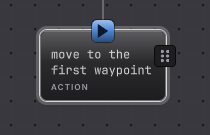
While the request is outstanding the node holds the status pill at RUNNING, then takes SUCCESS on arrival. Bind your own IBehaviorMovementAdapter first, because nothing moves without it.
-
Open
Assets/Platformer/Behavior/DocumentationLeafNodes.bqbehaviorand select move to the first waypoint. -
The rail shows TARGET WORLD SPACE · METERS with X, Y, and Z fields. This node holds
6.5,3.8,0. -
Below the target sit Speed, in meters per second, and Arrival tolerance, in meters. The fixture uses
2and0.1. Tolerance is how close counts as arrived, which is what stops a controller oscillating around an exact point. -
Implement
IBehaviorMovementAdapterin your game. Five methods: begin one request, advance it by a time step, pause, resume, and stop. -
Register it with
BehaviorMovementServiceand make sure the graph declares themovementservice. The agent needs that service composed before it can run a Move To at all. -
Run it. The node stays Running while your adapter advances, and reports Success the moment the adapter says the request completed.
How it decides
Section titled “How it decides”Move To is an action with an awaited external service. Its first evaluation issues the request and returns Running; later evaluations read the completion.
Result
- Success
- The movement service reported the request completed.
- Failure
- The service reported the request failed, or refused a valid request.
- Running
- The request is outstanding and the adapter is still advancing it.
- The node never touches a Transform or an entity itself. It emits one request carrying the target, speed, and tolerance, and your adapter does the moving.
- GameObject hosts compose
BehaviorMovementServicearound anIBehaviorMovementAdapter. Entity hosts supply a compatible command handler for the samemovementtoken. - One request at a time. The service refuses a second request while one is active, which surfaces as a typed refusal rather than two controllers fighting.
- An interrupt or a Time Limit cancels this exact request by its correlation identity. The adapter’s
Stopis where you make the character actually stop. - Movement requests do not support authority replay. After a handoff the request is restarted rather than resumed mid-flight.
- A late completion cannot revive a request the tree has already abandoned.
When it goes wrong
Section titled “When it goes wrong”When it goes wrong
| Symptom | Check | Fix |
|---|---|---|
| Nothing moves and the node holds Running forever. | Confirm the movement service is composed on this agent and your adapter is registered with it. | Register the adapter, then confirm the graph declares the movement service. |
| The node fails immediately. | Read what your adapter returns from Begin. A refused request fails the node. | Accept the request, or return a failure you actually intend. |
| The agent stops short or overshoots. | Compare Arrival tolerance with your controller step size. | Widen the tolerance past one movement step. |
| Two movement requests fight. | Look for a second agent or a game script also driving locomotion. | Leave one owner. The service refuses overlapping requests by design. |
| The character keeps walking after an interrupt. | Check what your adapter does in Stop. | Cancel the motion there, and clear any velocity your controller holds. |
| The node succeeds while the character is nowhere near the target. | Read the status your Advance returns. | Report completion only when the backend has actually arrived. |
- Give up after: put a deadline around the trip.
- Adapters and services: where the movement service is composed.
- Move To reference: the fields and their units.