
Bindings
Point a graph node at a method, property, field, or event you already wrote, and keep every line of gameplay code where it lives.
On this page
Your components already know how to move the character, spend the ammo, and raise the alarm. A binding lets the graph call those exact members, so the graph decides and your code acts.
The problem
Section titled “The problem”Every graph tool eventually asks you to wrap your game in its own task classes. One wrapper per method, each one a file that exists to forward arguments, each one another place a rename can break. Racing Line’s CPU driver touches two dozen distinct members of its race services in one graph, which as wrappers would be two dozen classes that do nothing.
CpuRace.bqbehavior binds the members directly. HasDriverFinished(int), SignedGapToPrimaryPlayerMeters(int), and SmoothPaceGap(int, float, float, float, int) are ordinary methods on ordinary services, selected by their exact signatures. The importer generates the call sites, so nothing looks a member up while the game runs.
The six kinds
Section titled “The six kinds”The picker lists four under ACTIONS and two under CONDITIONS. Each one is a node you place like any other.
| Kind | The picker says | Reach for it when |
|---|---|---|
| method | invoke a c# method on a target | The return value decides what the graph does next, or the call takes time. |
| property | read or write a property | A value has to move between a member and a variable, in either direction. |
| field | read or write a field | Same, for a plain field. Horde’s AttackIntent.Ready is a two-way field. |
| message | send a message; fire and forget | One void call, no waiting, no answer. |
| member condition | gate on a member comparison | A value is a yes or no gate on a branch. |
| event condition | wait for one firing of an event | The graph has to wait until your game says it happened. |
DocumentationMemberNodes.bqbehavior in the Platformer project holds one of each, named after what it does, ready to be read. The reference is the field-by-field version.
Every binding starts at Target
Section titled “Every binding starts at Target”The Target card answers one question: which object holds the member. Its Mode control offers four choices on the GameObject path.
| Mode | What you supply | What happens at runtime |
|---|---|---|
| Agent | Resolve (Self, Children, or Parent), a Child path when Children is chosen, then the Component | The component is found on the agent’s own GameObject, on its parent, or on the first object matching that child path |
| Reference | A Target Type and a named slot, filled by your host in code, by a project asset dropped into Object, or by a scene owner | The object in the slot is used, with no search |
| Static | A Type | The static declaration is called, with no instance at all |
| Variable | A compatible blackboard value that carries an object | The object the variable currently holds is used |
Agent resolution stays local. Self means the agent’s GameObject, Parent means its transform’s parent, Children means the first match on the path you typed. None of them walks the scene looking for a candidate. On the chosen host, the component whose runtime type matches exactly wins; if none matches exactly, one assignable component is accepted; a missing host, an absent component, or two equally good candidates is reported instead of guessed.
Guard2.bqbehavior uses three of the four: Agent on the guard’s own services, Reference for the shared Guards and GameMaster objects, and Variable to read Position off the focus target a variable is already holding.
The entity path has its own four modes; see entity bindings.
Targets and resolve covers all of it, including the component acquisition shortcut.
The member picker
Section titled “The member picker”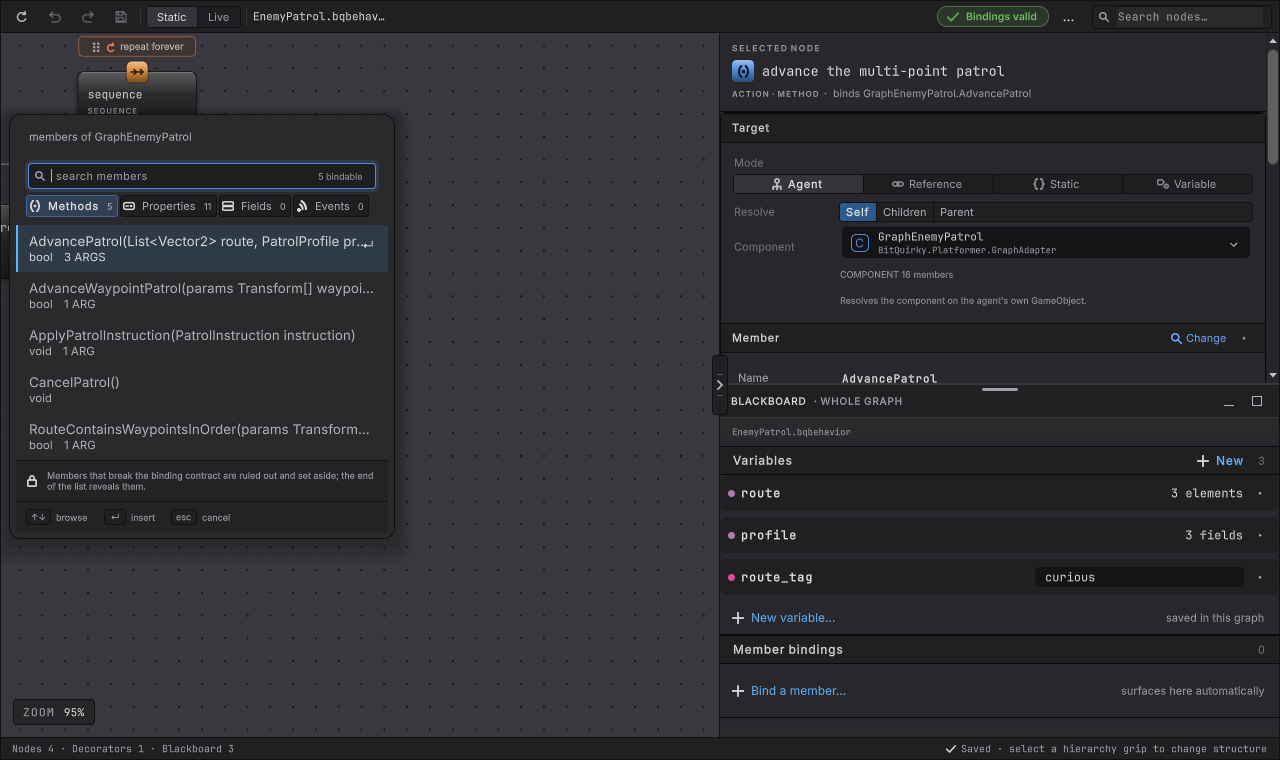
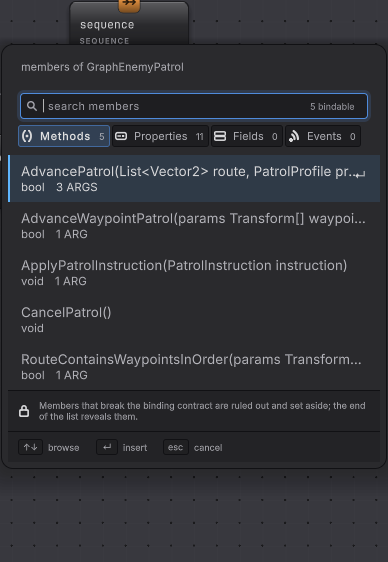
Public members are listed. A non-public one appears when that exact declaration carries [BehaviorMember], or overrides a declaration that carries it, which changes visibility without changing what is supported. A public property with a private setter is still a public declaration, and its setter stays unavailable until the property itself opts in. Property accessors never appear in the methods list, and members inherited from object or UnityEngine.Object are hidden unless the type you are browsing is the one that declared them.
An unavailable declaration stays visible with its reason rather than disappearing, so you can see that the graph found your member and refused it, and why.
Nothing is guessed later
Section titled “Nothing is guessed later”The saved binding is an exact identity. Rename the member, change an overload, reorder a parameter, or swap a return type and the binding goes stale and says so, keeping your argument, output, comparison, and result choices for the repair. No nearby overload is substituted.
Where to go next
Section titled “Where to go next”Bind the operation:
- Method: call it, read the answer, wait for it if it takes time.
- Property and field: one-way, two-way, and static members.
- Message: the void call with nothing to report.
- Condition and event: the two condition kinds and their cards.
Get the values right:
- Arguments and results: constants, variables, optional parameters,
params,ref,out, generics, indexers, and the Result rules. - Conversion: the exact set of accepted type conversions.
Know the lifetime:
- Waiting and cancellation: coroutines, awaitables, give-up, faults.
- Entity bindings: what the Burst path offers.
- AOT and IL2CPP: generated providers and what to re-run after a signature change.
Before you blame the binding
| Symptom | Check | Fix |
|---|---|---|
| The member is missing from the picker. | Confirm the target type, whether the member is static, its access level, and the complete signature. | Pick the type that actually declares it, or make the declaration public. |
| The picker shows the member but will not let you pick it. | Read the reason on the unavailable row. | Change the signature, the direction, or the value type it needs. |
| Validation says the target is ambiguous. | Two components on the host satisfy the chosen type. | Choose the exact concrete type, or move one component off that object. |
| The binding worked yesterday and is stale today. | Something in the declaration changed: name, parameters, access, or return type. | Reopen the picker and choose the current declaration deliberately. |
| The agent throws about a member provider on entering Play Mode. | A graph with bindings needs its generated provider assigned on the agent. | Assign it to Member Provider Component, as in AOT and IL2CPP. |