
Live editing
Read a running agent's member-bound values while the game plays, tune the ones you are allowed to write, and know exactly why the others refuse.
On this page
Attach the editor to one running guard and every value it binds to your game gets a card: what the graph sees, what your component holds, which way the binding points, and whether you can type a new number in right now.
The problem
Section titled “The problem”Dungeon Heist’s second guard patrols at 2.2. Is that too slow to be a threat? The honest way to find out is to watch it walk while you change the number. Stop, edit, replay, and walk back to the same corridor is ten slow loops for one tuning decision, and you still have to trust that the value you typed is the one the graph read.
Guard2.bqbehavior binds patrolSpeed two-way onto the guard’s FloatVariable. In Live that binding becomes a card you can type into, and the guard changes speed while you watch.
When to reach for it
Section titled “When to reach for it”- Tuning a number in motion: patrol speed, a cooldown, a detection radius, anything bound two-way or blackboard to member.
- Settling an argument between the graph and your code. A card shows the value the graph received beside the value your component holds, and says so when they differ.
- Proving an edit stays on one agent. Change
patrolSpeedon Guard_2 and the other four Dungeon Heist guards keep their pace.
See it
Section titled “See it”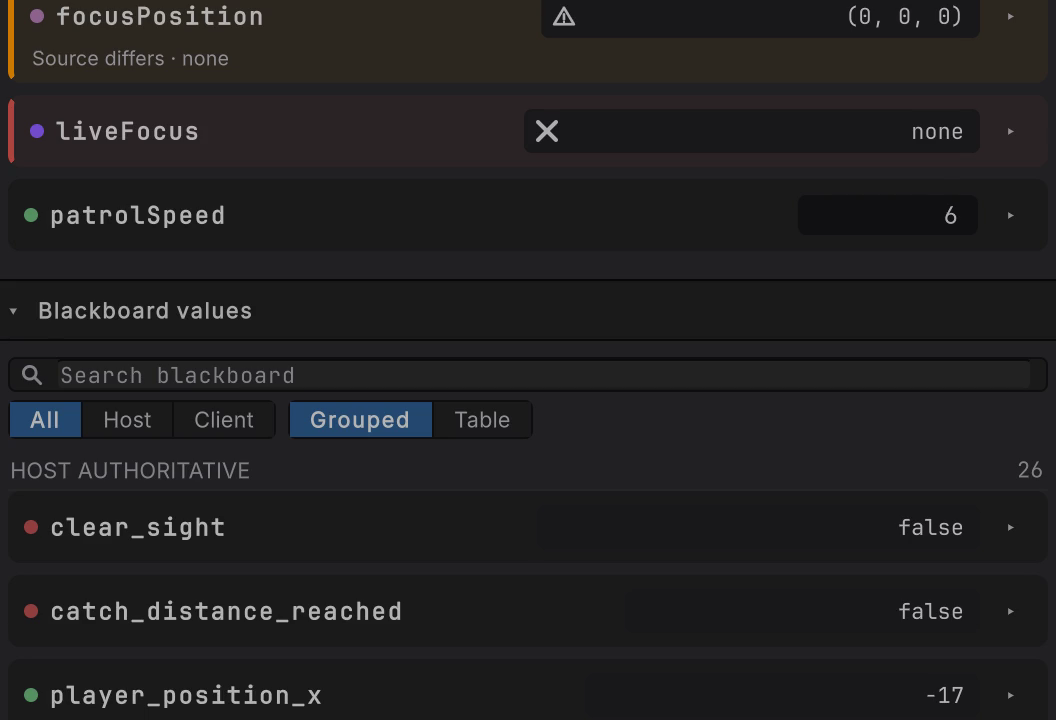
patrolSpeed typed from the authored 2.2 to 6 while the guard walks. The card confirms at once, and the graph picks the value up on its next tick.
Every change travels along the one binding you authored. There is no second synchronization path to fall out of step, and no path at all back to the graph file.
-
Enter Play Mode with the graph editor open and select the GameObject that carries the Behavior Agent you want, here Guard_2. The toolbar switches to Live, names the follower, and reads ATTACHED.
-
Click an empty spot on the canvas so nothing is selected. The rail opens with a Member binding section, marked surfaced, above Blackboard values. Each surfaced binding is one card.
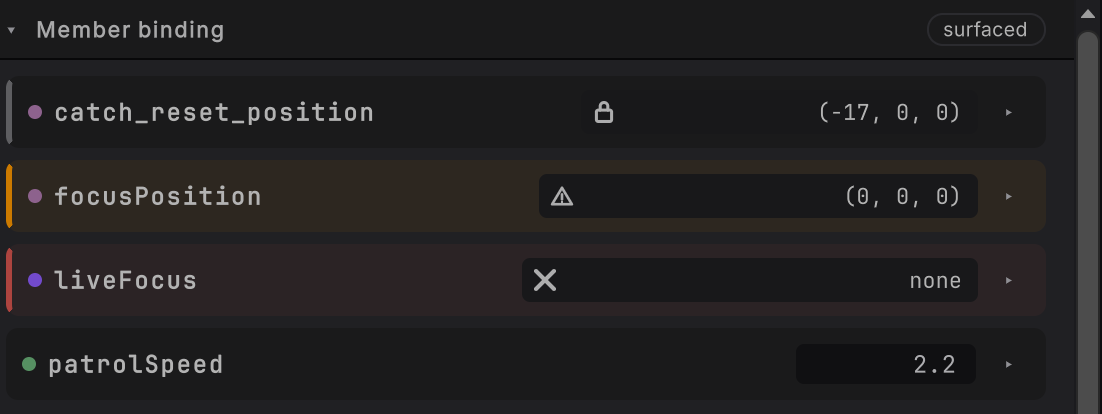
Figure 1. Guard_2’s four cards while it patrols. Each refusing card carries an icon in its value box; patrolSpeedhas a plain field, so it takes one. -
Find a card whose value sits in an editable field. That is a binding that writes the member, such as the two-way
patrolSpeed. -
Type the new value into the field and press Enter (or click away). Exactly one edit goes to the running agent, through the generated setter.
-
Read the card. Current holds your value straight away, and the line under the name reads
Edit accepted · awaiting evaluationuntil the graph’s next evaluation reads it, which at normal speed is the next tick. While the follower is paused it readsEdit accepted · waiting for Stepinstead.
Read a card
Section titled “Read a card”Every card opens with the arrow at its right edge (Show details). Open patrolSpeed and you get the whole binding in one place.
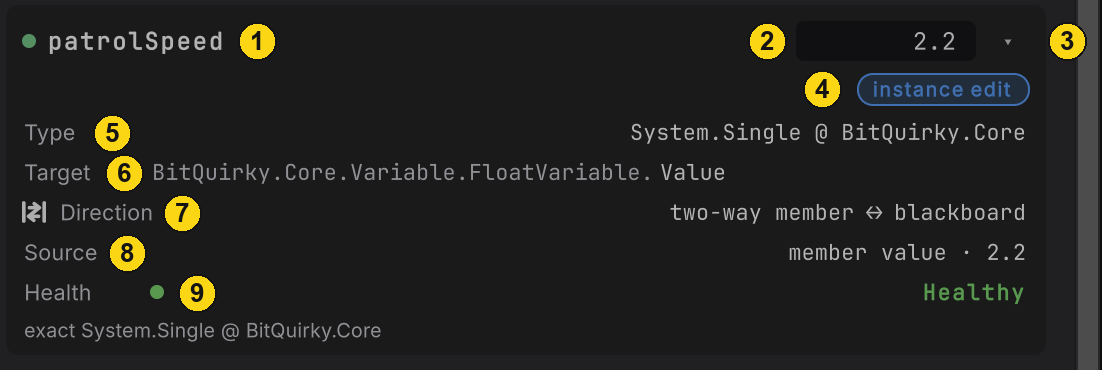
patrolSpeed on Guard_2, healthy and editable.| # | Part | What it tells you |
|---|---|---|
| 1 | Name | The blackboard name the binding surfaces, here patrolSpeed. |
| 2 | Current | The value graph nodes receive. An editable field when the chip reads instance edit, a plain reading otherwise. |
| 3 | Details arrow | Show details and Hide details. Stays open across Live refreshes. |
| 4 | Status chip | Whether an edit will be accepted right now. See when a card refuses. |
| 5 | Type | The exact value contract and its assembly: System.Single @ BitQuirky.Core. Nothing is converted to fit it. |
| 6 | Target | The declaring type and the member: BitQuirky.Core.Variable.FloatVariable. then Value. |
| 7 | Direction | The authored direction: blackboard → member, member → blackboard, or two-way member ↔ blackboard. |
| 8 | Source | The value on your member and what last moved it: member value, game write, or runtime edit. |
| 9 | Health | Healthy whenever the binding resolves to its exact member and type, including a read only binding. The line under it is the exact type when the chip is instance edit, or a short refusal word when it is not. |
Hover any icon on a card, the lock, the triangle, the cross, the type dot, or the direction glyph, for a one-line explanation of it.
When a card refuses
Section titled “When a card refuses”A card that cannot take an edit shows no field. It keeps its last confirmed value on show (hover it and the tooltip reads Last confirmed value), draws a colored edge, and puts its reason in the details. Guard_2 carries all three refusals at once:
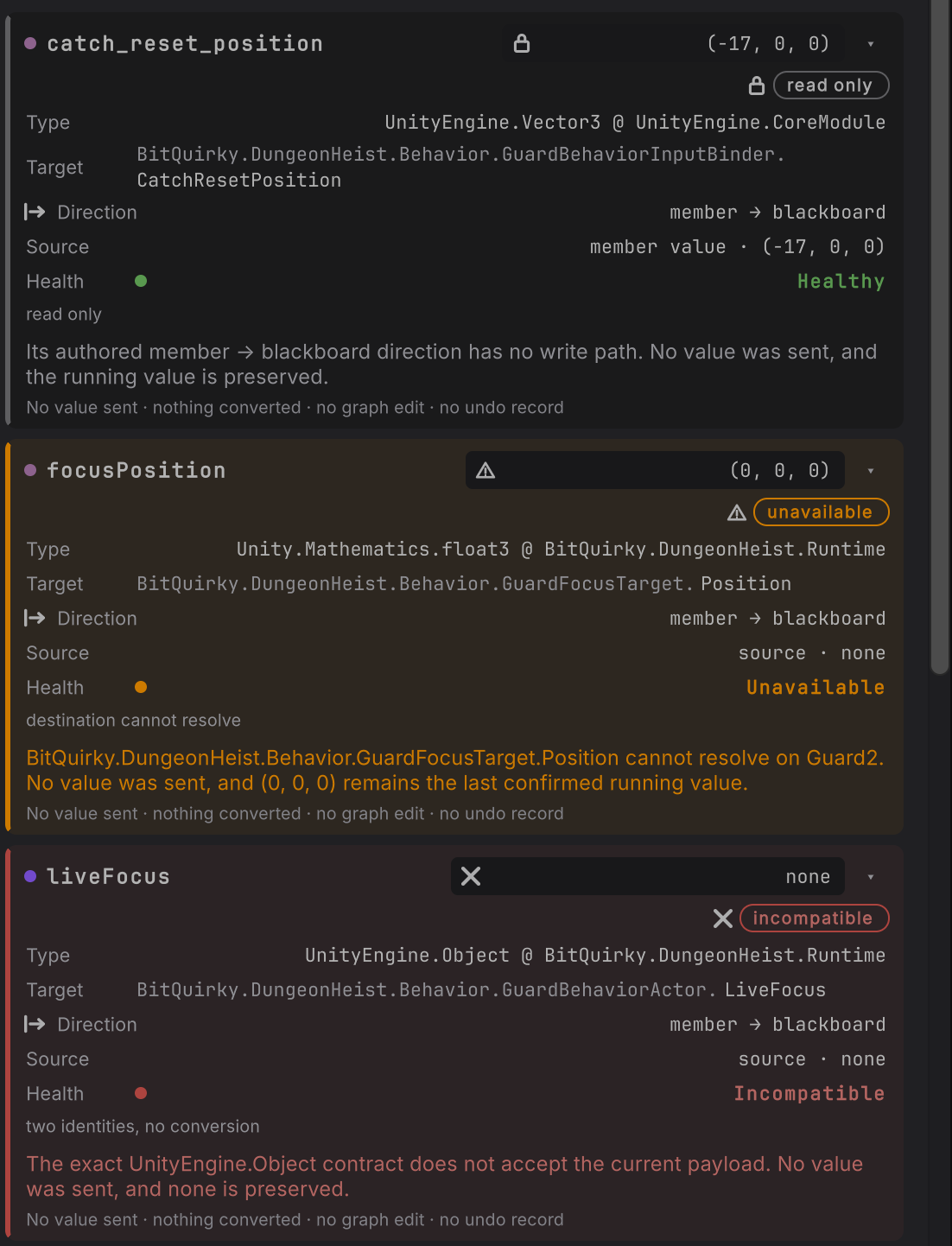
catch_reset_position is a UnityEngine.Vector3, so its value reads as three components and its Type row names UnityEngine.Vector3.| Chip | Edge and icon | Why it refuses | Reason under Health |
|---|---|---|---|
| instance edit | none | It does not. The binding resolves and writes the member. | the exact type |
| read only | gray, lock | The authored direction reads the member and never writes it, or the member has no setter. | read only |
| unavailable | amber, triangle | The target, the member, or the member runtime cannot be reached right now. focusPosition reads through the guard’s focus, and a patrolling guard has none. |
destination cannot resolve, or runtime disposed once the agent’s runtime is gone |
| incompatible | red, cross | The value has no exact form Live can carry, such as an object read into the blackboard. | two identities, no conversion |
| no instance | none | The attachment has ended. See when the attachment ends. | none |
Under the reason, a sentence names the cause and what was kept, then one line closes every refusal:
No value sent · nothing converted · no graph edit · no undo record
Typing something the exact type cannot hold, fast into a float for instance, is refused beside the field and stays visible with the details closed: The exact System.Single contract does not accept 'fast'. No value was sent, and 2.2 is preserved.
When the game changes it first
Section titled “When the game changes it first”Your code keeps writing the member while you watch, and the card keeps up. When the member moves before the graph has read it, the card says so under the name.
-
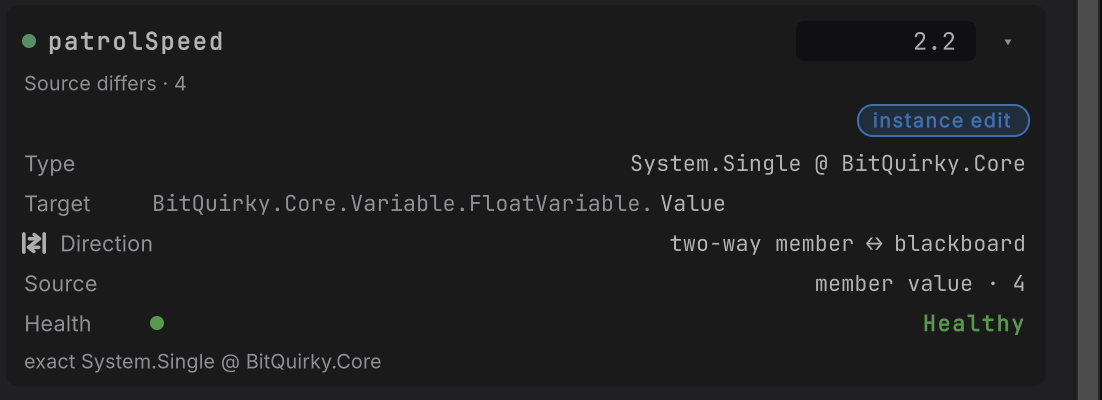
Figure 4. patrolSpeed opened while the follower is paused: Current still 2.2, the note Source differs · 4, and Source reading member value · 4 The game set the guard’s patrol speed to
4(Dungeon Heist’sguard.patrol-speedcommand, the same path its own systems use). Source readsmember value · 4and the card readsSource differs · 4, while Current still holds the2.2the graph last received. -
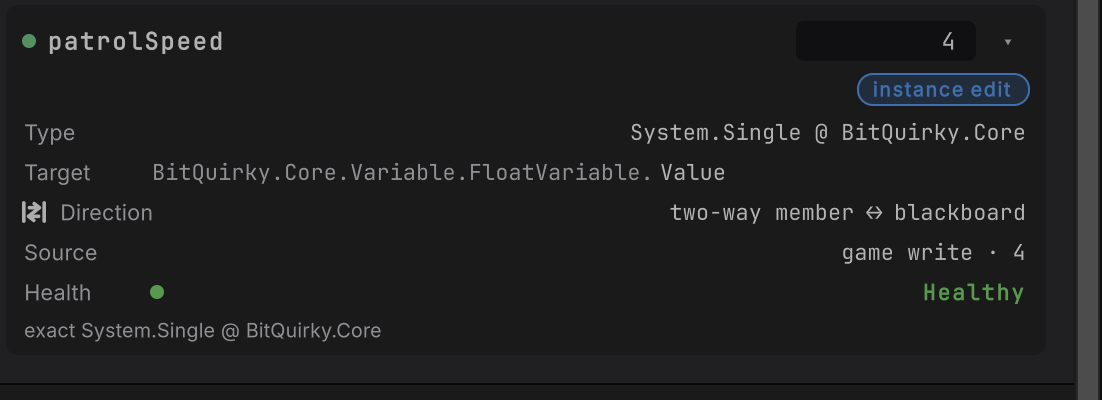
Figure 5. patrolSpeed after one step: Current 4, no note, Source reading game write · 4 The graph’s next evaluation reads the member through the same binding. Current becomes
4, the note clears, and Source readsgame write · 4. No prompt, no conflict dialog, and nothing to save.
A game write that lands after one of your Live edits replaces it the same way. The last writer wins, through the one binding.
Edit while paused
Section titled “Edit while paused”Pause holds one follower still so you can set a value and watch exactly one evaluation use it. Choose pause in the toolbar, or press Space with the editor focused; the button becomes resume and TICK drops to 0Hz. Everything else in the scene keeps running.

-
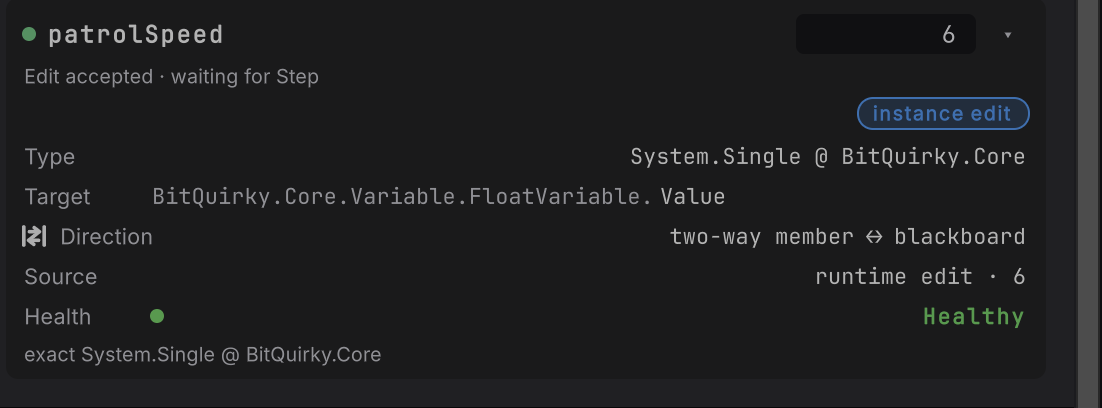
Figure 7. patrolSpeed holding 6 with the note Edit accepted · waiting for Step and Source runtime edit · 6 Type
6and press Enter. The setter has already run, so Current and Source (runtime edit · 6) both confirm it. The card readsEdit accepted · waiting for Step. -

Figure 8. The rail’s Evaluation section reading Waiting for Step. Confirmed by the running instance. The row follows the game through this binding. At the bottom of the rail, the Evaluation section spells out what the graph is waiting for:
Waiting for Step. Confirmed by the running instance. The row follows the game through this binding. -
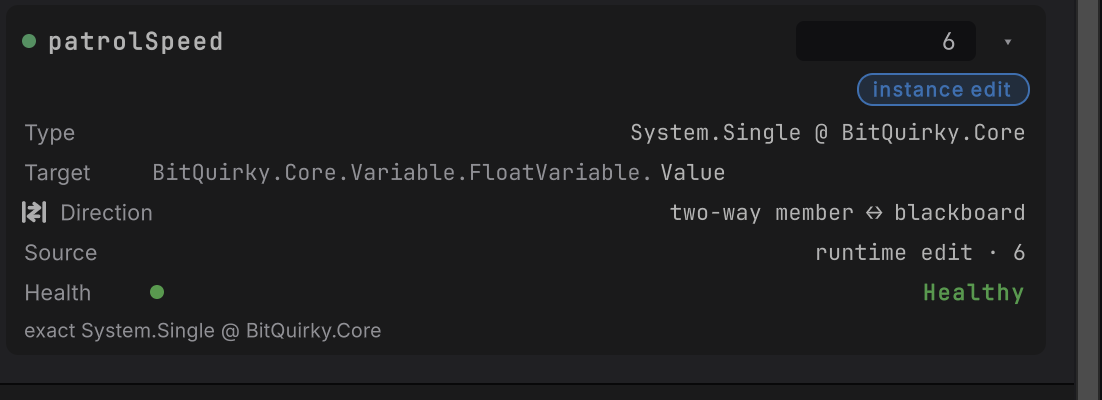
Figure 9. patrolSpeed holding 6 with no note and Source runtime edit · 6 Choose step, or press ., for one ordinary evaluation. The graph reads
6, the note clears, and the Evaluation section closes. Stepping again changes nothing: the edit is applied once and never echoed back.
Pausing grants nothing new. An editable card stays editable, and a refused card stays refused.
When the attachment ends
Section titled “When the attachment ends”Select something else, destroy the guard, reset its runtime, or reimport its graph, and the attachment ends. The toolbar reads LOST and the canvas shows Detached. The cards stay, because the binding is still part of the graph, but every runtime fact clears. The Blackboard values rows read cleared too, so no number left over from the old instance looks current.
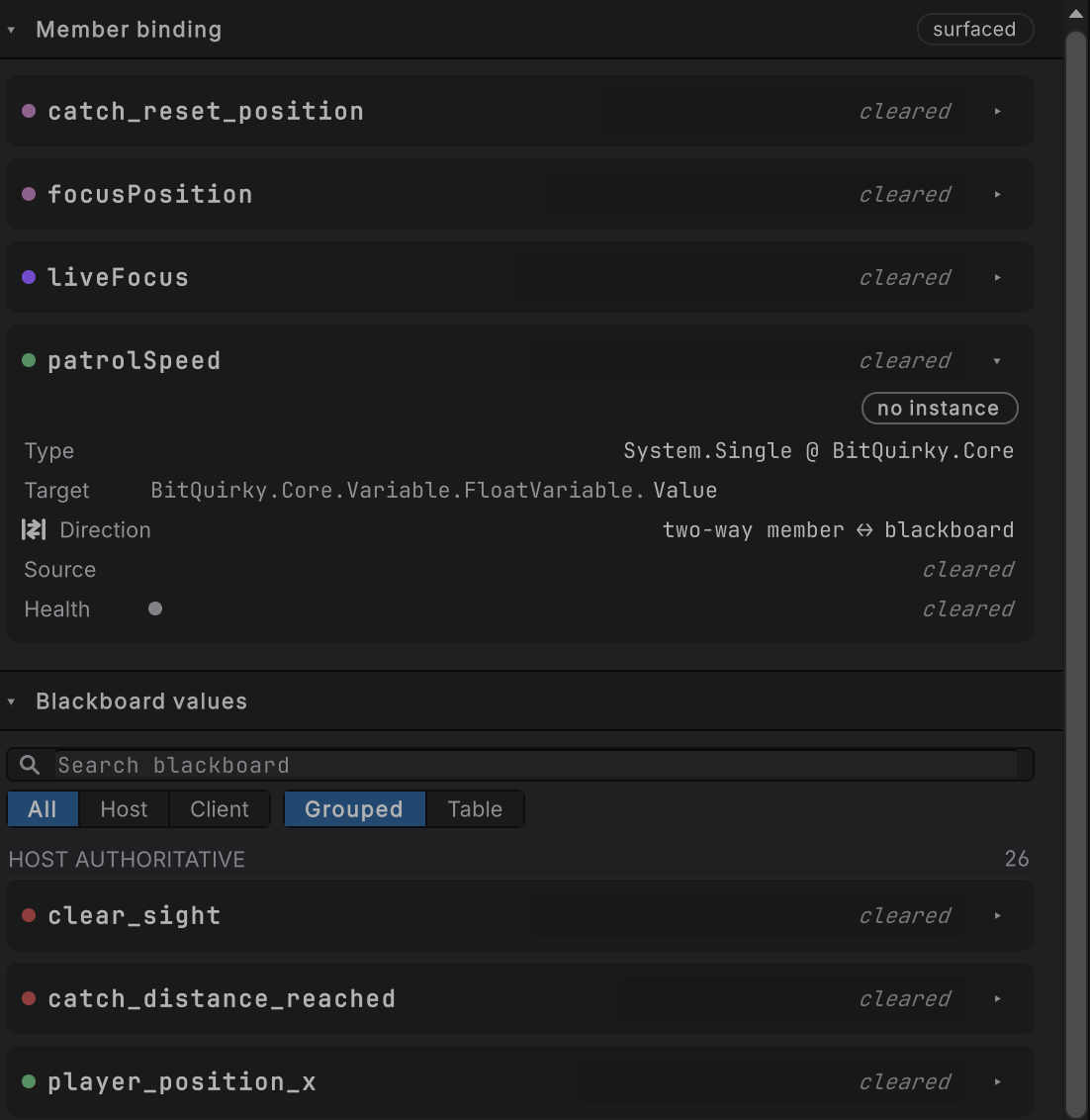
cleared, the Current field is gone, and Target and Direction keep the authored binding in view. A card you open stays open while it waits.Nothing you typed can reach a different guard. Select Guard_2 again while it runs and it attaches afresh.
In a narrow window
Section titled “In a narrow window”Below 1100 pixels wide, the rail stops sharing the window and slides over the canvas instead, with two tabs: Blackboard (member cards plus every blackboard value, with a count) and Selection (the selected node). Blackboard opens first. Editing and refusal work exactly as they do full width.
The toolbar makes room the same way. When the row runs short it drops the TICK reading first (the status bar still carries the rate), then shows the verdict chips as their glyphs alone, with the words on each chip’s tooltip. The attachment pip stays, and no control is ever squeezed under its own text.

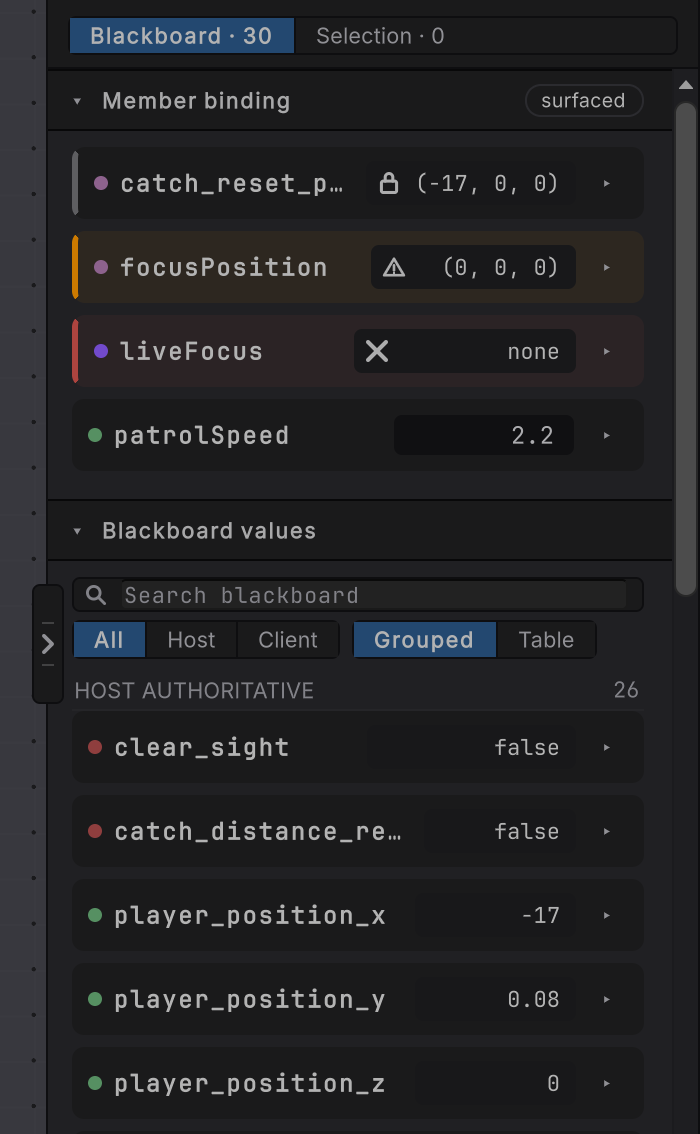
Blackboard · 30 counts the 26 blackboard values plus the four surfaced cards.How it decides
Section titled “How it decides”Which values get a card
- Every member binding the attached graph surfaces, on a GameObject agent. Entity Live observes only.
- The Blackboard values section below the cards is a read-only snapshot of the whole blackboard. Its rows never take an edit.
When Current is an editable field
- The chip reads instance edit: the target and member resolve, the authored direction writes the member, and the member has a setter.
- The value is one the card has an editor for: a number (whole or decimal), a
bool, achar, astring, an enum (a dropdown of its members), a vector (float2,float3,float4, or an all-float struct such asVector3orQuaternion, edited per component), or a Unity object reference (an object field). Other structs show their fields without a field to type into; the limits are on what it does not do yet.
What one edit does
- One committed value sends one typed request to the one attached agent. A refresh, a repaint, a focus change, or a detach sends nothing.
- The generated setter runs once. Current and Source confirm the value immediately.
- The graph reads it at its next evaluation (one step while paused) and nothing is written a second time.
- The graph file, the document’s saved state, and graph undo are untouched.
When an edit is refused
- The card states which rule failed, keeps the last confirmed value, and sends nothing. Refusals cover the authored direction, an unreachable target or runtime, a runtime that restarted or a graph that changed since the card was drawn, a value of the wrong kind, a member that is not a property or field, and a setter that threw. A setter that throws is not retried.
- If the game moved the value between the moment you read the card and the moment you pressed Enter, the edit is judged against the binding as it is now. It is accepted or refused; the older value you saw is never restored.
How long an edit lasts
- Until something else writes the member, the agent’s runtime resets, or Play Mode ends.
When it goes wrong
Section titled “When it goes wrong”When it goes wrong
| Symptom | Check | Fix |
|---|---|---|
| The rail shows no Member binding section. | Read the toolbar: Live, a follower name, and ATTACHED. Then check whether the graph surfaces any member binding. | Select the running object so the editor attaches. A graph with no surfaced binding has nothing to edit here. |
| Current shows a value and no field. | Open the details and read the chip and the Type row. | A read only, unavailable, or incompatible chip names its reason. A healthy card whose value is a struct with non-float fields is read here and changed in your code. |
| A card says read only. | Read the Direction row. | A member → blackboard binding never writes the member. Make it two-way or blackboard → member in Static if the graph should drive it. |
| A card says unavailable. | Read the sentence under Health for what could not resolve. | Usually the target does not exist yet, such as a focus the guard has not acquired. It clears by itself when the target resolves. |
| A card says incompatible. | Read the Type row. | An object read into the blackboard has no Live edit. Make the binding two-way in Static if you need to set it while the game runs, or change it from your own code. |
| The card says Source differs. | Gameplay changed the member since the graph last read it. | A binding that reads the member takes the new value at its next evaluation, so step once if the follower is paused. |
| The edit worked and then went away. | Look for a runtime reset, a graph replacement, or your own code writing the member every frame. | The last writer wins. For a value only the graph should drive, author a blackboard → member binding. |
| Both guards changed. | Check whether the binding target is Static, or whether both guards share one asset instance. | Bind an instance target, or give each agent its own copy of the asset, for per-agent tuning. |
| The number you typed is gone after you stopped. | Live edits never write back to the graph file. | Set the starting value in Static mode, or on the asset your binding targets, once you know the number you want. |
- Attach and inspect: which agent Live is following, and what the toolbar says about it.
- Pause, step, breakpoints: holding one follower still.
- Property and field bindings: where a two-way binding comes from.
- Dungeon Heist: the guard whose
patrolSpeedyou just changed.