
Actions and conditions
The leaves are where a tree stops deciding and starts touching your game, through a declared fact or a call into your own C#.
On this page
Composites and decorators only shuffle results around. The leaves are where a tree reads a real fact and asks your game to do something.
The problem
Section titled “The problem”A tree that cannot reach your game is a diagram. The question every project hits on day one is how much has to move onto the canvas, and the answer here is none of it: your components keep doing what they already do, and the graph decides when to call them.
DocumentationLeafNodes.bqbehavior is the smallest version of that: a Sequence over a Condition, an Action, a Move To, and a Subgraph. One fact, one request, one trip, one reused branch.
When to reach for each leaf
Section titled “When to reach for each leaf”- Condition when the fact is already a declared value on the graph, like
route_clear, and you want a cheap read with no call into game code. - Action when a composed game service owns the work, and the graph only names the operation to run.
- A member node when the fact or the work lives on one of your own components. Six kinds cover a method, a property, a field, a message, a condition, and an event.
The Platformer patrol uses the member route: EnemyPatrol.bqbehavior binds a member condition and a member method on GraphEnemyPatrol, so the graph decides and the component moves the enemy.
See it
Section titled “See it”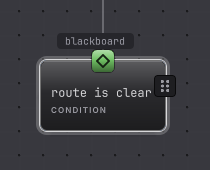
-
Open
Assets/Platformer/Behavior/DocumentationLeafNodes.bqbehaviorand select the Condition called route is clear. -
Read its three controls: variable, comparison, and value. An unset node shows the prompt Choose a blackboard variable… and the comparison stays disabled until a valid variable is chosen.
-
Pick a
bool,int, orfloatdeclared value. Boolean variables offer==and!=; numbers add<,<=,>=, and>. -
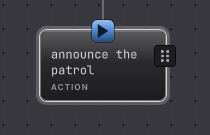
Select the Action called announce the patrol. Its rail carries the shared identity header and its semantic line. An Action names an operation for the host to service, so there is no member picker on it.
-
For work that lives on your own component, add a member node instead and bind it. Your first binding walks a method, a property, an event, and a message on one component.
How it decides
Section titled “How it decides”Condition
Result
- Success
- The comparison held.
- Failure
- The comparison did not hold. The typed reason is Blocked, which composites treat as a failed step and diagnostics keep.
- Running
- A Condition never holds Running. It answers on the update it is reached.
That Blocked result matters twice: a Selector moves on, and an Inverter passes it through rather than flipping it. To negate a declared fact, invert the comparison in the node.
Action
Result
- Success
- A pure action with no awaited service finishes in one update, or the awaited service reported completion with Success.
- Failure
- The awaited service reported failure, or a valid request was refused.
- Running
- The request is outstanding and the node is waiting for its correlated completion.
- An Action that declares a service emits one request and waits. Its completion has to arrive with the same correlation identity, so a late completion from an abandoned activation is discarded.
- An Action without an awaited service is immediate: one update, Success.
- Required handlers and adapters are composed explicitly on the host. A missing one is a typed composition fault rather than a quiet Failure. Adapters and services covers that wiring.
- An Action name does not resolve to a method. For a direct C# call, use a member node.
Member nodes
The six member kinds are the bridge to your code, and they carry their own rail: a target, a member, arguments, and a mapping from the call’s outcome to a graph result. They are documented in the member node reference and in the binding guides.
When it goes wrong
Section titled “When it goes wrong”When it goes wrong
| Symptom | Check | Fix |
|---|---|---|
| The comparison control is disabled. | Read the variable dropdown for the prompt or a missing name. | Choose a readable declared value of a comparable type. |
| A Condition reports Blocked and you expected Failure. | Blocked is the typed reason for a false guard. | Nothing to repair for composites. For an Inverter, invert the comparison instead. |
| An Action holds Running forever. | Confirm the service it waits on is composed and is publishing completions. | Compose the handler, or bound the wait with a Time Limit. |
| An Action succeeds and nothing happened in the game. | An action with no awaited service succeeds immediately by design. | Bind a member node, or compose the service that performs the work. |
| The value field rejects what you typed. | Compare the literal with the variable type chip. | Enter a literal of that type, or name a same-typed declared value. |
- Your first behavior tree: bind one member and watch an object move.
- Move somewhere: the one action node that ships with its own contract.
- Node reference: every leaf, field by field.