
Inspector
Configure the selected card in the right rail, rename what it is called, select a decorator that has no card of its own, and read the graph-wide blackboard below it.
On this page
The canvas shows the shape. The rail shows the settings of the one thing you selected, and it is the only place a node’s behavior is configured.
The problem
Section titled “The problem”A Platformer patrol card called advance patrol is a promise until you fill in what it advances. Which method, on which component, with which arguments, and what its return value means to the graph. Cards cannot hold that much text, so the canvas stays readable and the rail carries the contract.
DocumentationDecorators.bqbehavior exists to be read this way: select each card and the rail names exactly the controls that node owns.
Read the rail
Section titled “Read the rail”The rail opens on selection. Its header shows an eyebrow naming what you have, SELECTED NODE or SELECTED DECORATOR, with the editable name beneath it.
-
Click a card. The rail fills in with that node’s controls, and
GRAPH HOME · NOTHING SELECTEDhides. -
Read the sections. A composite shows Children with a count, a reorderable list, and an + Add button. A decorator shows its own policy controls. A member node shows Target, Member, Arguments, Result, and the cards its binding needs.
-
Fill in the required fields. An invalid required value stays where you typed it, with the reason beside it, instead of being silently replaced.
-
Read Validation on a member node, or the required-child line under Children on a composite, for anything that node alone is missing.
Rename without breaking references
Section titled “Rename without breaking references”Names are presentation. References, breakpoints, undo, and runtime tracing use the node’s stable id, which the editor allocates once and never derives from the label.
Click the name in the identity header to edit it. Commit by moving focus away, and cancel with Escape. Names cannot contain quotes or line breaks, behavior tree labels may repeat, and Any State keeps its name.
Right-click a card and choose Copy node id when you need the identity itself, for a breakpoint discussion or a bug report.
Select a decorator
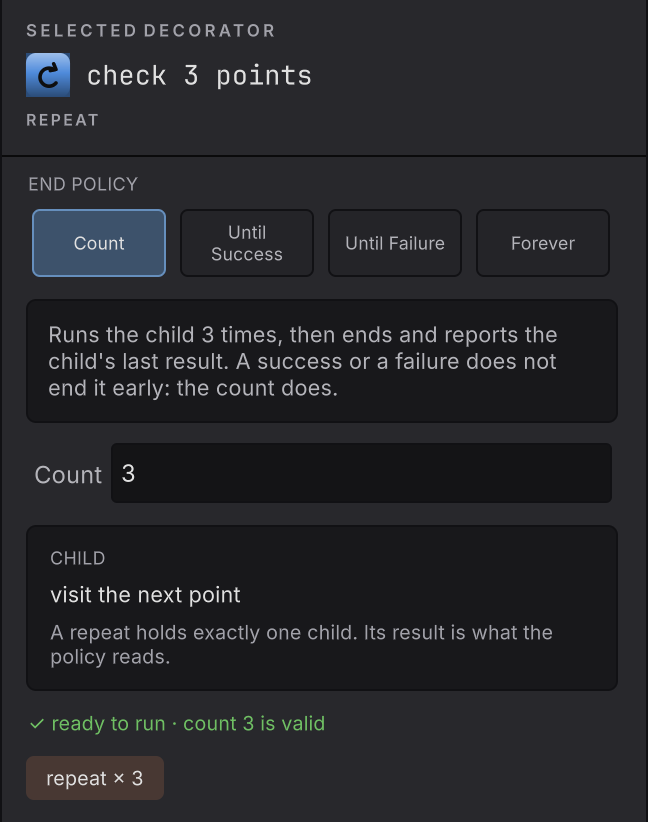
Section titled “Select a decorator”Decorators render as pills stacked above the card they wrap, so they have no card of their own. Click the pill and the rail switches to SELECTED DECORATOR with that decorator’s controls, like a Repeat’s end policy and count.
Two consequences follow from pills being pills. A decorator found through graph search selects the owning card, because search centers cards. Deleting a pill deletes that decorator and leaves the card beneath it alone.
The blackboard below the rail
Section titled “The blackboard below the rail”Under the selected item sits the graph-wide blackboard: the variables this graph declares, with their types and their saved starting values. The panel collapses and resizes, and it has its own search, focused with Cmd/Ctrl+Shift+F.
In Live that panel becomes a read-only snapshot of the attached instance, which attach and inspect covers. Variables and types covers declaring them.
Change one thing
Section titled “Change one thing”Project-defined nodes get the same rail
Section titled “Project-defined nodes get the same rail”A node kind declared in your own C# with BehaviorNodeAttribute is discovered at import, and its BehaviorNodeParameterAttribute declarations provide the keys, labels, types, order, required flags, numeric bounds, and enum choices. The rail renders the standard controls from that schema and writes changes through the same undoable session as everything else.
The schema carries the parameter kinds the standard controls can express. A contract those cannot express belongs in your game code, reached through a member or service boundary.
When it goes wrong
| Symptom | Check | Fix |
|---|---|---|
| The rail shows GRAPH HOME · NOTHING SELECTED. | Confirm a card or a decorator pill is selected. | Click a card or a decorator pill. The home card hides and that node’s controls take the rail. |
| You selected a decorator and got the card. | Read the eyebrow: SELECTED NODE or SELECTED DECORATOR. | Click the pill itself. Search results resolve to the owning card. |
| A required field keeps its invalid value. | Read the reason beside it. | That is deliberate, so your typing survives. Correct the value and the complaint clears. |
| Renaming a node broke nothing, and you expected it to. | References use the stable id, not the label. | Nothing to repair. Rename freely. |
| Your project node kind shows no controls. | Read whether its parameters carry BehaviorNodeParameterAttribute declarations. | Declare the parameters, let the importer run, and reopen the graph. |
- Search and validation: reading the verdict chips the rail feeds.
- Bindings: the member cards in detail.
- Blackboard: what the panel under the rail holds.