
Entity agents
Register one graph against an entity query and let a system advance every matching entity, with no GameObject in the loop.
On this page
Horde Survival’s enemies have no GameObject, no MonoBehaviour, and no per-enemy component to hang a graph on. One registration gives every one of them the same graph, and the generated Burst carrier advances every matching entity together through ordered sample, tick, and push stages.
The problem
Section titled “The problem”A survivor game spawns enemies faster than a GameObject per enemy can carry. Horde Survival’s enemies are entities: a position, a velocity, a health value, an attack intent. Their decision is still a decision though. Chase the survivor, hold when there is no target, attack when contact is permitted.
EnemyBrain.bqbehavior is that decision, and its header puts it on the entity vocabulary: %% runtime-path: entity. GraphEnemyBrainComposer registers the graph once for the whole swarm, and each entity gets its own blackboard and its own execution state inside package-owned buffers.
When to reach for it
Section titled “When to reach for it”- Hundreds or thousands of agents share one decision and you cannot afford a component each.
- Every fact the decision needs already lives in component data, and every effect it causes is a component write or a spawn your systems own.
- The tick has to fit in a frame budget with the rest of the simulation, which puts it in a Burst job. See Burst and jobs.
See it
Section titled “See it”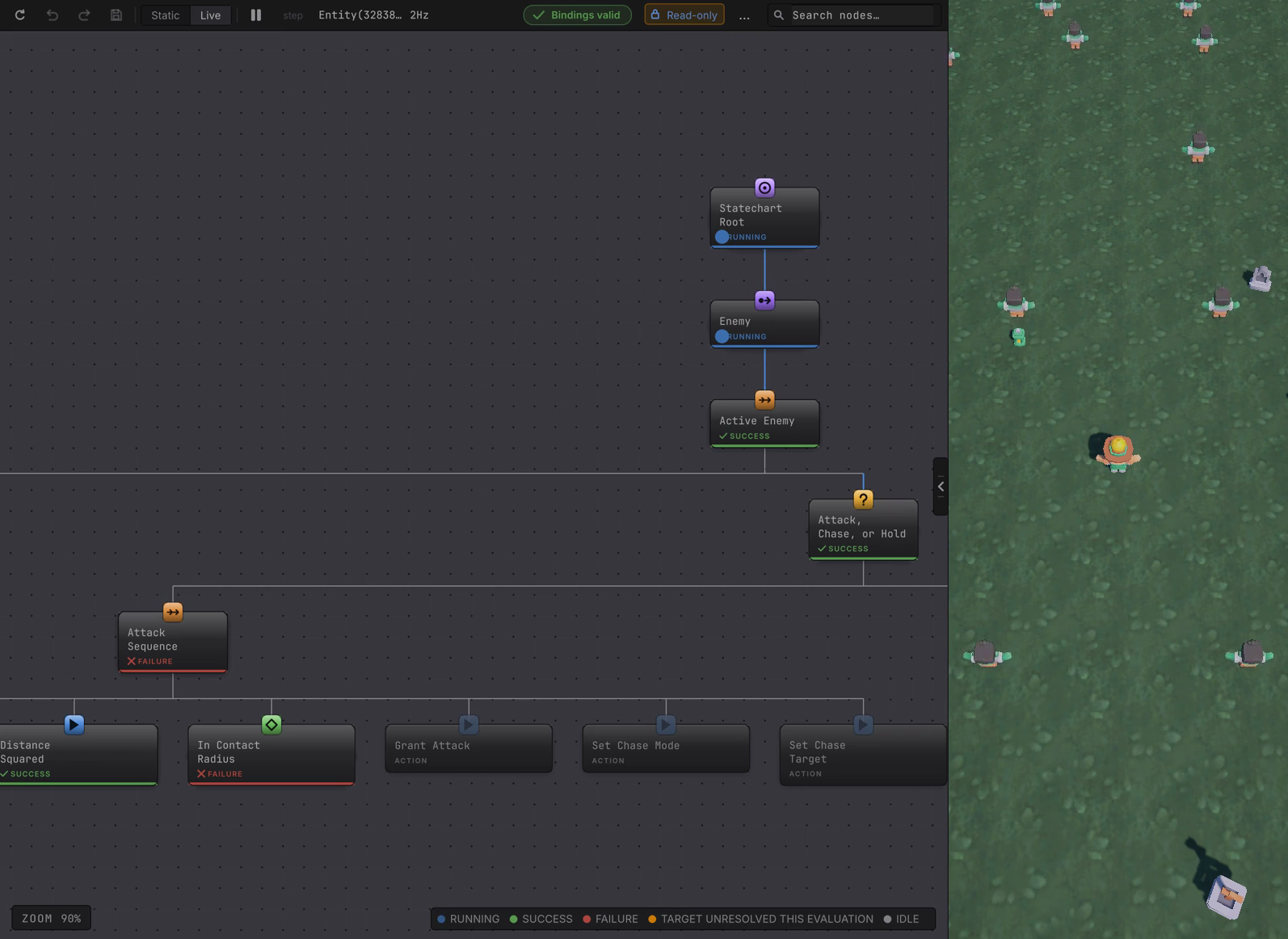
Horde Survival’s GraphEnemyBrainComposer is the shape to copy: build the query, create the runtime, register the graph, hand the handle to a system, and dispose everything the system owned when it stops.
-
Build the query that selects your agents. Horde asks for the enemy components that prove an entity is a live enemy, and keeps that
EntityQueryfor the lifetime of the system. -
Create one runtime for the World you already have.
new BehaviorEntityRuntime(world)takes the World explicitly, and nothing looks for a default World. -
Register the graph.
BehaviorEntityGraphHandle graph = runtime.RegisterGraph(source,candidates,inputBinder,commandHandlers);A graph whose whole gameplay surface is generated entity member bindings uses the other overload,
RegisterGraph(source, candidates, memberBindings, memberScheduler), which is what Horde’s enemies use. The binding set and its scheduler are supplied together or neither is supplied. -
Tick it from the system that owns the runtime, inside the group where its results belong.
runtime.TickGraph(graph, frameNumber, SystemAPI.Time.DeltaTime, Dependency);Horde’s
GraphEnemyBrainSystemsits inSimulationSystemGroupand ticks only while the run is playing. -
Dispose in
OnDestroy. Disposal completes tracked jobs, publishes cancellations, releases graph artifacts and queries, and removes the runtime’s owner entity. -
Press Play, then select one of those entity rows in Unity’s Hierarchy under the live World. The graph opens in Live and reports what that single entity is doing.
Change one thing
Section titled “Change one thing”How it steps
Section titled “How it steps”TickGraphcompletes the dependency you passed and attaches entities that newly match the query. A graph without generated member stages schedules the input binder when there is one, runs one graph job across the registration’s agents, completes it, drains member readings, then dispatches commands. A graph with generated member bindings runs sample, input, tick, command dispatch, then push inside that generated entry point, andTickGraphdrains member readings afterwards.TickAllattaches candidates for every registration, then processes registrations in registration order. One registration is one parallel batch; several registrations are not fused into one.- Both calls complete their work before returning. The
JobHandleparameter orders your work against the tick; it is not an outstanding handle you can carry forward. - A handle carries the World sequence and a runtime-local graph id, so it is usable with the runtime and World that created it.
ResetGraph(graph, frameNumber)cancels outstanding work for every attached agent, restores execution state and native blackboard defaults, and drains the resulting cancellations. Event occurrence state survives reset deliberately, so a continuously retained occurrence needs an opposite observation to rearm.GetAgentQuery(graph)hands back the package-owned query of attached agents when your systems need to iterate them.- One source asset registers once on one runtime, and two registrations may not claim overlapping candidate queries. Each attempt is refused by name instead of being merged.
What the entity path will not do
Section titled “What the entity path will not do”- Managed values, coroutines, awaitables, C# events, and UnityEvents belong to the GameObject host. An entity graph has no managed fallback for them.
- Entity member bindings need Burst AOT and their generated accessors. Nothing is discovered by name while the game runs.
- A probability graph needs
BehaviorEntityRandomSeedpresent on every candidate entity before it attaches. - Live attachment observes. Breakpoints and per-agent pause belong to the GameObject host, which entity debugging covers.
When it goes wrong
| Symptom | Check | Fix |
|---|---|---|
| No entity ever attaches. | Run the query yourself and count the matches. | Fix the query, or add the components your query asks for to the spawned entities. |
| Registration throws about a binding set. | Confirm the generated binding set and the generated scheduler are both supplied. | Pass both, from the generated pair for that graph and consuming assembly. |
| A target mode is refused at validation. | Read the graph header for the runtime path and the target mode on the node. | Entity graphs address Self, one Entity handle, a singleton, or a static member. |
| The graph ticks but nothing in the world changes. | Read whether your command handlers are registered for the tokens the graph emits. | Handle each emitted token in a game-owned handler that writes the component or spawns the thing. |
| Editor complains about jobs after a scene change. | Confirm Dispose runs exactly once from the owning system. | Dispose in OnDestroy, and never reuse a handle from a disposed runtime. |
- Burst and jobs: which code is compiled and what that costs you.
- Performance: the recorded figures from the Horde benchmark.
- Entity bindings: the member surface this host offers.
- Entity variables: what the entity blackboard can hold.