
Debugging
Watch one running agent decide, in the colors the editor draws, with the pause and step controls that belong to that agent alone.
On this page
Static shows what you authored. Live shows what one running instance is doing, colored by what each node reported in the latest tick.
The problem
Section titled “The problem”One Platformer enemy stopped walking and the other one is fine. A log line tells you a method ran. It does not tell you which branch asked for it, what the condition above it compared, or whether that agent is ticking at all. Two enemies, two graphs, one bug, and print statements cannot separate them.
Live attaches to the exact agent you selected and draws its current graph. On a GameObject agent the cursor node carries the status pill; on an entity, every node that reported a result keeps its own pill. Either way the question stops being “what does the log say” and becomes “which card is lit”.
See it
Section titled “See it”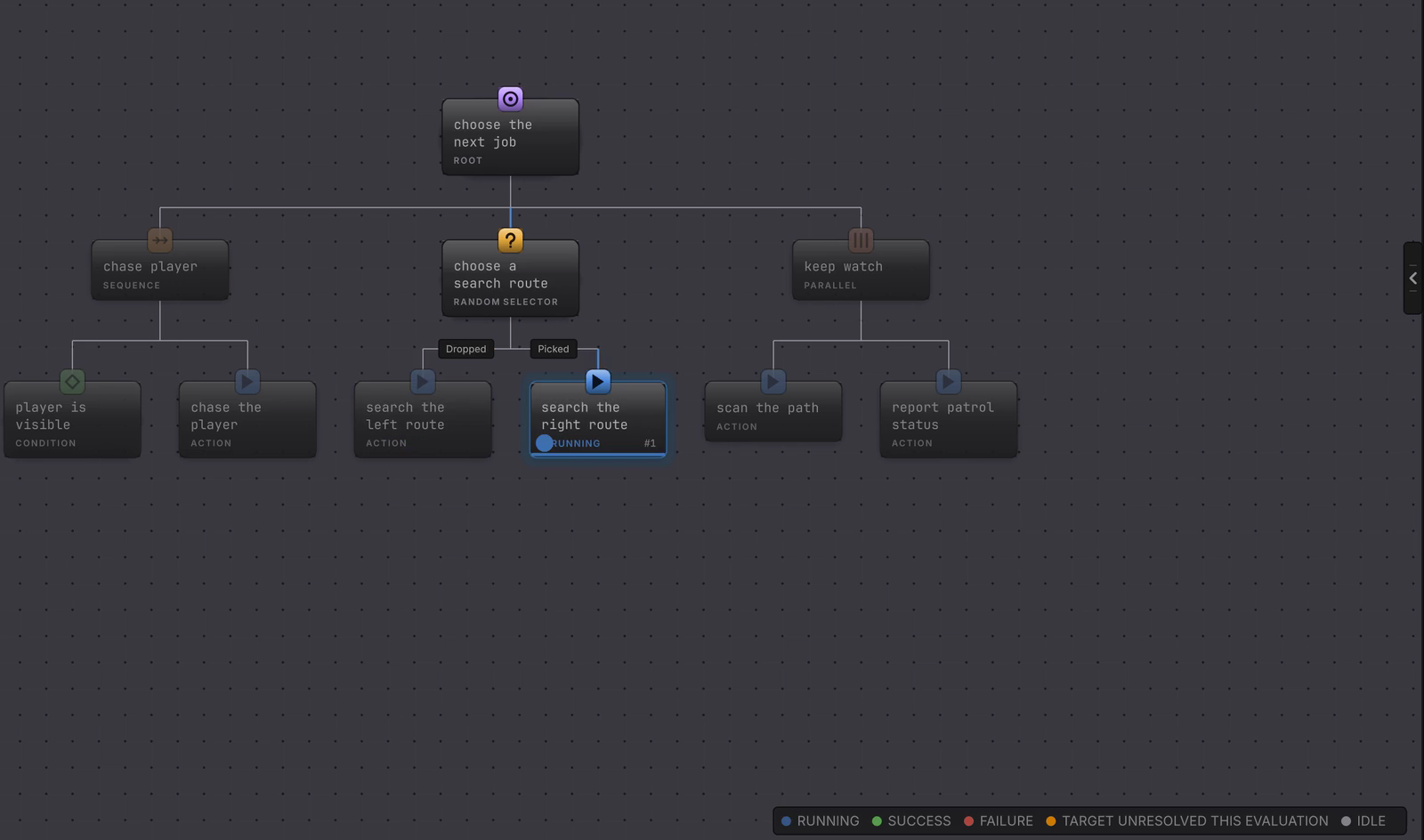
The five words
Section titled “The five words”
The legend sits in the corner of a Live canvas and names the whole vocabulary of a behavior tree document.
| Legend word | What the card is telling you |
|---|---|
| RUNNING | This work is still active. Its pip pulses. |
| SUCCESS | The latest pass finished the job its parent asked for. |
| FAILURE | The latest pass finished without satisfying its parent. |
| TARGET UNRESOLVED THIS EVALUATION | The node’s target could not be reached on that evaluation, so the node failed. The binding is still sound, which is why this reading is amber and separate. |
| IDLE | No result to show since initialization or reset. |
A state machine canvas swaps that legend for two words, ACTIVE and INACTIVE, because a state is one or the other. Live colors covers the card words that are not in the legend, INTERRUPTED and DISABLED.
Pick the page you need
Section titled “Pick the page you need”- Live colors: every status word, the active marker, and what a stale result means.
- Attach and inspect: choosing the exact agent, reading the toolbar, and opening the values behind a decision.
- Pause, step, breakpoints: holding one follower still while the rest of the scene plays.
- Entity debugging: what the entity host offers, and what it deliberately does not.
- Faults: ordinary Failure, an unresolved target, and a real fault, told apart.
Watch it run is the tutorial version of this section, with the Platformer enemy start to finish.
Before you blame Live
| Symptom | Check | Fix |
|---|---|---|
| The editor stays on Static. | Confirm Play Mode is running and the selected agent initialized. | Select a running, initialized agent. The toolbar cannot invent a runtime target. |
| Nothing is lit on the canvas. | Read the attachment word in the toolbar: ATTACHED, DETACHED, or LOST. | Select the still running target again. A reset or a replaced graph changes identity. |
| Every card reads IDLE. | Read Last result in the rail. A faulted graph stops ticking and clears its active node. | Read the faults page, then the agent’s fault trace. |
| The colors look one tick behind. | Find the card carrying the status pill. | Only the active node reports this tick. Retained words on other cards are history. |
| You cannot edit a value you expected to edit. | Read whether it is a blackboard row or a two-way member card. | The blackboard panel is a read-only snapshot in Live. A two-way member card offers its Current row. |