
Entity debugging
Watch one enemy out of a horde decide, in the same window, with the honest limits the entity host imposes.
On this page
Select one entity out of hundreds and its graph opens, drawn in the same status colors as a GameObject agent. The window observes and does not steer.
The problem
Section titled “The problem”Horde Survival’s enemies are entities, and one of them is not chasing. There is no GameObject to click, no component to inspect, and no console line that says which branch that particular enemy took. Pausing the whole simulation to find out changes the thing you are trying to observe.
EnemyBrain.bqbehavior runs on every matching entity. Live attaches to exactly one of them, from Unity’s own entity selection, while the other enemies keep running at full speed.
See it
Section titled “See it”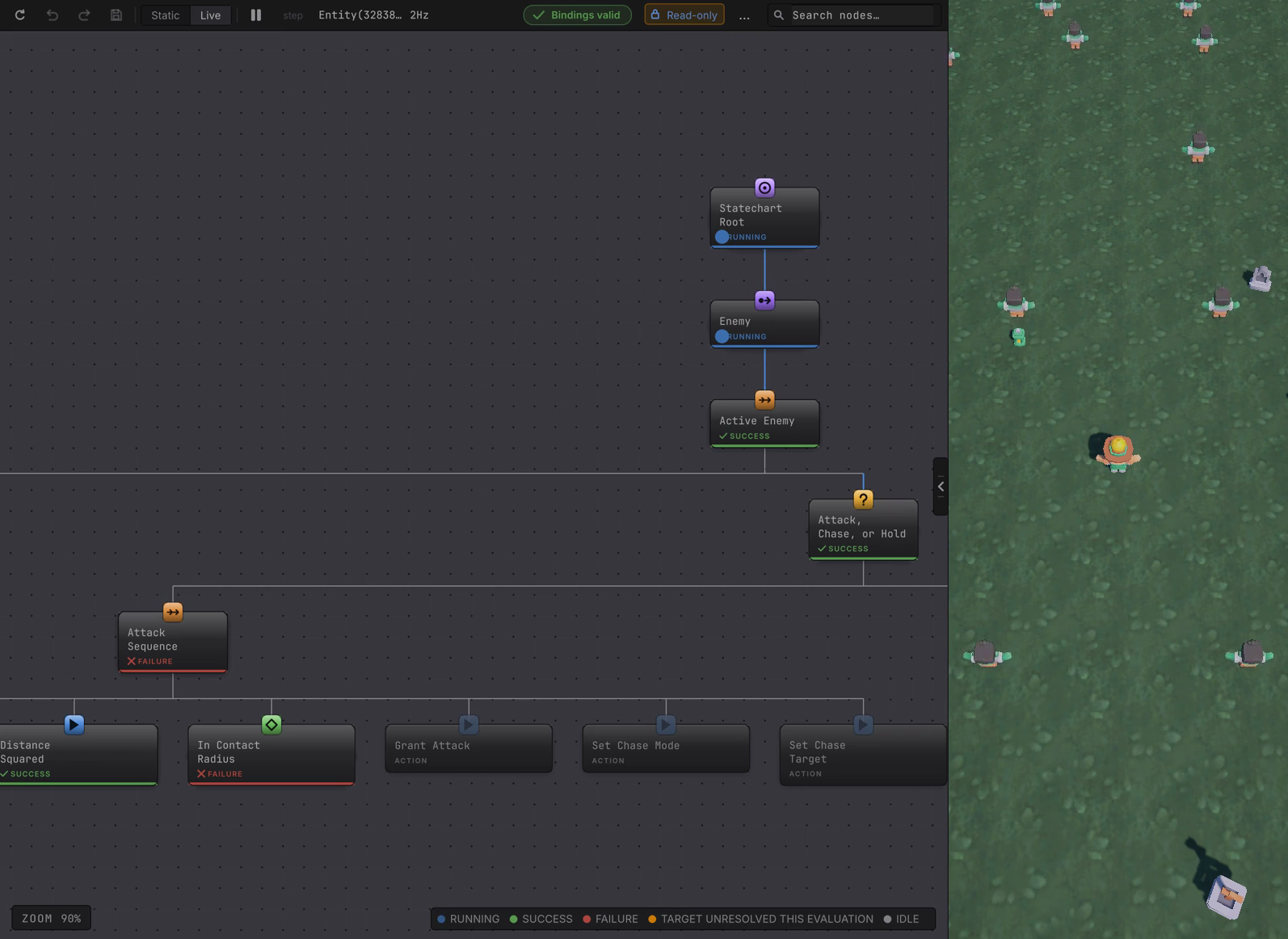
Attach to one entity
Section titled “Attach to one entity”-
Press Play and let the run reach the point you care about.
-
In Unity’s Hierarchy, under the live World, select the entity row. Entity selection belongs to Unity: clicking a rendered object in the Scene view does not select a pure entity, and the package creates no proxy GameObjects.
-
Read the toolbar. It shows the entity identity, a Read-only badge, and BOUND while the entity is alive.
What the entity view offers
Section titled “What the entity view offers”- The full canvas with the same status words, including the amber unresolved-target reading, which the entity path publishes exactly like the GameObject path.
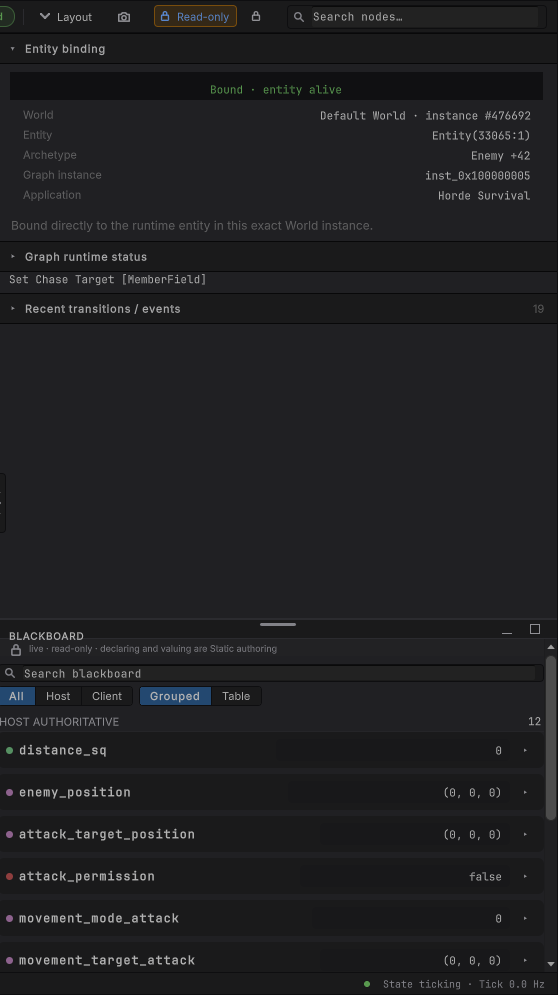
- The rail’s runtime status, pending requests, selected node details, and the read-only blackboard snapshot for that entity.
- A stable identity: World sequence plus entity index and version. An index reused with a new version is a different entity and needs selecting again.
- The deepest evaluated node gets the running glow. Every other node that reported a result keeps its own status pill.
- A toolbar that states the boundary: a Read-only lock chip beside Bindings valid, with the entity id and the tick rate.
What it deliberately does not offer
Section titled “What it deliberately does not offer”| Capability | GameObject host | Entity host |
|---|---|---|
| Per-agent pause and step | Yes, that follower alone | No. The controls mirror Unity’s global Play mode |
| Breakpoints | Yes, stored per graph and node id | No. The menu item exists and nothing can pause |
| Editing a live value | A two-way member card’s Current row | No. The entity binding exposes no live member surface |
| Watched values | Empty in this release | Empty in this release |
The reason is structural: the entity document is opened without per-entity execution authority, so its pause and step controls retune to Unity’s globals, reading Pause / Resume Unity Play mode: Space and Advance one Unity frame: . In a simulation with hundreds of agents that is the honest boundary. One entity’s schedule belongs to your systems, and the editor does not reach into the job to hold a single entity still.
A destroyed entity keeps its identity and its authored graph in the window, clears the facts that would otherwise look current, and says selected entity no longer exists. The focus control in the rail says the same thing: Focus → (entity destroyed).
Debug an entity graph without per-agent control
Section titled “Debug an entity graph without per-agent control”- Pause Unity globally and step frames. The whole World advances a frame at a time, and your one entity advances with it.
- Read the amber target readings. They are published for entity targets too, with entity-specific reasons like a destroyed handle, a missing component, or a singleton count that moved.
- Narrow the problem with a smaller query: a benchmark or test scene with a handful of entities makes a single decision readable.
- Move a decision that genuinely needs breakpoints onto a GameObject agent for the length of the investigation. Graph semantics are identical on both hosts, so the same shape behaves the same way.
When it goes wrong
| Symptom | Check | Fix |
|---|---|---|
| Selecting the enemy in the Scene view opens nothing. | Confirm you selected the entity row in the Hierarchy under the live World. | Select the entity itself. Rendered objects are not entity selection. |
| The window stays on Static. | Confirm Play Mode is running and the entity attached to a registered graph. | Check the query in the system that registered the graph. |
| Space pauses the whole game. | That is the entity behavior: the controls mirror Unity globals. | Use frame stepping, or reproduce on a GameObject agent for per-agent control. |
| A Current row will not edit. | The entity binding exposes no live member editing. | Change the authored default in Static, or write the component from your own system. |
| A breakpoint on this card does nothing. | Entity documents have no per-agent execution control. | Nothing to repair here; use global pause and step. |
| The view says the entity no longer exists. | The entity was destroyed, or its index was reused with a new version. | Select a live entity again. The old identity is deliberately not reused. |
- Entity agents: the host that schedules this graph.
- Entity variables: what the rail is showing you.
- Faults: reading a failure that is not an ordinary refusal.